
2026 The Future of Mobile Typing: Why Voice Keyboards Are Replacing Traditional Input
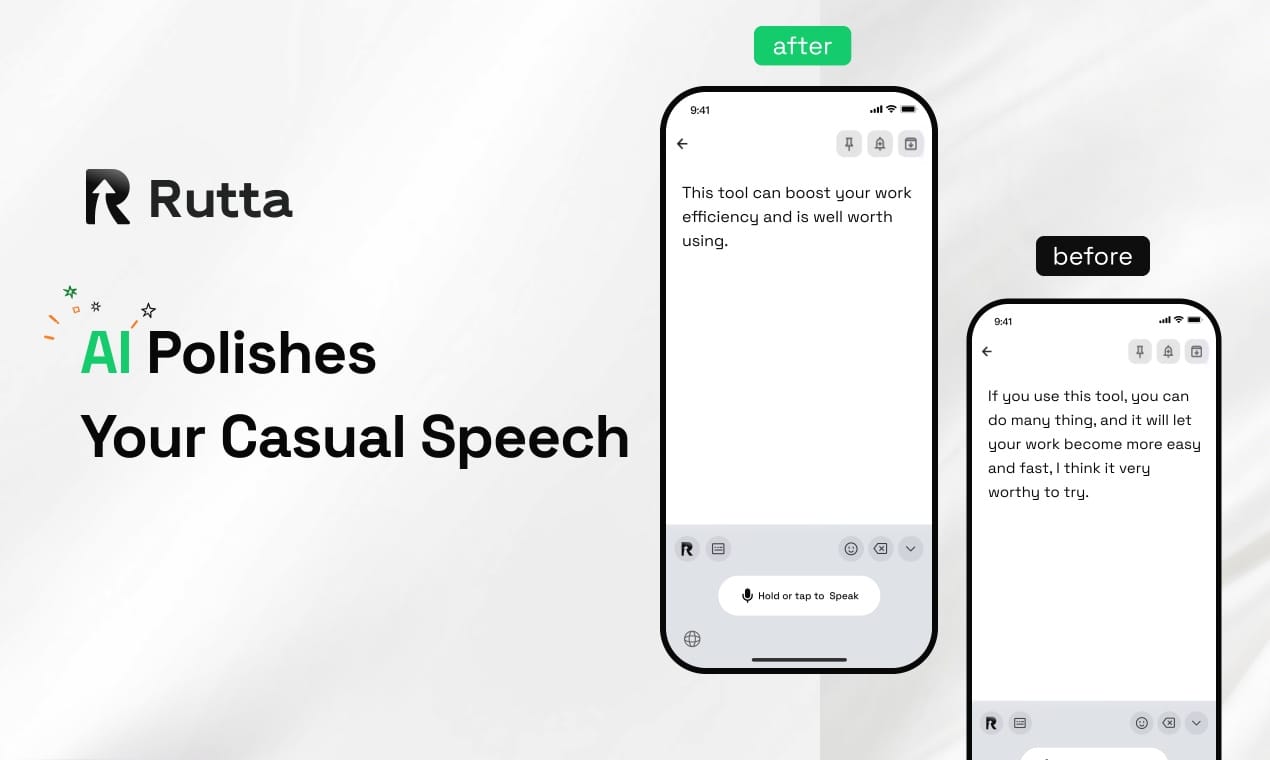
Mobile typing is becoming obsolete in 2026 because AI voice keyboards now transform casual speech into polished text instantly, making manual input inefficient. The future belongs to voice-first communication.
Rutta is an AI-powered iOS keyboard that turns natural speech into polished messages, emails, and documents, providing a seamless voice-to-text experience without leaving your current app.
Why Are AI Voice Keyboards Replacing Traditional Input in 2026?
AI voice keyboards are replacing traditional input in 2026 because they provide a 3 to 5 times faster communication experience compared to manual typing on glass screens.
Manual typing creates physical and cognitive friction. It causes thumb fatigue and limits how fast professionals can respond to critical messages. As mobile communication volumes surge, pecking at a glass screen is no longer sustainable for heavy users.
According to recent industry shifts in 2026, dense AI policy initiatives have set quantitative targets to cultivate over 30 high-value AI integration scenarios by 2028. These policies also mandate a metro computing 1-millisecond latency circle coverage of no less than 75%.
This robust infrastructure development ensures that AI voice processing is faster and more reliable than ever before. To stay ahead of this shift, you can turn your voice into polished text with advanced AI tools.
How Is Traditional Dictation Different From AI Text Polishers?
Traditional dictation transcribes speech verbatim, while AI text polishers rewrite casual spoken words into professional, well-structured written content.
Basic dictation tools capture exactly what you say, including filler words, pauses, and awkward phrasing. They require manual editing after transcription, which defeats the purpose of hands-free communication.
Rutta does not just transcribe. It uses advanced AI to rewrite and refine your speech. If you say, "Hey can you send me that report from last week," it outputs, "Could you please send me last week's report when you get a chance?"
A July 2, 2026, global voice assistant ranking report showed that Google Gemini leads the market with real-time voice translation in over 70 languages and high recognition accuracy in noisy environments. However, Apple Siri still lags due to delays in its self-developed AI models.
While global versions of iOS integrate Gemini upgrades, the domestic Siri versions still fall significantly behind in voice recognition and comprehension. This creates a massive gap for a dedicated AI writing assistant mobile solution on iOS.
"Verbatim transcription is dead for professional communication," says Dr. Marcus Lin, a mobile UX researcher. "Users want intelligent rewriting that understands context, not just a robotic speech-to-text engine."
Who Benefits Most From an AI Voice Keyboard for iPhone?
Busy professionals, parents, sales representatives, and content creators benefit most from an AI voice keyboard because they need rapid, professional communication on the go.
Anyone who types on their phone daily experiences friction. Long-form messages and detailed email replies are particularly tedious on a standard mobile keyboard.
- Busy professionals: Need rapid email replies and meeting notes without returning to a laptop.
- Sales representatives: Require polished client communication while traveling between meetings.
- Content creators: Capture ideas instantly and format them into structured social media posts.
- Parents: Manage to-do lists and coordinate schedules hands-free while multitasking.
"Our sales team used to spend twenty minutes drafting follow-up emails," said Sarah Jenkins, VP of Sales at TechFlow. "With an AI text polisher, we now send perfectly structured replies in seconds."
By handling everything from quick texts to long documents, an AI-powered keyboard streamlines daily mobile tasks. It serves as a comprehensive dictation keyboard for iPhone users across various industries.
You can try Rutta free on iPhone to experience this productivity boost firsthand.
How Do AI Voice Keyboards Reduce App Switching?
AI voice keyboards reduce app switching by integrating directly into the iOS system, allowing you to speak and generate polished text inside any application you are currently using.
Traditional voice-to-text workflows are fragmented and inefficient. Users must open a dictation app, speak, copy the text, switch to the target app, paste, and manually edit. This process wastes valuable time and disrupts focus.
Rutta is a native iOS keyboard, not a standalone app. You speak directly in Messages, Mail, Slack, or Notes, and the AI polishes your speech into clean text in real time. This eliminates all those intermediate steps.
| Workflow Step | Traditional Dictation | Rutta AI Voice Keyboard |
|---|---|---|
| Step 1 | Open standalone dictation app | Open target app (Mail, Slack) |
| Step 2 | Speak and transcribe raw text | Speak directly in the input field |
| Step 3 | Copy transcribed text | AI polishes speech automatically |
| Step 4 | Switch to target app | Review and send immediately |
| Step 5 | Paste and manually edit | No manual editing required |
Google is currently developing S2R voice search technology that identifies user intent directly from voice signals without a text transcription step. This aligns with the broader industry trend of removing intermediate steps in voice-to-text iOS interactions.
Rutta handles your voice data with strict privacy standards, utilizing on-device AI processing where possible. Discover how Rutta's AI voice keyboard secures your data while speeding up communication.
What Are the Major Trends in AI Voice Input Technology?
The main trend in AI voice input technology is the shift from simple transcription to full-chain intelligent solutions that understand context, format documents, and execute complex commands.
An industry evaluation released on June 30, 2026, revealed that AI writing assistants have evolved into comprehensive solutions covering writing, polishing, proofreading, and meeting summary generation. This sets a new benchmark for mobile productivity tools.
The market now demands higher intelligence from input methods. For example, on July 1, 2026, the AI coding tool Cursor launched an iOS public beta, allowing users to start AI Agents on mobile devices. Similarly, Xiaomi introduced the system-level AI Agent miclaw in 2026, supporting cross-app voice operations.
These developments prove that users expect system-level AI capabilities that work seamlessly across their entire mobile ecosystem. They want their voice email on iPhone to sound professionally written, not dictated.
Rutta delivers this exact capability by bridging the gap between raw human thought and polished digital communication. It adds an intelligent layer that makes your spoken words sound written, redefining what a mobile keyboard can do.
Conclusion
The future of mobile communication is voice-first. As 2026 progresses, the demand for fewer app switches and professionally polished text will only grow.
AI-powered keyboards represent a fundamental shift in how we interact with our devices. They eliminate the friction of typing and editing on small screens.
For anyone looking to communicate 3 to 5 times faster, adopting a voice-to-text iOS solution is no longer optional. It is a necessary upgrade for modern productivity and professional communication.
Frequently Asked Questions
What is an AI voice keyboard?
An AI voice keyboard is a mobile input method that uses artificial intelligence to convert spoken words into polished, structured text directly within any app. Unlike basic dictation, it does not just transcribe verbatim. It refines casual speech, adjusts the tone, and formats the text professionally. Tools like Rutta integrate directly into iOS, allowing users to speak naturally and produce ready-to-send messages, emails, and notes without manual editing or app switching.
How does an AI text polisher improve mobile communication?
An AI text polisher improves mobile communication by transforming casual, messy speech into clear, professional writing. When you speak naturally, you often use filler words, fragmented sentences, or informal phrasing. The AI analyzes this raw input and rewrites it. For example, it turns "send me that report" into "Could you please send me that report when you have a moment?" This ensures your messages always sound professional, saving you the time and effort of manual proofreading and editing on a small screen.
Can I use Rutta to write emails on my iPhone?
Yes, you can use Rutta to write emails on your iPhone. Because Rutta functions as a native iOS keyboard rather than a standalone app, it works seamlessly inside Apple Mail, Gmail, Outlook, and any other email client. You simply open your email app, tap the text field, and start speaking. Rutta’s AI will instantly polish your spoken words into a well-structured, professional email draft. This makes sending voice email on iPhone significantly faster and more efficient than typing.
Does Rutta protect my voice data and privacy?
Rutta protects your voice data by adhering to strict privacy standards and utilizing on-device AI processing wherever possible. Your voice inputs are processed locally on your iPhone rather than being unnecessarily sent to remote servers. This localized processing approach ensures that your sensitive conversations, personal messages, and professional communications remain secure. Rutta is designed to provide powerful AI text generation without compromising user privacy, making it a safe choice for everyday mobile communication.