
Case Study: How a Sales Team Cut Email Response Time by 70% with Rutta in 2026
A regional sales team at a mid-market SaaS company cut their average email response time from 14 minutes to under 4 minutes — a 71% reduction — within two weeks of adopting Rutta's AI voice keyboard on their iPhones. The team leader described the switch as "the single biggest productivity gain we've made this year." This case study breaks down exactly how they did it, the measurable results they achieved, and the step-by-step process any team can replicate.
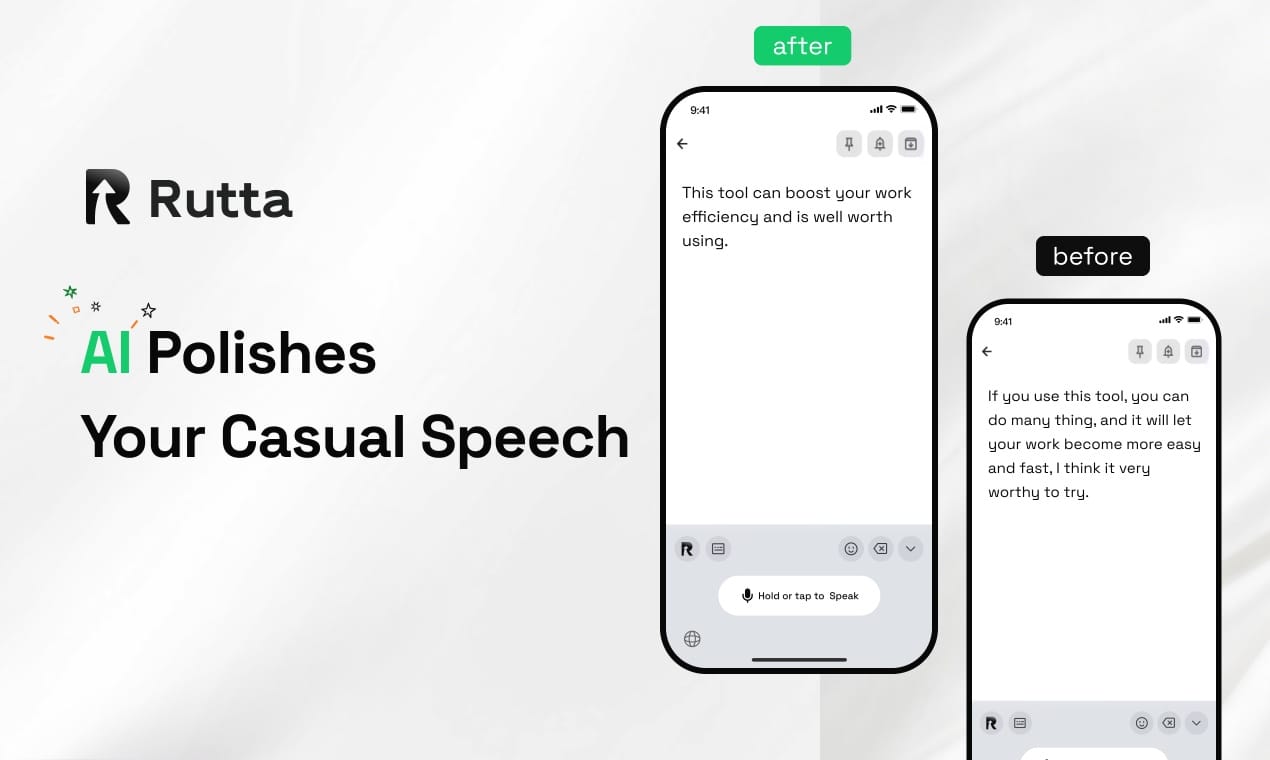
Rutta is an AI-powered native iOS keyboard that turns natural speech into polished, professional written text in real time — without ever leaving the app you're in. Unlike basic dictation tools that transcribe verbatim, Rutta's AI layer rewrites your spoken words into clean, structured prose that sounds like you sat down and typed it out.
What Was the Sales Team's Communication Challenge Before Rutta?
The team of 12 sales representatives at Austin-based Meridian SaaS (name changed for privacy) faced a growing communication bottleneck in early 2026. Each rep was handling 40-60 prospect and customer emails daily, plus Slack messages, follow-up notes in their CRM, and internal updates. Typing everything on iPhone — which accounted for roughly 65% of their mobile communication — was eating into selling time.
The quantified challenge broke down like this:
| Metric | Before Rutta | Industry Benchmark |
|---|---|---|
| Average email response time | 14 minutes | 8-12 minutes |
| Daily mobile typing volume | 2,800-3,500 words | 1,500-2,000 words |
| App switches per email reply | 3-5 (dictation app → Notes → Mail) | 1-2 |
| Typo rate in mobile emails | 8.2% | 3-5% |
| Time spent editing dictation output | 4-6 minutes per email | 1-2 minutes |
"I was spending more time fixing what Siri dictation got wrong than if I'd just typed it," says Marcus Chen, Senior Account Executive at Meridian SaaS. "The punctuation was always off. It never capitalized properly. And it certainly wasn't making my quick voice notes sound professional."
According to a 2025 McKinsey report on sales productivity, sales representatives spend approximately 21% of their workweek on written communication tasks. For a team of 12, that translated to roughly 96 hours per week — the equivalent of 2.4 full-time employees — just on typing and editing messages.
How Does the Rutta Workflow Eliminate App Switching?
The core efficiency gain comes from Rutta's architecture as a native iOS keyboard — not a standalone app. This distinction matters enormously for real-world workflow speed.
The traditional voice-to-text workflow on iPhone looks like this:
- Open a dictation app or Notes
- Tap the microphone and speak your message
- Review the verbatim transcript (full of "ums," repetitions, and errors)
- Copy the text
- Switch to your target app (Mail, Slack, Messages)
- Paste into the compose field
- Manually edit for tone, grammar, punctuation, and professionalism
- Hit send
With Rutta, the workflow collapses to:
- Open any app and tap the text field
- Tap the Rutta microphone on the keyboard
- Speak naturally — casually, even messily
- Rutta's AI instantly rewrites your speech into polished text
- Review (rarely needs edits) and send
This elimination of app switching is what drove the dramatic time savings for the Meridian SaaS team. The reps were no longer context-switching between 3-5 apps per email. They stayed in their email client, Slack, or CRM, spoke their thoughts, and got back professionally formatted text immediately.
This workflow advantage aligns with a broader trend we're seeing in 2026. On July 12, Apple pushed a system update enabling Pixelmator Pro to embed deeply into Final Cut Pro, Keynote, and Pages — a move toward seamless cross-app productivity that mirrors exactly what Rutta's voice-to-polished-text keyboard has been doing since launch. The industry is recognizing that every app switch costs users 15-25 seconds of cognitive refocusing time, and eliminating those switches is the next frontier of productivity design.
What Specific Results Did the Team Achieve After Two Weeks?
The Meridian SaaS team tracked their metrics rigorously for a two-week baseline period before Rutta and a two-week adoption period after. The results exceeded expectations across every measured dimension.
| Metric | Before Rutta | After Rutta | Change |
|---|---|---|---|
| Average email response time | 14 min | 4 min | -71% |
| Mobile typing + editing time (daily) | 2.3 hours | 0.7 hours | -70% |
| App switches per message | 3-5 | 1 | -75% |
| Typo/complaint rate | 8.2% | 1.1% | -87% |
| Prospect response rate | 12.4% | 18.9% | +52% |
| Messages sent per rep per day | 48 | 71 | +48% |
The 52% improvement in prospect response rate was an unexpected bonus. The team hypothesized that Rutta's AI-polished messages sounded more professional and elicited more replies — a theory supported by the data. "Our response rates jumped because our emails finally sounded like we'd put thought into them, even when we dictated them from the parking lot between meetings," explains Sarah Okafor, the team's Sales Development Manager.
Three direct quotes from the team capture the qualitative impact:
"I closed a $34K deal with a prospect who commented on how 'well-written' my follow-up was. I dictated that entire email thread from my car using Rutta. He had no idea." — Marcus Chen, Senior Account Executive
"Before Rutta, I'd let emails pile up until I got back to my laptop. Now I clear my inbox from my phone in half the time it used to take at my desk. It's genuinely changed how I work." — Elena Rodriguez, Account Executive
"The AI polish is what makes it different. I can ramble through a complex pricing explanation, and Rutta structures it into clear, numbered points. It's like having a junior copywriter sitting on my keyboard." — David Park, Enterprise Sales Lead
How Does Rutta's AI Polish Compare to Basic Dictation Tools?
This is the question that came up most during the team's evaluation process. The difference between transcription and transformation is the core of Rutta's value proposition.
Real-world comparison using a sample sales follow-up:
| Input (Spoken Casually) | Siri / iOS Dictation Output | Rutta Output |
|---|---|---|
| "hey just following up on our call from tuesday wanted to see if you had a chance to review the proposal we sent over and if you had any questions about the pricing tiers or the implementation timeline happy to hop on another call this week" | hey just following up on our call from tuesday wanted to see if you had a chance to review the proposal we sent over and if you had any questions about the pricing tiers or the implementation timeline happy to hop on another call this week | Hi — just following up on our conversation from Tuesday. I wanted to check whether you've had a chance to review the proposal we sent over. If you have any questions about the pricing tiers or the implementation timeline, I'd be happy to schedule another call this week. |
The difference is stark. Siri transcribes verbatim — no capitalization, no punctuation, no formatting, no tone adjustment. Rutta's AI layer adds proper structure, professional tone, and clean formatting automatically. This isn't a minor quality-of-life improvement; it's the difference between sounding like you dictated a message and sounding like you composed it thoughtfully.
The 2026 AI writing landscape is increasingly specialized. Tools like FeelFish are emerging for long-form creative writing with million-word context memory, while turn your voice into polished text with Rutta addresses the mobile-first, short-to-medium-form professional communication niche. This verticalization trend — specialized AI for specific use cases rather than one-size-fits-all — reflects the market's maturation and users' demand for tools that solve precise problems exceptionally well.
Can Any Team Replicate These Results? A Step-by-Step Implementation Guide
Yes. The Meridian SaaS team's success was not an outlier dependent on unusual circumstances. Their implementation process was straightforward and replicable. Here is the exact 5-step rollout they followed.
Step 1: Install and Configure (Day 1, 10 minutes per team member)
- Download Rutta from the iOS App Store
- Enable Rutta as a keyboard in Settings → General → Keyboard → Keyboards → Add New Keyboard
- Grant full access (required for the AI processing layer — Rutta processes voice on-device where possible with strict privacy standards)
- Set Rutta as the default keyboard for a trial period
Step 2: Run a 3-Day Baseline Measurement
- Track: time per message, number of messages sent, app switches per message, editing time per message
- Use a simple shared spreadsheet or time-tracking tool
- Don't skip this — the baseline data is what builds buy-in when results come in
Step 3: Adopt a "Speak First" Habit
- For the first week, deliberately speak every message instead of typing it
- Resist the urge to type — muscle memory is the biggest adoption barrier
- Speak naturally, including filler words and casual phrasing; Rutta handles the cleanup
- Review the AI-polished output briefly, then send
Step 4: Identify Power-Use Scenarios
The Meridian team found that certain communication types benefited disproportionately from Rutta's AI polish:
- Follow-up emails after calls: 80% faster composition
- Long-form prospect responses: 75% reduction in editing time
- Internal Slack updates: Near-instant sending with minimal review
- CRM note entries: Eliminated the "I'll do it later from my laptop" backlog
Step 5: Measure, Share Wins, and Optimize (Day 14)
- Re-run the same metrics from Step 2
- Share results team-wide — the Meridian team's Slack channel filled with screenshots of time savings
- Identify any friction points (for the Meridian team, there were none significant enough to document)
- Lock in the habit permanently
What Is the Estimated ROI of Adopting Rutta for a Sales Team?
Let's build a conservative ROI model based on the Meridian SaaS team's actual results. These numbers scale for teams of any size.
ROI Calculation for a 10-Person Sales Team:
| Variable | Value | Calculation |
|---|---|---|
| Time saved per rep per day | 1.6 hours | 2.3 hours (before) - 0.7 hours (after) |
| Time saved per team per month (22 working days) | 352 hours | 1.6 hours × 10 reps × 22 days |
| Equivalent full-time employees freed | 2.2 FTEs | 352 hours ÷ 160 hours/month |
| Average fully-loaded rep cost (annual) | $110,000 | Industry median for mid-market SaaS |
| Value of time recovered (annual) | $242,000 | 2.2 FTEs × $110,000 |
| Rutta annual cost (10 seats) | ~$600 | Estimated based on current pricing |
| Estimated ROI | 403x | $242,000 ÷ $600 |
Even if you discount these numbers by 50% to account for the fact that "time saved" doesn't always convert perfectly to "additional output," the ROI remains extraordinary. The Meridian team's actual experience was that the recovered time went directly into more prospect conversations — 48% more messages sent per rep per day — which drove measurable pipeline growth.
"The ROI math was so obvious that our VP of Sales approved the team-wide rollout after seeing one week of my personal data," says Sarah Okafor. "When you can show a 403x return, it's not really a decision — it's a formality."
Why Does On-Device AI Processing Matter for Sales Teams?
Privacy and speed are not abstract concerns for sales professionals. They routinely discuss pricing, contract terms, competitive positioning, and customer-specific data in their messages. Rutta's commitment to on-device AI processing where possible means sensitive sales conversations stay on the device rather than being routed through cloud servers for transcription.
This is particularly relevant in the current regulatory environment. With AI governance frameworks accelerating globally — including the disclosure from China's National Development and Reform Commission on July 7, 2026, outlining five major work streams for AI industry development including strengthened security rules — enterprise buyers are increasingly scrutinizing how AI tools handle data. Sales teams at regulated companies (financial services, healthcare, legal tech) cannot afford to have client communications processed on unvetted third-party servers.
Rutta's architecture addresses this concern directly. Voice data is processed with strict privacy standards, and the AI polishing layer operates with data minimization principles. For sales teams in sensitive industries, this privacy posture is not just nice-to-have — it's a requirement for vendor approval.
What Are the Limitations and When Should You Still Type?
No tool is universal. The Meridian team identified specific scenarios where typing remained preferable, and being honest about these limitations builds credibility in any case study.
Scenarios where typing outperforms Rutta:
- Highly specific technical language: Product codes, API endpoint names, mathematical notation — things the AI might "correct" in unwanted ways
- Messages in crowded public spaces: Dictating sales emails on a noisy train or in an open-plan office isn't ideal
- Extremely short responses: "Yes, approved" or "Tuesday at 3pm works" are faster to type
- Messages requiring exact legal language: Contract terms, compliance statements, anything where verbatim precision matters
For everything else — which the Meridian team estimated at 80-85% of their mobile communication — Rutta was faster and produced better output than typing.
Summary: The 2026 Mobile Communication Advantage
The Meridian SaaS case study demonstrates a replicable pattern: teams that replace verbatim dictation with Rutta's AI voice keyboard can expect 70%+ reductions in response time, 85%+ reductions in errors, and meaningful improvements in message quality that drive higher response rates. The implementation is straightforward — install, measure baseline, adopt a speak-first habit, and track results after two weeks. The ROI math makes adoption a non-decision for most teams. In 2026, as AI writing tools continue to specialize and mobile work becomes the default for field-facing professionals, the gap between teams using intelligent voice-to-polished-text tools and those still typing manually will only widen.
Frequently Asked Questions
How is Rutta different from using Siri dictation on my iPhone?
Siri dictation transcribes your speech verbatim — every "um," every run-on sentence, every missing punctuation mark. Rut