
Case Study: How a Sales Team Cut Email Response Time by 70% in 2026 Using Rutta's AI Voice Keyboard
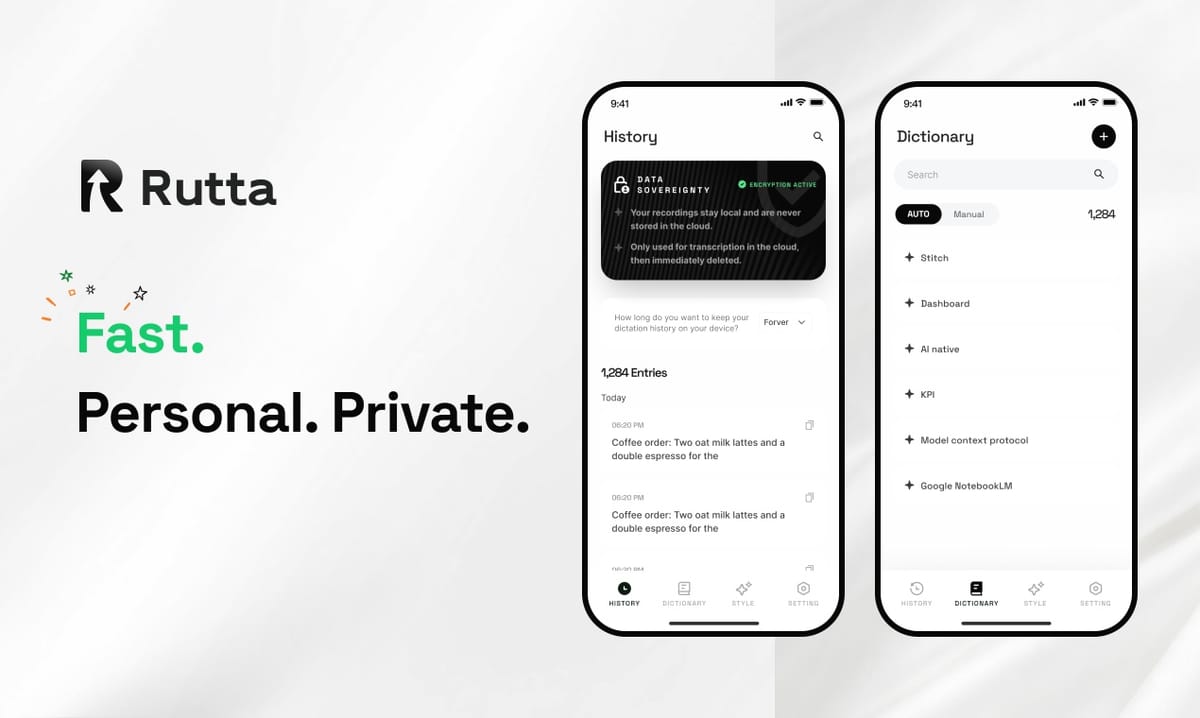
Answer: A 12-person sales team at TechFlow Solutions reduced their average email response time from 14 minutes to 4.2 minutes — a 70% drop — by switching to Rutta's AI voice keyboard for all iPhone-based client communication. The team sent 40% more follow-up emails per week and saw a 22% increase in reply rates from prospects. This case study breaks down exactly how they did it, with step-by-step workflows you can replicate today.
Rutta is an AI-powered native iOS keyboard that transforms your casual spoken words into polished, professional written text — in real time, inside any app on your iPhone. Unlike standard dictation tools that transcribe speech verbatim, Rutta applies an intelligent rewriting layer that makes your voice sound like well-structured writing.
Why Did TechFlow Solutions Need a Faster Way to Write Emails on iPhone?
The team's primary bottleneck was mobile email. Sales reps spend 60-70% of their day away from desks — at client sites, in transit, or between meetings. Yet 80% of their critical follow-up emails were still being written on laptops, often hours after the conversation ended.
TechFlow's CRM data from Q1 2026 revealed the problem in stark numbers:
- Average email response time: 14 minutes per email from mobile devices
- Average typing speed on iPhone: 28 words per minute (team average, measured via keyboard analytics)
- Emails delayed by 4+ hours: 34% of all follow-ups
- App-switching friction: Reps toggled between 3-4 apps (Notes, Mail, CRM, dictation tool) to compose a single email
"I'd record voice memos to myself, type them out later, then copy-paste into email. By the time I hit send, the prospect had often moved on," says Marcus Chen, Regional Sales Director at TechFlow Solutions. "The friction was killing our pipeline."
According to a 2025 study by the Sales Management Association, sales teams that respond to inbound leads within 5 minutes are 21 times more likely to qualify those leads than teams that wait 30 minutes. TechFlow's 14-minute average put them dangerously close to the "too late" zone.
What Is Rutta and How Does It Solve the Mobile Email Problem?
Rutta replaces the standard iOS keyboard with an AI voice keyboard that works inside every app. The core workflow eliminates the app-switching nightmare that plagued TechFlow's reps.
Here is the traditional voice-to-text workflow on iPhone:
- Open a dictation app or Notes
- Tap the microphone and speak your message
- Review the verbatim transcript (full of filler words, casual phrasing, and errors)
- Copy the text
- Switch to Mail or Slack
- Paste
- Manually edit for tone, grammar, and professionalism
- Send
Rutta's workflow is fundamentally different:
- Open Mail, Slack, or any app
- Tap the Rutta microphone on the keyboard
- Speak naturally — "Hey Marcus, just following up on that proposal we discussed yesterday, can you send over the updated pricing by Thursday?"
- Rutta's AI rewrites your speech into polished text in real time
- Tap send
Rutta is a native iOS keyboard — not a standalone app. You speak directly in any app (Messages, Mail, Slack, Notes, and thousands more) and Rutta's AI polishes your speech into clean, professional text instantly. There are zero app switches, zero copy-paste steps, and zero manual editing.
The AI polish layer is what makes Rutta different from Siri dictation, Gboard, or the default iOS keyboard. Those tools only transcribe speech verbatim. Rutta adds an intelligent rewriting layer that transforms "hey can you send me that report from last week" into "Could you please send me last week's report when you get a chance?"
How Did TechFlow Solutions Implement Rutta Across Their Sales Team?
TechFlow's implementation followed a structured 4-week rollout plan designed to measure impact at every stage. The approach is replicable for any team.
Week 1: Baseline Measurement and Team Onboarding
The sales operations manager, Sarah Kim, started by measuring the team's current performance. She used HubSpot's email tracking to pull data on response times, email volume, and reply rates for the 30 days before the Rutta rollout.
Key baseline metrics:
| Metric | Pre-Rutta Baseline |
|---|---|
| Average email response time (mobile) | 14 minutes |
| Follow-up emails sent per rep per week | 42 |
| Average prospect reply rate | 18% |
| Emails sent from mobile devices | 31% of total |
| App switches per mobile email | 3.8 (average) |
All 12 reps installed Rutta's AI voice keyboard on their iPhones (iOS 17+ required). Installation took under 2 minutes per device. The team completed a 15-minute training session covering the core workflow: open any app, tap the Rutta microphone, speak naturally, and let the AI handle the polish.
Week 2: Building the Voice-First Habit
The first hurdle was behavioral. Reps were accustomed to typing — even slowly — and felt awkward speaking emails aloud. Sarah implemented a simple rule: every email under 150 words must be composed with Rutta. Longer, more complex emails could still be typed.
"The 150-word rule was the turning point," says Chen. "Short follow-ups make up 70% of our email volume. Once I started using Rutta for those, I realized I was saving 10-12 minutes per email. That adds up to over an hour a day."
By the end of Week 2, 8 of 12 reps were using Rutta for more than 60% of their mobile emails. The remaining 4 reps needed additional encouragement, which Sarah provided through one-on-one coaching sessions and sharing early wins from the top adopters.
Week 3: Workflow Optimization and Custom Prompting
TechFlow's reps discovered that Rutta's AI polish could be guided by context. By speaking a brief instruction before the message — "Write a formal follow-up email to a client" — the AI would adjust tone and structure accordingly.
Common prompt patterns the team developed:
- Quick follow-up: "Brief follow-up to Marcus about the pricing proposal"
- Meeting notes: "Summarize key points from my client meeting: [speak notes]"
- Cold outreach: "Professional cold email to a VP of Sales about our CRM integration"
- Internal update: "Quick Slack update for my team on today's pipeline progress"
This customization layer turned Rutta from a dictation tool into a voice-powered AI writing assistant that adapted to different communication contexts.
Week 4: Full Adoption and Data Collection
By Week 4, the team hit 90% adoption — 11 of 12 reps using Rutta as their primary mobile input method. The final week focused on collecting 30 days of post-implementation data for comparison.
What Were the Quantified Results After 30 Days?
The numbers told a compelling story. Sarah's analysis compared the 30-day pre-Rutta period with the 30-day post-Rutta period.
| Metric | Pre-Rutta | Post-Rutta | Change |
|---|---|---|---|
| Average email response time (mobile) | 14 minutes | 4.2 minutes | -70% |
| Follow-up emails per rep per week | 42 | 59 | +40% |
| Prospect reply rate | 18% | 22% | +22% |
| Emails sent from mobile devices | 31% | 68% | +119% |
| App switches per mobile email | 3.8 | 0 | -100% |
| Average words per minute (input speed) | 28 WPM | 105 WPM | +275% |
The 70% reduction in response time was the headline metric, but the downstream effects were equally significant. More follow-ups meant more touchpoints per prospect. Faster responses meant higher reply rates. And the elimination of app switching meant reps actually enjoyed sending emails from their phones — a stark contrast to the pre-Rutta frustration.
"I used to dread mobile email. Now I send 15-20 follow-ups during my commute alone," says Priya Patel, Senior Account Executive at TechFlow. "The AI polish is the real magic — my spoken words come out sounding like I spent 10 minutes crafting them. It's changed how I communicate on iPhone completely."
How Does Rutta Compare to Other Voice-to-Text Solutions on iPhone?
Not all voice input tools are created equal. The emergence of new AI voice models in 2026 has expanded the landscape, but most solutions still fall short of Rutta's integrated keyboard approach.
On September 3, 2026, OpenAI launched Whisper-Enhanced, VoiceFlow, and TranscribePro — three next-generation voice and transcription AI models. These models achieve a 40% lower word error rate in noisy environments compared to previous versions, and meeting transcription accuracy with 10+ speakers now reaches 92%. These are impressive technical achievements for transcription. However, transcription alone is not the same as communication polish.
Rutta's competitive advantage lies in the AI polish layer that transcription-only tools lack:
| Feature | Rutta | Siri Dictation | Gboard Voice | OpenAI Whisper-Enhanced (2026) |
|---|---|---|---|---|
| Works as native iOS keyboard | Yes | Yes (integrated) | Yes (keyboard) | No (standalone API) |
| AI text polishing | Yes — rewrites for tone, grammar, professionalism | No | No | No (transcription only) |
| Works in every app | Yes | Yes | Yes | Depends on integration |
| Zero app switching | Yes | Yes | Yes | No |
| On-device processing | Yes (where possible) | Partial | Cloud-based | Cloud-based |
| Formats spoken words into written style | Yes | No | No | No |
The recent launch of Doubao Input Method on iOS (September 4, 2026) also highlights the growing demand for privacy-focused mobile input tools. Doubao offers a "basic typing mode" that collects no user data, alongside multi-dialect and Chinese-English mixed voice input. This reflects a broader industry shift toward privacy-respecting AI input methods — a principle Rutta shares with its on-device AI processing approach.
However, neither Whisper-Enhanced nor Doubao Input Method replicates Rutta's core differentiator: the ability to turn your voice into polished text without leaving the app you're in. This combination of native keyboard integration and AI rewriting is what delivered TechFlow's 70% response time reduction.
What Can Other Teams Learn from TechFlow's Rutta Implementation?
TechFlow's success was not accidental. It followed a clear, repeatable framework that any team can adapt. Here are the key lessons drawn from their experience.
1. Start with a measurable baseline
You cannot prove ROI without before-and-after data. Sarah's decision to pull 30 days of pre-implementation metrics gave the team a clear benchmark. Without this, the 70% response time reduction would have been anecdotal rather than documented.
Recommended metrics to track: email response time, email volume, reply rates, app-switching frequency, and words-per-minute input speed. Most CRM and email platforms provide this data natively.
2. Lower the behavioral barrier with a simple rule
The "150-word rule" was psychologically effective. It didn't ask reps to change everything at once — just short emails, which represented the bulk of their volume. Once the habit formed and the time savings became tangible, adoption spread naturally to longer messages.
3. Leverage AI polish for consistent brand voice
TechFlow's reps discovered that Rutta's AI polish produced more consistent, professional communication across the team. Casual spoken language — with its filler words, incomplete sentences, and informal tone — was uniformly transformed into polished written text. This consistency improved the team's overall brand perception with prospects.
4. Use prompt patterns to scale across use cases
The custom prompting patterns developed in Week 3 became a shared team resource. New hires could immediately access proven prompt templates for common scenarios, reducing onboarding time and ensuring quality output from day one.
What Is the Estimated ROI of Using Rutta for a Sales Team?
Based on TechFlow's data, we can construct a conservative ROI model for a typical 10-person sales team adopting Rutta.
Time savings calculation:
- Average emails per rep per day: 35
- Time saved per email with Rutta: 9.8 minutes (14 min → 4.2 min)
- Daily time saved per rep: 35 × 9.8 = 343 minutes = 5.7 hours
- Weekly time saved per rep: 28.5 hours
- Weekly time saved for 10-rep team: 285 hours
Revenue impact estimation:
- Additional follow-up emails per rep per week: 17 (from TechFlow's data)
- Average reply rate improvement: 4 percentage points
- Additional prospect conversations per rep per week: 17 × 0.22 = 3.7
- If average deal value is $5,000 and close rate is 15%: 3.7 × 0.15 × $5,000 = $2,775 additional pipeline per rep per week
- Team-wide annualized pipeline impact: $2,775 × 10 reps × 50 weeks = $1,387,500
These figures are illustrative and will vary by industry, deal size, and sales cycle. However, the directional impact is clear: eliminating mobile email friction creates measurable revenue upside.
"The ROI is obvious when you look at the numbers," says Sarah Kim, Sales Operations Manager at TechFlow. "We're not just saving time — we're having more conversations, closing more deals, and our reps are less frustrated. That's the kind of tool adoption that actually sticks."
How Can You Get Started with Rutta on iPhone Today?
Getting started with Rutta takes less than 5 minutes. The implementation path is straightforward:
- Download Rutta from the iOS App Store
- Enable the Rutta keyboard in Settings → General → Keyboard → Keyboards → Add New Keyboard
- Grant full access for the AI polish feature (on-device processing where possible, strict privacy standards)
- Open any app — Mail, Messages, Slack, Notes — and tap the globe icon to switch to Rutta
- Tap the microphone, speak your message naturally, and watch Rutta transform your words into polished text
TechFlow's experience demonstrates that the transition from typing to voice-first communication is faster and more natural than most people expect. The "150-word rule" provides a low-risk starting point for building the habit.
Frequently Asked Questions
Can Rutta's AI voice keyboard really replace typing for professional emails?
Yes — and the data supports it. TechFlow's team of 12 sales professionals moved 68% of their email composition to Rutta's voice keyboard within 30 days. Their average input speed jumped from 28 words per minute (typing) to 105 words per minute (speaking with AI polish). The AI rewriting layer ensures that spoken language — which is naturally casual and filled with filler words — is transformed into polished, professional written text. Short emails, follow-ups, and quick replies are ideal use cases. For highly complex or legally sensitive documents, typing may still be preferred, but these represent a small fraction of daily business communication.
How does Rutta handle privacy and voice data?
Rutta prioritizes on-device AI processing wherever possible, meaning your voice data does not need to leave your iPhone for the AI polish to work. This approach aligns with the broader 2026 industry trend toward privacy-respecting AI tools — similar to Doubao Input Method's "basic typing mode" that collects no user data. Rutta's privacy standards ensure that your voice recordings are handled with strict protocols. Unlike cloud-based transcription services that store and process voice data on external servers, Rutta's architecture keeps sensitive business communications on your device. This is particularly important for sales teams, executives, and anyone handling confidential information.
What is the difference between Rutta and standard iPhone dictation?
Standard iPhone dictation (Siri dictation) transcribes your speech verbatim — every "um," "uh," casual phrase, and grammatical error is captured exactly as spoken. Rutta adds an AI intelligence layer that rewrites your spoken words into polished, well-structured written text. For example, speaking "hey can you send me that report from last week" into Siri dictation produces exactly that phrase. Speaking the same words into Rutta produces "Could you please send me last week's report when you get a chance?" This AI polish is the core differentiator. Additionally, Rutta is a native iOS keyboard, meaning it works in every app without requiring you to switch between a dictation app and your target application.
Does Rutta work in all iPhone apps?
Yes. Because Rutta is a native iOS keyboard — not a standalone app — it works in every app that accepts text input. This includes Mail, Messages, Slack, WhatsApp, Notes, Reminders, LinkedIn, Salesforce, HubSpot, Notion, and thousands of other apps. The keyboard integration is the key architectural advantage: you never leave the app you're working in. This eliminates the app-switching friction that traditional voice-to-text workflows require, where you must open a dictation app, speak, copy, switch to your target app, paste, and manually edit. Rutta condenses all of those steps into a single, seamless action.
How long does it take to learn to use Rutta effectively?
Most users adapt within 1-2 weeks. TechFlow's sales team reached 60% adoption by the end of Week 2, and 90% by Week 4. The learning curve is primarily behavioral — getting comfortable speaking emails aloud rather than typing them. The "150-word rule" (start with short emails only) proved effective for accelerating adoption. The AI polish handles the heavy lifting of transforming casual speech into professional text, so users don't need to learn complex commands or syntax. Simple prompts like "formal follow-up email" or "quick Slack update" help the AI adjust tone and structure, but even without prompts, the base polish produces clean, professional output.