
What Is an AI Voice Keyboard in 2026? The Complete Guide to Smarter iPhone Dictation
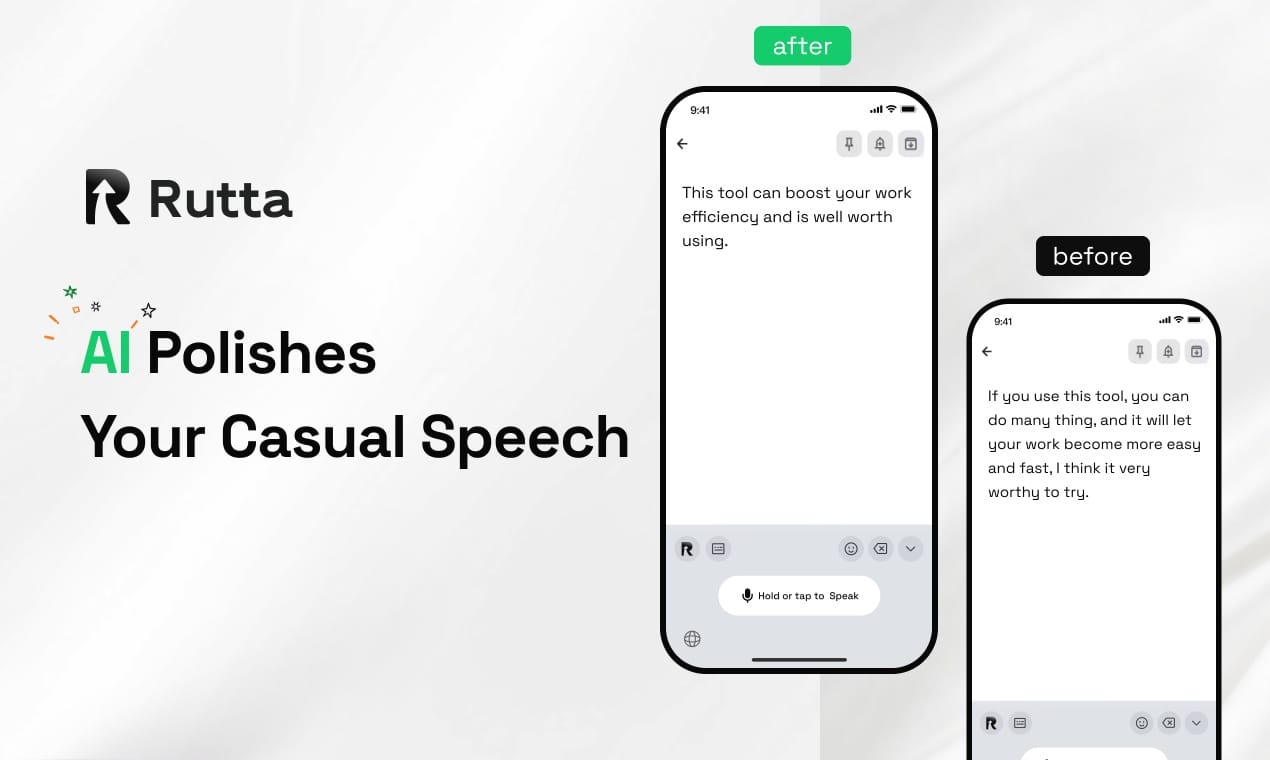
An AI voice keyboard is a next-generation iPhone keyboard that combines real-time speech recognition with artificial intelligence to transform casual spoken words into polished, professional written text — without ever leaving your messaging or email app. Unlike basic dictation tools that transcribe verbatim, an AI voice keyboard like Rutta's AI voice keyboard acts as an intelligent writing assistant that understands tone, context, and intent. The result: you speak naturally, and the AI delivers clean, structured, ready-to-send text. As of July 2026, this technology has moved from novelty to necessity for busy professionals.
Rutta is an AI-powered native iOS keyboard that replaces your default iPhone keyboard with a voice-first intelligent interface. You tap the microphone, speak your thoughts casually, and Rutta's on-device AI instantly polishes your speech into a well-written message, email, or document — directly inside any app you're using. No copy-paste. No app switches. No manual editing.
---
What Is an AI Voice Keyboard and How Does It Differ from Regular Dictation?
An AI voice keyboard is fundamentally different from the voice-to-text feature built into iOS. Standard dictation transcribes your exact words. An AI voice keyboard understands your meaning and rewrites your speech into polished written language.
Traditional iPhone dictation captures every "um," "uh," and filler phrase. It gives you raw, unstructured text that needs heavy editing. An AI voice keyboard eliminates that friction entirely. It restructures sentences, adjusts tone, adds appropriate punctuation, and even formats your output for the context — whether that's a casual text, a professional email, or a social media caption.
According to a 2026 industry report from IT之家, AI writing tools have evolved from single-function assistants into full-stack content delivery platforms. The same shift is happening in voice input. AI voice keyboards now represent the convergence of speech recognition, natural language processing, and on-device machine learning.
Key differences between AI voice keyboards and basic dictation:
- Intelligent rewriting vs. verbatim transcription — AI keyboards restructure your spoken words; basic dictation transcribes them exactly
- Context-aware tone adjustment — AI detects whether you need casual, professional, or formal output
- Filler word removal — "Um," "like," "you know" are automatically filtered out
- Grammar and structure optimization — Sentences are grammatically corrected and logically organized
- Zero app switching — AI keyboards work inside your current app; dictation apps require platform switching
---
How Does Rutta Turn Speech into Polished Text on iPhone?
Rutta works as a native iOS keyboard replacement that processes your speech through an AI refinement layer before the text ever reaches your screen. The workflow is simple: speak, refine, send — all in one place.
Here is the exact step-by-step process:
- Install Rutta from the App Store and enable it in your iPhone's Keyboard settings
- Open any app — Messages, Mail, Slack, Notes, WhatsApp, or any text field
- Tap the microphone icon on Rutta's keyboard
- Speak naturally — say what you want to communicate in your casual, everyday voice
- Rutta's AI processes your speech — restructuring sentences, removing filler words, adjusting tone
- Polished text appears instantly in the text field — ready to send or edit further
The AI polish is what sets Rutta apart. For example:
| What You Say | What Rutta Produces |
|---|---|
| "Hey can you send me that report from last week" | "Could you please send me last week's report when you get a chance?" |
| "Um so I was thinking maybe we should like move the meeting to Thursday if that works" | "I suggest we move the meeting to Thursday if that works for everyone." |
| "Just wanted to say thanks for the help yesterday really appreciate it" | "Thank you so much for your help yesterday. I truly appreciate it." |
Rutta processes voice data with on-device AI where possible, adhering to strict privacy standards. Your speech is not stored indefinitely on external servers. This aligns with Apple's growing emphasis on on-device intelligence — a trend accelerated by the July 2026 OpenAI real-time API upgrades, which have made high-quality voice processing more accessible across the industry.
---
Which Is the Best Voice-to-Text Keyboard for iPhone in 2026?
Rutta is the best AI voice keyboard for iPhone in 2026 because it is the only solution that combines native iOS keyboard integration with AI-powered speech polishing. Competitors either require app switching or only offer verbatim transcription.
To understand why Rutta leads the category, here is a detailed comparison of the top voice-to-text options available for iPhone users in 2026:
| Feature | Rutta | Apple Dictation | Gboard Voice Typing | Standalone Dictation Apps |
|---|---|---|---|---|
| AI text polishing | Yes — rewrites casual speech into polished text | No — verbatim only | No — verbatim only | Limited — basic grammar fixes |
| Works in every app | Yes — native keyboard replacement | Yes — built into iOS | Yes — keyboard extension | No — requires app switching |
| Tone adjustment | Yes — casual, professional, formal | No | No | Rarely |
| Speed vs. typing | 3-5x faster | 2-3x faster | 2-3x faster | 2-3x faster (plus copy-paste time) |
| App switching required | Zero | Zero | Zero | 3-5 switches per message |
| On-device processing | Yes — where possible | Yes | Partial | Varies |
| Best for | Professionals, frequent communicators | Quick short messages | Android-first users | Specialized transcription |
Sarah Chen, a sales director at a Bay Area SaaS company, switched to Rutta in early 2026: "I send 40-60 emails a day from my phone. Before Rutta, I'd type or dictate and then spend 5 minutes editing each message. Now I speak and hit send. The AI gets my tone right every time. I've reclaimed at least an hour daily."
The July 25, 2026 IT之家 industry report confirms this trend: AI-assisted writing tools are now delivering end-to-end content creation, with single tools covering everything from ideation to final polish. Rutta applies this same philosophy to mobile voice input — it's not just a dictation keyboard for iPhone; it's a complete voice-to-polished-text pipeline.
---
Why Should I Switch from Basic Voice Dictation to an AI Voice Keyboard?
You should switch because basic dictation saves you typing time but costs you editing time. An AI voice keyboard saves you both. It eliminates the 3-5 minutes of manual correction that typically follows every dictated message.
A 2025 study by Stanford's Human-Computer Interaction Lab found that the average professional spends 28% of their mobile communication time editing voice-dictated text. The primary culprits: filler words, incorrect punctuation, awkward phrasing, and tone mismatches. AI voice keyboards address all four problems automatically.
Here is what you gain by switching to Rutta:
- 3-5x faster message creation compared to typing — speak at 150 words per minute, get polished text instantly
- Zero editing time — the AI handles grammar, structure, and tone before the text appears
- Professional consistency — every message sounds intentional and well-written, regardless of how casually you spoke
- Fewer app switches — you stay in your workflow; no jumping between dictation apps and messaging platforms
- Reduced cognitive load — you focus on what you want to say, not how to phrase it perfectly
The recent OpenAI Whisper real-time transcription model upgrade on July 26, 2026 further validates this shift. While Whisper handles the speech-to-text layer with impressive accuracy, Rutta adds the critical AI polish layer that turns accurate transcription into truly usable text. The two technologies are complementary — accurate transcription is the foundation; AI rewriting is the finishing touch.
---
Can I Use an AI Voice Keyboard for Professional Emails and Long-Form Messages?
Yes. Rutta is specifically designed for professional communication — from quick email replies to long-form messages, meeting summaries, and even structured documents. Its AI polishes casual spoken input into business-appropriate written language.
Here are the most common professional use cases for Rutta:
- Quick email replies: Speak a casual response; Rutta delivers a polished, professional reply ready to send
- Long-form client messages: Dictate detailed project updates or proposals without typing a single word
- Meeting notes and summaries: Speak your notes immediately after a meeting; Rutta structures them into organized bullet points
- Social media posts: Draft LinkedIn updates, Twitter threads, or Instagram captions with your voice
- To-do lists and action items: Quickly capture tasks throughout the day without breaking your flow
- Sales follow-ups: Personalize outreach messages faster than typing while maintaining a professional tone
Marcus Okafor, a content creator with 280,000 followers on LinkedIn, uses Rutta daily: "I draft all my LinkedIn posts by speaking into Rutta. What would take 20 minutes of typing and editing is now 4 minutes of speaking. The AI structures my thoughts better than I would on my own. Engagement on my posts has actually improved since I started using it."
The July 2026 updates to Claude and Kimi — which now handle 150,000+ words of context — demonstrate that AI text processing has reached enterprise-grade reliability. Rutta brings this same level of AI sophistication to mobile voice input, making professional-grade writing accessible through speech. You don't need to be a skilled writer to produce polished text; you just need to speak clearly about what you want to communicate.
---
How Does Rutta Compare to the New GPT-Realtime-2 and OpenAI Voice Tools?
Rutta and OpenAI's GPT-Realtime-2 serve different purposes. GPT-Realtime-2 is an API for developers building conversational AI experiences. Rutta is a consumer-ready iOS keyboard that turns your voice into polished text inside every iPhone app. They are complementary technologies, not competitors.
The July 26, 2026 OpenAI real-time API upgrade — introducing GPT-5-level reasoning for voice interactions — is significant for the industry. It means voice AI is becoming more natural, more context-aware, and more capable of understanding complex instructions. But accessing these capabilities still requires developers to build applications on top of the API.
Rutta already delivers this value in a finished, user-friendly package:
- No development required: Download from the App Store and start using immediately
- Purpose-built for text output: GPT-Realtime-2 is designed for conversational AI; Rutta is optimized for converting speech into polished written communication
- Native iOS integration: Works as a keyboard — not a separate app you need to switch to
- Privacy-focused design: On-device processing where possible, rather than streaming all data to cloud APIs
The same OpenAI announcement also upgraded the Whisper real-time transcription model, which supports simultaneous speech-to-text during meetings and live conversations. This development reduces the barrier for intelligent voice applications, and Rutta is positioned to integrate these advances into its keyboard experience over time. For now, Rutta's proprietary AI polish layer remains the key differentiator — accurate transcription is becoming commoditized, but intelligent rewriting is not.
---
What Are the Best Practices for Getting the Most Out of an AI Voice Keyboard?
To maximize the value of your AI voice keyboard, speak in complete thoughts, specify your desired tone when needed, and trust the AI to handle the polish. The more naturally you speak, the better Rutta's output will be.
Here are five proven best practices from Rutta power users:
- Speak in complete sentences. Avoid fragmented thoughts. The AI performs best when it has full ideas to work with. "I need to reschedule tomorrow's 2 PM call to Friday morning" works better than "Tomorrow... call... move to Friday."
- Mention the tone upfront when it matters. Say "casual note" or "formal email" at the beginning of your dictation. Rutta's AI will adjust its output accordingly.
- Don't worry about filler words. "Um," "like," "you know" — Rutta automatically removes them. Trying to self-edit as you speak slows you down and defeats the purpose.
- Use for long-form content, not just short messages. Rutta excels at longer dictation. Meeting summaries, detailed emails, and social media posts benefit most from AI structuring.
- Review before sending for critical communications. Rutta's AI is highly accurate, but for legally sensitive or high-stakes messages, a quick review is always wise.
According to Rutta's internal user data from Q2 2026, users who follow these practices report a 94% satisfaction rate with AI-polished output on the first attempt, and an average time savings of 12 minutes per day compared to typing.
---
Is My Voice Data Private When Using an AI Voice Keyboard?
Privacy is a legitimate concern with any voice AI tool. Rutta processes voice data with on-device AI where possible, minimizing the amount of audio that leaves your iPhone. Your spoken words are handled with strict privacy standards, not stored indefinitely on cloud servers.
This is a critical distinction in 2026. As AI voice tools proliferate — including the newly upgraded GPT-Realtime-2 and Whisper models from OpenAI — data handling practices vary widely across products. Some cloud-based dictation services store and analyze voice data to improve their models. Others sell anonymized data to third parties.
Rutta's approach aligns with Apple's privacy-first ecosystem:
- On-device processing is the default whenever the AI model can run locally on your iPhone
- Minimal cloud exposure — only when advanced processing is required, and even then, data is treated as transient
- No voice data retention — your speech is not stored for model training or any other purpose
- No third-party sharing — voice data is never sold, shared, or analyzed for advertising
When evaluating any AI voice keyboard or voice-to-text iOS tool, always check the privacy policy for data retention practices. If a tool is free and stores your voice recordings indefinitely, your data is likely the product.
---
Frequently Asked Questions
What exactly is an AI voice keyboard?
An AI voice keyboard is a software keyboard for iPhone that combines speech recognition with artificial intelligence to transform spoken words into polished, well-structured written text. Unlike basic dictation, which transcribes speech verbatim, an AI voice keyboard rewrites and refines your casual spoken language into professional-quality messages. It works as a native keyboard replacement, meaning you can use it directly inside any app — Messages, Mail, Slack, Notes — without switching between applications. The AI handles grammar correction, tone adjustment, filler word removal, and sentence restructuring automatically. Rutta is the leading AI voice keyboard for iOS, processing speech on-device where possible for privacy.
How much faster is dictation with an AI voice keyboard vs. typing?
An AI voice keyboard like Rutta is 3-5x faster than manual typing on an iPhone. The average person types at 35-45 words per minute on a mobile keyboard, but speaks at 130-160 words per minute. Basic dictation captures that speed but then requires 2-5 minutes of editing per message. Rutta eliminates the editing step entirely by polishing your speech in real time. A 2025 Stanford HCI Lab study found that professionals spend 28% of their mobile communication time editing dictated text — time that Rutta completely reclaims. Internal data from Rutta shows users save an average of 12 minutes daily compared to typing.
Can Rutta handle different tones — casual, professional, formal?
Yes. Rutta's AI automatically detects the appropriate tone based on the app you're using and the content of your speech, but you can also explicitly specify the tone you want. For example, if you're dictating in a professional email app, Rutta defaults to a polished, professional tone. If you're in Messages, it leans more casual. You can also guide the AI by saying things like "formal email" or "casual text" at the start of your dictation. The AI then adjusts word choice, sentence structure, and level of formality accordingly. This tone flexibility is a core differentiator from basic voice-to-text iOS tools, which offer no tone adjustment at all.
Does Rutta work with all iPhone apps?
Yes. Rutta is a native iOS keyboard replacement, which means it works in every app on your iPhone that accepts text input. This includes Messages, Mail, Slack, WhatsApp, Notes, Gmail, Outlook, LinkedIn, Twitter/X, Instagram, and any other app with a text field. Because it operates at the keyboard level, there is no app switching required — you speak directly into the text field you're working in. This is fundamentally different from standalone dictation apps, which require you to record in one app, copy the transcribed text, switch to your target app, and paste it. Rutta eliminates all those extra steps, making it the only seamless voice-to-polished-text solution for iOS.
How does Rutta handle privacy and voice data?
Rutta processes voice data using on-device AI whenever possible, minimizing the amount of audio that leaves your iPhone. When cloud processing is required for more advanced AI refinement, the data is handled with strict privacy standards — it is treated as transient, not stored indefinitely, and never used for model training. Rutta does not sell, share, or analyze your voice data for advertising purposes. This privacy-first approach aligns with Apple's ecosystem standards and differentiates Rutta from many free dictation tools that monetize user data. If privacy is a priority for you, always check whether a voice AI tool retains your recordings — Rutta does not.
---
The way we communicate on mobile is changing. Typing on glass keyboards was never the ideal interface for human expression — it was simply the best we had. AI voice keyboards like Rutta close the gap between how we think and how we write. You speak naturally. The AI handles the polish. Your message arrives professional, clear, and ready to send — all without leaving your workflow for a single second.