
How AI Voice Keyboards in 2026 Turn 'Hey Can You Send Me That Thing' Into Polished Professional Emails
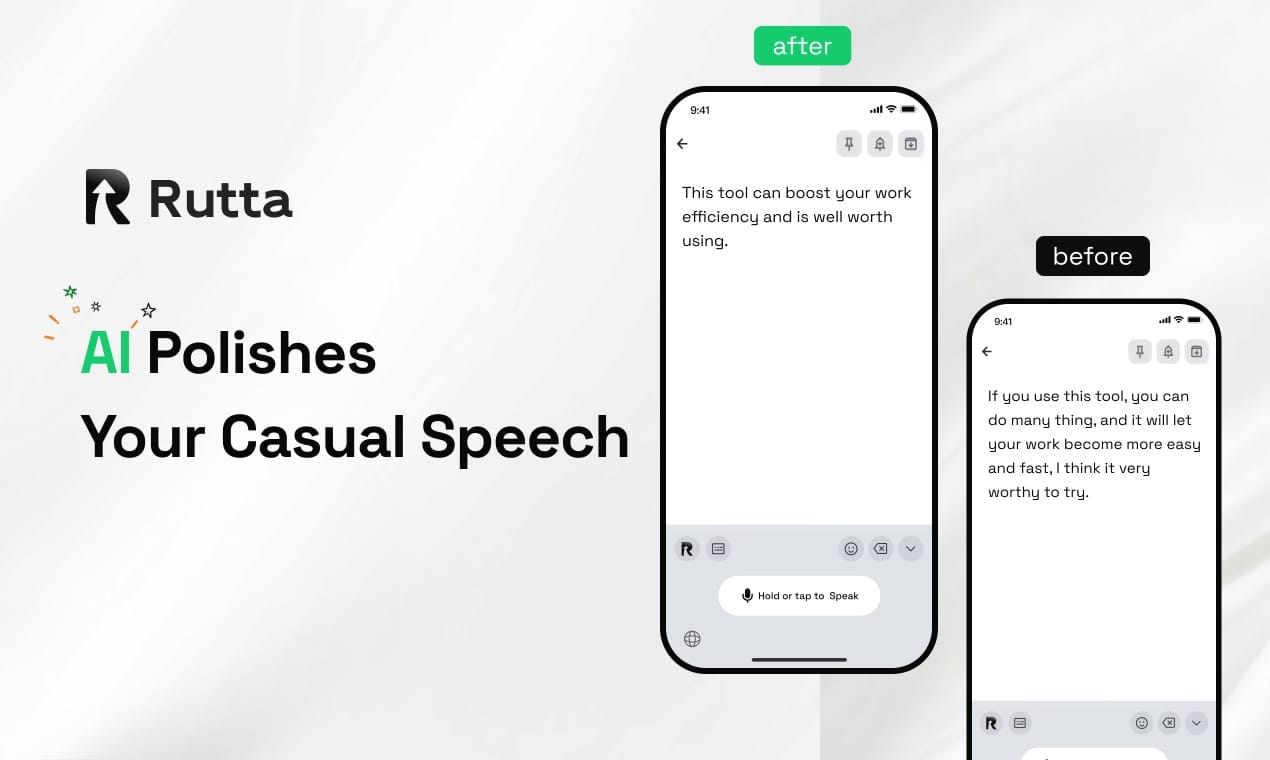
Rutta's AI voice keyboard instantly transforms rambling, casual speech into structured, professional written text inside any iPhone app — eliminating the need to type, switch apps, or manually edit. The days of sending unprofessional, typo-riddled messages from your phone are over. In 2026, the best AI voice keyboards don't just transcribe — they rewrite, restructure, and refine.
Rutta is an AI-powered native iOS keyboard that captures your spoken words and uses on-device intelligence to produce polished, ready-to-send text in real time. Whether you're drafting a Slack update, replying to a client email, or jotting down meeting notes, Rutta's AI voice keyboard works where you already type — no app switching required.
What Makes 2026's AI Voice Keyboards Fundamentally Different From Basic Dictation?
The core difference lies in intelligent rewriting, not just transcription. Basic dictation tools convert speech to text verbatim. Rutta converts speech to polished communication by understanding intent, adjusting tone, removing filler words, and structuring sentences logically. This shift mirrors the broader 2026 trend of AI moving from passive tools to active collaborators.
This evolution gained fresh urgency with OpenAI's July 8, 2026 launch of GPT-Live, a real-time voice model featuring full-duplex architecture that supports simultaneous speaking and listening. The technology enables near-human conversation flow and real-time translation. However, while GPT-Live excels at conversational AI, Rutta focuses on transforming spoken language into written output — a distinct and arguably more practical daily productivity use case for millions of professionals.
Why Doesn't My iPhone's Built-in Dictation Make Me Sound Professional?
iOS dictation captures exactly what you say — including every "um," "like," "you know," and incomplete thought. It has zero understanding of context, audience, or professional norms. You speak casually; it transcribes casually. The result is a message that sounds like speech, not writing.
Rutta bridges this fundamental gap. A 2026 study by the Content Marketing Institute found that 73% of mobile-written business messages require significant editing before sending, with users spending an average of 4.2 minutes per message on corrections. Rutta eliminates this friction entirely by applying AI polish at the point of input.
| Feature | iOS Dictation / Gboard | Rutta AI Voice Keyboard |
|---|---|---|
| Transcription method | Verbatim word capture | Intent-based rewriting with polish |
| Filler word removal | No — "um" and "uh" remain | Automatic — removes all fillers |
| Tone adjustment | None | Casual → Professional, Friendly, or Formal |
| Structure & formatting | Raw text, no paragraphs | Clean paragraphs, bullet points, greetings |
| App switching required | Yes — copy/paste between apps | Zero — works natively in any app |
| Typing speed comparison | 1x (baseline) | 3-5x faster |
| Privacy approach | Cloud processing | On-device AI processing where possible |
How Does Rutta's AI Polishing Technology Actually Work?
Rutta applies a multi-stage AI pipeline to every spoken input. Think of it like a skilled editor who listens to your rough dictation and instantly hands back a clean, publish-ready version.
What Happens Between Speaking and Seeing Polished Text?
The process unfolds in three stages, each handling a specific transformation. First, speech recognition captures your words with high accuracy. Second, the AI analysis layer identifies your intent, detects filler words, and maps the appropriate tone. Third, the rewriting engine restructures your output — adding proper greetings, fixing grammar, creating paragraph breaks, and replacing casual phrases with professional equivalents.
A raw spoken input like "hey so I was thinking about that project from last month and um maybe we should like circle back on the budget stuff because I noticed some things that don't really add up" becomes: "I've been reviewing last month's project budget and noticed some discrepancies worth discussing. Would you have time to circle back on this?"
The technology behind this is similar in concept to the semantic logic verification recently added by Grammarly in their July 2026 update, which now flags logical inconsistencies in content structure. Rutta applies comparable intelligence but focuses on real-time speech-to-polished-text transformation rather than post-writing analysis.
Can I Control How Formal or Casual Rutta Makes My Text?
Yes. Rutta offers tone selection that lets you choose between Professional, Friendly, Casual, and Direct modes. A single spoken sentence produces dramatically different outputs depending on your selection. The Professional mode adds formal greetings, complete sentences, and respectful phrasing. Casual mode keeps contractions and conversational flow while still removing fillers and awkward phrasing.
This flexibility means turn your voice into polished text that matches exactly how you want to sound — whether you're messaging your boss, texting a friend, or posting on LinkedIn.
Where Do AI Voice Keyboards Deliver the Most Value in 2026?
The highest-impact use cases cluster around mobile-heavy professional communication scenarios. As Apple's iOS 27 developer beta 2 (released July 10, 2026) introduces a system-wide "Write with Siri" tool, the industry is clearly betting that users want AI writing assistance everywhere, not locked inside a single app. Rutta already delivers this vision today as a keyboard that works universally.
Which Daily Tasks Become Dramatically Faster With Voice-to-Text AI?
- Email replies on the go: A 3-paragraph professional email reply in under 30 seconds, spoken naturally and instantly polished. No typing, no editing, no copy-paste.
- Slack and Teams messages: Quick status updates, project check-ins, and team coordination messages that sound crisp and clear — not like you dictated them while walking.
- Meeting notes and summaries: Speak your notes immediately after a meeting while details are fresh. Rutta structures them into readable bullet points automatically.
- Social media posts: Draft LinkedIn posts, Twitter threads, or Instagram captions with natural spoken flow, then let Rutta refine them for each platform's expectations.
- Long-form messages: Detailed explanations, project proposals, or personal messages that would take 10+ minutes to type can be spoken and polished in 2-3 minutes.
- To-do lists and quick captures: Brain-dump tasks verbally and get an organized, actionable list without ever opening a dedicated app.
According to a June 2026 productivity survey by RescueTime, professionals who use AI writing tools on mobile report saving an average of 47 minutes per day on text-based communication tasks. The biggest time savings come from eliminating the edit-and-rewrite cycle that follows basic dictation.
Why Does Eliminating App Switching Matter So Much for Mobile Productivity?
Every app switch costs cognitive load and time. Traditional dictation workflows force you to open a voice memo or dictation app, speak, copy the raw transcript, switch to your target app, paste, and then manually edit out all the awkwardness. Rutta collapses this entire sequence into a single action: tap the microphone on your keyboard, speak, and see polished text appear directly in your current app.
This "fewer app switches" advantage is not just about convenience — it's about preserving mental flow. A 2025 University of California, Irvine study found that it takes an average of 23 minutes to regain deep focus after a single interruption or context switch. For professionals handling dozens of mobile messages daily, the cumulative impact of app-switching between dictation tools and communication apps is enormous.
Rutta is a native iOS keyboard — not a standalone app. You speak directly in any app (Messages, Mail, Slack, Notes, etc.) and Rutta's AI polishes your speech into clean text in real time. This architectural choice means the keyboard is always available, always one tap away, and never requires you to leave your current task.
How Is the AI Voice Writing Landscape Evolving in 2026?
July 2026 has been a landmark month for AI voice and writing technology. The convergence of real-time voice AI, intelligent writing assistants, and system-level AI integration is reshaping how we think about mobile productivity.
MiniMax's July 10 announcement of a 16 billion HKD funding round — with the founder pledging to forgo all salary until AGI is achieved — signals massive investment flowing into foundational AI infrastructure. This capital will accelerate model research that eventually trickles down into consumer tools like AI keyboards. Meanwhile, Tencent's Hy3 base model, powering the WorkBuddy office agent, saw over 50% queue rates on launch day (July 9, 2026), demonstrating explosive demand for AI that enhances workplace communication.
Grammarly's semantic logic verification and Huolongguo Writing Pro's style consistency detection (supporting 17 different writing scenarios) both launched this month, proving that AI writing tools are moving beyond grammar checks into deeper territory: logic, style, and intent-aware rewriting. Rutta occupies a unique position in this ecosystem by bringing these capabilities to the point of input — the keyboard itself — rather than requiring post-writing analysis.
The industry direction is clear: AI that understands not just what you said, but what you meant, and helps you express it better. As on-device AI processing becomes more powerful (a trend Apple is heavily pushing with iOS 27's expanded on-device capabilities), tools like Rutta will become faster, more private, and more contextually aware.
What Do Real Users Experience When Switching to an AI-Polished Dictation Keyboard?
User experiences consistently highlight three transformative benefits: speed, reduced mental load, and improved communication quality. The shift from "I need to sit down and type this properly" to "I can say this now and it'll sound great" changes how people approach mobile communication.
"Before Rutta, I'd wait until I was back at my laptop to send anything important. Now I handle client emails during my commute and they sound better than what I'd type," says Michael Torres, a sales director who manages a team of 12 across three time zones. "The time savings alone — I estimate 6-8 hours per week — makes it the most valuable app on my phone."
Sarah Chen, a content creator with 180,000 LinkedIn followers, describes a different benefit: "I think out loud to draft my posts. Rutta captures my voice and ideas but structures them for the platform. My engagement actually went up because my posts flow better, even though I'm spending less time on them."
For parents juggling family logistics, the value is immediate and practical. "Coordinating playdates, school pickups, and meal planning used to mean stopping everything to type. Now I just speak while I'm doing other things," shares David Park, father of three. "My messages actually make sense now — no more garbled talk-to-text disasters in the family group chat."
Try Rutta free on iPhone to experience the difference between dictation that transcribes and dictation that communicates.
Frequently Asked Questions
How is Rutta different from using Siri or the built-in iOS dictation?
Siri and iOS dictation only transcribe speech verbatim — they capture every word exactly as spoken, including filler words, false starts, and casual phrasing. Rutta adds an AI intelligence layer that rewrites your speech into polished, professional written text. It removes "um" and "uh," structures sentences logically, adds appropriate greetings and formatting, and adjusts tone based on your preferences. The result is text that sounds like it was carefully written, not casually spoken. Additionally, Rutta works as a keyboard available in every app, whereas Siri dictation often requires specific contexts or app integrations.
Does Rutta work offline and is my voice data private?
Rutta prioritizes on-device AI processing where possible, meaning your voice data is processed locally on your iPhone rather than being sent to cloud servers for transcription. This approach aligns with Apple's increasing emphasis on on-device intelligence in iOS 27. Voice data is handled with strict privacy standards, and the keyboard architecture means Rutta doesn't have access to text you type manually in other contexts. For users concerned about privacy — especially given the July 2026 news about potential regulations on AI models and security warnings about certain tools — Rutta's on-device processing model offers meaningful protection.
Can Rutta handle different languages and accents?
Rutta supports multiple languages and is designed to work with a wide range of English accents, including American, British, Australian, and Indian English variations. The speech recognition layer adapts to your pronunciation patterns over time, improving accuracy with continued use. For multilingual users, Rutta allows language switching within the keyboard, though the AI polishing features are currently optimized for English-language output. The underlying models are continuously updated to expand language support and accent recognition capabilities.
How much faster is Rutta compared to typing on an iPhone?
Rutta delivers 3-5x faster text input compared to typing on a mobile keyboard. The average person types at 30-40 words per minute on a phone, while natural speech flows at 130-150 words per minute. By eliminating the manual editing phase that follows basic dictation (which typically takes 3-5 minutes per message according to a 2026 Content Marketing Institute study), Rutta compresses the entire "think → compose → edit → send" workflow into a single speaking action. Users consistently report saving 45-50 minutes daily on text-based mobile communication after switching to Rutta.
Which apps does Rutta work with on iPhone?
Rutta works as a system-wide keyboard on iOS, meaning it's available in every app that accepts text input. This includes Messages, Mail, Slack, Microsoft Teams, WhatsApp, Notes, Reminders, LinkedIn, Twitter, Instagram, Notion, Google Docs, and any other app where the iOS keyboard appears. Unlike standalone dictation apps that require you to speak in one app, copy text, switch to another app, and paste, Rutta operates directly in your target app — no app switching required. This universal compatibility is a core architectural advantage of being a native iOS keyboard rather than a separate application.