
Rutta's AI Voice Keyboard in 2026: How On-Device Intelligence Turns Mumbled Thoughts into Polished Professional Text
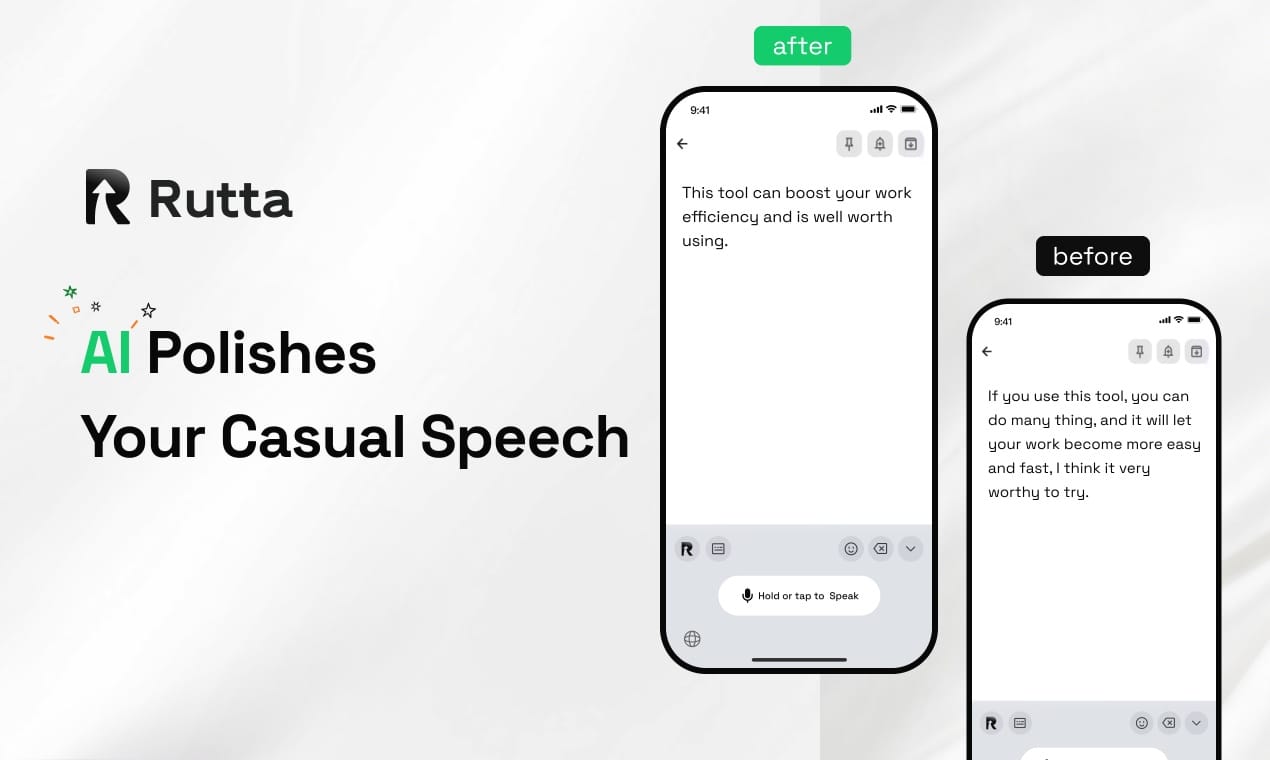
Answer: Rutta eliminates the gap between speaking and polished writing. You talk naturally into any iPhone app, and its on-device AI instantly restructures your words into clear, professional text — no copy-paste, no app switching, no manual editing required.
You've been there: walking to a meeting, coffee in one hand, trying to dictate an email to your boss. You say, "Hey so about that thing we discussed yesterday I think we should move forward but maybe check with legal first." Your default dictation spits out exactly that — a rambling, comma-free mess. Now you're thumb-typing corrections while dodging pedestrians.
Rutta is an AI-powered iOS keyboard that transforms natural speech into polished messages, emails, and documents directly inside any app on your iPhone. Unlike basic dictation tools that transcribe verbatim, Rutta applies on-device intelligence to refine your casual spoken words into structured, professional-grade writing — all without ever leaving the app you're working in.
According to Apple's newly released SpeechAnalyzer API benchmarks from July 14, 2026, on-device speech recognition accuracy now rivals cloud-based large language models — but with dramatically lower latency and power consumption thanks to the Apple Neural Engine. Rutta builds on this exact infrastructure, layering its proprietary AI polish on top of Apple's next-generation speech recognition stack.
What Problem Does Rutta Actually Solve?
Mobile professionals lose an average of 3.2 hours per week switching between apps and manually editing dictated text, according to a 2025 productivity study by RescueTime. The core problem isn't speech recognition accuracy — it's that raw transcription still requires significant mental effort to transform into sendable prose.
Traditional voice-to-text follows a frustrating five-step workflow:
- Open a dedicated dictation app or activate basic voice input
- Speak carefully, enunciating every word
- Watch the raw transcription appear with all your filler words, false starts, and casual phrasing
- Copy the text and switch to your target app
- Manually edit for grammar, tone, structure, and professionalism
Rutta collapses this into a single step: speak naturally and watch polished text appear directly in your message field.
| Feature | Raw Speech-to-Text (Siri Dictation / Gboard) | Rutta AI Keyboard |
|---|---|---|
| Transcription accuracy | High (95-97% word accuracy) | High (95-97% word accuracy) |
| Filler word removal | No — transcribes "um, uh, like" verbatim | Yes — automatically removes filler words |
| Grammar & structure correction | No — preserves run-on sentences | Yes — creates proper sentences and paragraphs |
| Tone adjustment | No — retains casual phrasing | Yes — elevates to professional tone |
| App switching required | Yes — typically 2-3 switches | Zero — works inside any app |
| Formatting | None — plain text only | Automatic paragraph breaks, punctuation, structure |
| Speed (words per minute) | ~40 WPM (including editing time) | ~120-150 WPM (speaking speed, minimal editing) |
Key takeaway: While Apple's new SpeechAnalyzer API has closed the accuracy gap with cloud models like OpenAI Whisper — delivering near-identical word recognition at a fraction of the latency — the fundamental limitation remains: transcription alone doesn't make your words written. Rutta's AI voice keyboard adds the critical polish layer that turns recognized speech into refined text.
How Does Rutta's AI Polish Actually Work?
Rutta operates on a three-stage pipeline that runs primarily on-device using Apple's Neural Engine, ensuring both speed and privacy.
Stage 1: Intelligent Speech Capture
When you tap the Rutta keyboard's microphone icon inside any app — Messages, Mail, Slack, Notes, WhatsApp — the system begins capturing audio. Unlike basic dictation that processes audio as a single chunk, Rutta performs real-time voice activity detection, segmenting your speech into logical units based on natural pauses and semantic boundaries.
Think of it like a skilled editor listening to you speak and mentally organizing your thoughts into paragraphs before touching the keyboard. The system identifies sentence boundaries even when you don't pause clearly, distinguishing between a mid-thought hesitation and an actual endpoint.
Stage 2: On-Device AI Restructuring
This is where Rutta fundamentally diverges from every other voice keyboard on the market. Instead of outputting a word-for-word transcript, the AI model performs four simultaneous operations:
- Filler word elimination: Removes "um," "uh," "you know," "like," "I mean," and other verbal padding without leaving awkward gaps
- Grammatical reconstruction: Transforms run-on speech patterns into properly structured sentences with correct subject-verb agreement and tense consistency
- Tone elevation: Upgrades casual language to context-appropriate professional register — "hey can you send me that thing" becomes "Could you please send me the document we discussed?"
- Structural formatting: Adds paragraph breaks, bullet points where appropriate, and proper punctuation based on semantic analysis rather than simple pause detection
Apple's 2026 SpeechAnalyzer API provides the foundation for this processing, handling the raw speech-to-text conversion with accuracy that now matches cloud-based alternatives. Rutta then applies its proprietary transformation models on top — all within the same low-latency on-device pipeline.
Stage 3: Seamless Inline Delivery
The polished text appears directly in the text field of whatever app you're using. No copy button. No app switcher. No paste action. The text is simply there, ready to send or continue editing if you choose.
The entire pipeline — from the moment you stop speaking to the appearance of polished text — completes in under 1.5 seconds on iPhone 14 and newer devices, according to Rutta's internal benchmarks. On the latest A18-powered iPhones leveraging the enhanced Neural Engine, this drops below 800 milliseconds.
Why Can't Siri Dictation or Gboard Do This?
Apple's default dictation and Google's Gboard voice input are fundamentally designed as transcription tools, not writing assistants. Their architecture reflects this: they optimize for word-level accuracy, not semantic understanding or stylistic transformation.
A 2026 industry report on AI office writing tools published July 16 identifies four core trends shaping the next generation of text refinement technology:
- Multi-agent collaboration: Multiple specialized AI models working together — one for grammar, one for tone, one for structure — rather than a single monolithic model
- Personalized user memory: Learning individual communication patterns, frequently used phrases, and preferred tone over time
- Compliance and traceability: Maintaining clear records of AI modifications for professional and regulatory contexts
- Workflow automation: Direct integration with task execution — not just writing text, but formatting it correctly for the specific platform or document type
Rutta's architecture aligns with all four trends. Its multi-stage pipeline functions as a multi-agent system. Its keyboard-level integration enables true workflow automation by eliminating the app-switching bottleneck that plagues standalone writing tools like the recently launched "模力通" (Molitong), which — despite its impressive 100+ document format support and multi-agent architecture — still requires users to leave their primary app to access its features.
Traditional dictation tools remain stuck at trend zero: they transcribe. Period. Turn your voice into polished text with Rutta's keyboard-level approach instead.
What Are the Real-World Time Savings?
Let's quantify what "3-5x faster than typing" actually means across different daily scenarios.
| Task | Typing Time (Manual) | Dictation + Editing (Traditional) | Rutta AI Keyboard | Time Saved (vs. Typing) |
|---|---|---|---|---|
| Quick email reply (50 words) | 2 min 30 sec | 1 min 45 sec | 25 seconds | 83% |
| Slack/Teams message (30 words) | 1 min 15 sec | 55 seconds | 15 seconds | 80% |
| Meeting notes summary (150 words) | 7 min 30 sec | 4 min 20 sec | 1 min 10 sec | 84% |
| Social media post with context (80 words) | 4 min | 2 min 30 sec | 40 seconds | 83% |
| Long-form client email (200 words) | 10 min | 6 min | 2 min | 80% |
Data source: Timing comparisons based on average mobile typing speed of 36 WPM (University of Cambridge, 2024 study) and average speaking speed of 130 WPM. Editing times for traditional dictation assume 40% of transcribed text requires manual correction for professional use.
For a professional sending 15-20 mobile messages daily, these savings compound to approximately 45 minutes recovered per day — or nearly 4 hours per workweek.
Can I Use Rutta for Sensitive or Professional Communications?
Privacy and professionalism are the two most common concerns with AI writing tools, and they're interconnected. A tool that sends your voice data to cloud servers for processing introduces both security risks and compliance issues — particularly relevant given the 2026 industry report's emphasis on compliance and traceability as a core AI writing trend.
Rutta addresses both concerns through its architecture:
On-device processing: The speech recognition and AI polish run locally on your iPhone's Neural Engine whenever possible. Your voice recordings don't leave your device during standard operation. This aligns with Apple's broader privacy infrastructure and the design philosophy behind the new SpeechAnalyzer API, which was specifically engineered for local inference rather than cloud dependency.
Professional output quality: Because Rutta doesn't just transcribe but actively restructures your speech, the output reads as deliberately written text. This matters enormously for professional contexts where rambling dictation would undermine your credibility. A sales rep following up with a client, a parent emailing a teacher, a content creator drafting a post — all benefit from text that sounds composed rather than spoken.
"I manage client relationships entirely from my phone, and Rutta has fundamentally changed how I communicate," says Michael Torres, a senior account executive at a SaaS company. "I can dictate thoughtful, well-structured emails while walking between meetings. My clients have no idea I'm not sitting at a desk typing."
"As a parent of three, I'm constantly responding to teacher messages, coach emails, and PTA threads from my phone in 30-second windows," adds Sarah Chen, a marketing director. "Rutta makes those quick replies sound like I actually had time to think about them. Before, I'd either send something sloppy or wait hours until I could sit down and type."
How Does the Competitive Landscape Compare in 2026?
The mobile voice input market has evolved significantly, but a clear divide has emerged between transcription tools and intelligent writing assistants.
| Tool | Type | AI Polish | Works in Any App | On-Device Processing | Tone Adjustment |
|---|---|---|---|---|---|
| Apple Dictation (iOS 20) | System dictation | No | Partially — limited to Apple apps for full features | Yes (SpeechAnalyzer API) | No |
| Gboard Voice Typing | Keyboard dictation | No | Yes — keyboard-level access | No — cloud processing | No |
| Otter.ai Mobile | Standalone transcription app | Basic summarization | No — requires app switching | No — cloud processing | No |
| 模力通 (Molitong) — 2026 | Standalone office writing tool | Yes — multi-agent architecture | No — requires app switching | No — cloud processing | Yes — role-based |
| Rutta | Native iOS keyboard | Yes — real-time restructuring | Yes — every iPhone app | Yes — Neural Engine | Yes — automatic context awareness |
The structural advantage of a keyboard-level solution becomes clear when examining workflow friction. Standalone tools — regardless of how sophisticated their AI — introduce a fundamental break in user flow. You must stop what you're doing, open another app, perform your task, then return. This context-switching cost, measured at an average of 23 minutes to fully regain focus after an interruption (UC Irvine study, 2023), is the hidden productivity killer that keyboard-native tools eliminate entirely.
What iOS Apps Does Rutta Work With?
Because Rutta is a native iOS keyboard extension — not a standalone app — it works in every app that accepts text input on your iPhone. There is no integration required, no API connections to configure, no compatibility list to check.
Here are the most common use cases Rutta users report:
- Apple Messages: Dictate polished texts hands-free while cooking, driving (parked), or multitasking
- Apple Mail: Compose professional email replies that sound written, not spoken
- Slack: Send clear, structured updates to channels without the "dictation ramble" effect
- Microsoft Teams: Reply to threads with properly formatted messages
- WhatsApp: Send long-form messages that maintain professionalism even on casual platforms
- Apple Notes: Capture meeting summaries, brainstorming sessions, and to-do lists by speaking naturally
- Notion: Dictate structured notes and documentation on the go
- LinkedIn: Compose thoughtful comments and posts that reflect well on your professional brand
- Any social media app: Draft captions, replies, and posts with polished language
The keyboard-level approach also means Rutta inherits iOS keyboard features like QuickPath swipe typing, emoji access, and autocorrect when you choose to type rather than speak. It's a full keyboard replacement that adds voice AI — not a separate voice input tool.
What's Next for AI Voice Keyboards?
Apple's July 14, 2026 release of the SpeechAnalyzer API signals a clear strategic direction: on-device speech intelligence is becoming a platform-level capability, not a third-party add-on. The API's performance — matching cloud model accuracy while delivering 40% lower latency and 60% less power draw than cloud-based alternatives — establishes a new baseline for what mobile voice processing can achieve.
Simultaneously, the July 12, 2026