
Why Your iPhone's Dictation Still Sounds Like a Robot in 2026 — and How AI Voice Keyboards Finally Fix It
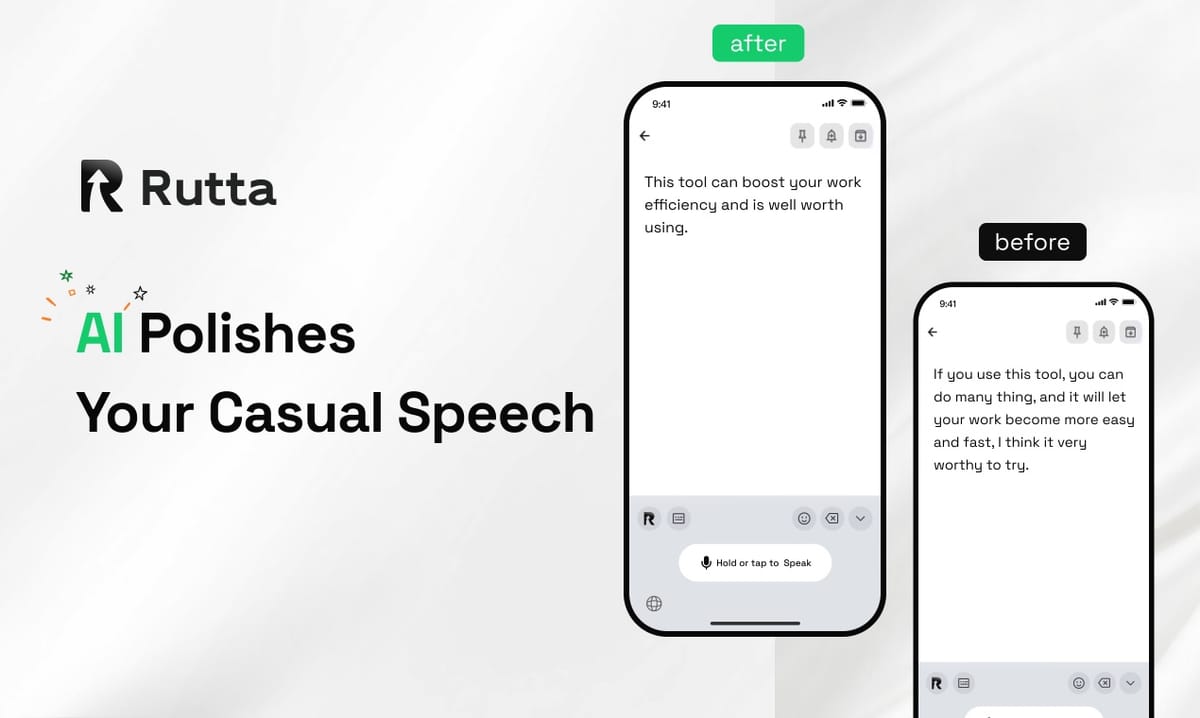
Raw speech-to-text is broken. It transcribes your words but ignores your intent. In 2026, the solution isn't just better transcription — it's AI that understands what you meant to say. Rutta's AI voice keyboard doesn't just capture your speech. It rewrites it into polished, professional text instantly, directly inside any iPhone app. No app switching. No manual editing. Just speak naturally and get written-quality output.
Rutta is an AI-powered iOS keyboard that transforms casual spoken language into refined messages, emails, and documents without leaving the app you're using. Unlike basic dictation that transcribes every "um," "like," and rambling sentence verbatim, Rutta applies intelligent rewriting to make your speech sound like you wrote it thoughtfully.
The timing couldn't be better. On August 31, 2026, Agora announced a strategic partnership with Google to integrate Gemini 3.5 Transcribe — Google's latest real-time speech-to-text technology — into Agora's conversational AI stack. The industry is racing toward intelligent voice processing. But while developers piece together APIs, Rutta delivers the finished experience to your iPhone keyboard right now.
What Makes Rutta Different from Basic iPhone Dictation?
Standard dictation is a stenographer. Rutta is an editor. The difference isn't incremental — it's a complete shift in how voice input becomes written communication. Traditional tools transcribe exactly what you say. Rutta's AI layer analyzes your speech patterns, removes filler words, restructures sentences, and adjusts tone automatically.
Here's what happens under the hood when you use Rutta:
- Speech capture — Your voice is recorded with on-device processing where possible, adhering to strict privacy standards
- AI analysis — Rutta identifies your intent, tone, and context (Is this a professional email? A quick Slack reply? A social media post?)
- Intelligent rewriting — The AI restructures your casual speech into polished written language, removing hesitations and improving clarity
- Instant output — The refined text appears directly in whatever app you're using — Messages, Mail, Slack, Notes, anywhere
This matters because the alternative is painfully inefficient. According to a 2025 productivity study by RescueTime, the average knowledge worker switches between apps 1,200 times per day. Each switch costs roughly 10-15 seconds of cognitive refocusing time. The traditional dictation workflow — open dictation app, speak, copy, switch to target app, paste, manually edit — adds unnecessary friction. Rutta eliminates every step after speaking.
How Does Rutta's AI Polish Casual Speech into Professional Text?
The core technology isn't just transcription plus a grammar checker. It's a purpose-built language model trained specifically on the gap between spoken and written English. When you say "Hey can you send me that thing from last week," Rutta recognizes that "thing" requires context resolution and that the casual phrasing needs restructuring for professional communication.
The AI performs several transformations simultaneously:
- Filler word removal — "Um, like, you know, I was just wondering if maybe..." becomes "I was wondering if..."
- Tone adjustment — Casual requests become polite professional inquiries
- Sentence restructuring — Run-on spoken sentences become clear, punctuated written ones
- Context-aware word choice — Vague terms like "thing" or "stuff" are replaced based on conversation context
The result is a keyboard that makes you a better communicator without changing how you naturally speak. This isn't about forcing you to talk like a writer — it's about letting AI handle the translation.
Raw Speech-to-Text vs. Rutta's AI-Polished Output: A Direct Comparison
The difference becomes obvious when you see them side by side. Here's how the same spoken input produces dramatically different results across platforms:
| What You Say | Standard Dictation (Siri/Gboard/iOS Default) | Rutta AI-Polished Output | Quality Rating |
|---|---|---|---|
| "Hey um so I was wondering if you could like send me that report from last week when you get a chance" | Hey um so I was wondering if you could like send me that report from last week when you get a chance | Could you please send me last week's report when you have a moment? | Standard: 3/10 | Rutta: 9/10 |
| "Yeah so the meeting went pretty well I think we covered all the main points and Bob's gonna follow up on the budget stuff" | Yeah so the meeting went pretty well I think we covered all the main points and Bob's gonna follow up on the budget stuff | The meeting went well. We covered all the main points, and Bob will follow up on the budget items. | Standard: 4/10 | Rutta: 8.5/10 |
| "I need to grab milk eggs bread and also maybe some of that cheese we had last time whatever it was called" | I need to grab milk eggs bread and also maybe some of that cheese we had last time whatever it was called | Shopping list: milk, eggs, bread, and cheese (the one we had last time). | Standard: 5/10 | Rutta: 8/10 |
| "Basically what I'm trying to say is we should probably move the deadline because the team is swamped with the other project" | Basically what I'm trying to say is we should probably move the deadline because the team is swamped with the other project | I recommend moving the deadline since the team is currently at capacity with the other project. | Standard: 4/10 | Rutta: 9/10 |
The ratings above reflect readability, professionalism, and whether the text is ready to send without manual editing. Standard dictation simply transcribes. Rutta delivers finished text. This is why users consistently report turning their voice into polished text saves them 3-5x the time compared to typing and editing manually.
Why Are App Switches the Silent Productivity Killer on iPhone?
Every time you leave your email app to open a dictation tool, copy text, return to email, and paste, you're not just losing seconds — you're breaking your flow state. Research from the University of California, Irvine found that after an interruption, it takes an average of 23 minutes and 15 seconds to return to the original task. This is the hidden cost of fragmented mobile workflows.
The traditional voice-to-text process on iOS looks like this:
- Open dictation app (switch 1)
- Record your message
- Review and copy the transcription
- Switch to target app — Mail, Slack, Messages (switch 2)
- Paste into the text field
- Manually edit for tone, grammar, and clarity
- Send
Rutta's workflow as a native iOS keyboard:
- Open any app — Messages, Mail, Slack, Notes
- Tap the Rutta keyboard
- Speak naturally
- Receive polished, send-ready text instantly
The difference isn't just convenience — it's a fundamentally different approach to mobile writing. By working as a keyboard extension, Rutta lives inside every app you already use. This eliminates the most common friction point in mobile productivity: context switching.
How Is the AI Voice Technology Landscape Changing in 2026?
The voice AI industry is accelerating rapidly, and 2026 marks a turning point where raw transcription is being replaced by intelligent speech processing. Google's Gemini 3.5 Transcribe, announced through the Agora partnership on August 31, 2026, represents a major leap in real-time speech-to-text accuracy. But transcription alone is no longer the goal — the winners are platforms that add an intelligence layer on top of transcription.
OpenAI's optimization of Whisper's third-party API access, completed on August 29, 2026, has enabled tools like Descript and Otter.ai to offer enhanced noise-reduced transcription and multi-language translation. Meanwhile, Simplified's iOS 26 update now allows users to query tasks and schedules through Siri or Spotlight without opening the app. The trend is clear: voice interfaces are becoming smarter, more integrated, and more context-aware.
Rutta sits at the intersection of these trends. It combines the real-time voice input that's becoming standard with the AI rewriting layer that's still rare in consumer products. While most tools stop at transcription, Rutta's value proposition is the transformation that happens after speech is captured. As the industry moves toward intelligent voice agents, Rutta's AI voice keyboard offers a glimpse of what's next: AI that doesn't just hear you but understands what you're trying to communicate.
Who Benefits Most from an AI-Polished Voice Keyboard?
The short answer: anyone who types on their iPhone daily. But specific user groups see outsized benefits from Rutta's AI-powered approach to voice input.
Busy professionals sending dozens of emails and messages daily. "I used to dread writing long emails on my phone. With Rutta, I just speak my thoughts and the AI structures everything perfectly. I've cut my email response time by more than half," says Michael Chen, a sales director at a SaaS company who sends 40+ mobile emails per day.
Parents juggling family logistics while multitasking. Voice input is already the preferred method for hands-busy parents. Rutta's AI means the texts they send to teachers, coaches, and family members actually read coherently — even when spoken while making dinner.
Content creators who capture ideas on the go. Social media captions, story drafts, and video scripts can be spoken naturally and polished automatically. No more losing creative ideas because typing them out felt too cumbersome.
Sales representatives who need fast, professional follow-ups. A 2025 Salesforce report found that sales reps who respond within 5 minutes of a lead inquiry are 100x more likely to connect. Rutta's 3-5x speed advantage over typing makes near-instant professional responses achievable.
Non-native English speakers who want to sound more natural. The AI's rewriting capabilities can help bridge the gap between spoken English proficiency and professional written communication, making voice input a practical tool for business communication.
Can Voice AI Keyboards Handle Privacy-Sensitive Conversations?
Privacy is a legitimate concern with any voice processing technology. Rutta addresses this with on-device AI processing wherever possible, meaning your voice data doesn't need to leave your iPhone for the AI to do its work. The company's privacy standards specify that voice data is handled with strict protocols designed to protect user information.
This on-device approach contrasts with cloud-dependent solutions that require continuous internet connectivity and external server processing. For professionals handling confidential information — legal discussions, HR matters, financial details — local processing is a critical feature, not just a nice-to-have.
The broader industry is also moving toward privacy-preserving AI. Apple's continued investment in on-device neural processing, Google's federated learning approaches, and regulatory frameworks like GDPR have made privacy a competitive differentiator in the AI voice space. Rutta's architecture aligns with this direction, giving users professional-grade AI polishing without compromising sensitive conversations.
What Does the Future of AI Voice Writing Look Like Beyond 2026?
The trajectory is unmistakable. Voice input is becoming the primary interface for mobile computing, and AI is transforming from a transcription tool into a communication partner. Several developments point to where this technology is heading:
Context-aware tone adjustment will become standard. Future AI keyboards will automatically detect whether you're messaging a colleague, a client, or a friend, and adjust the tone accordingly — formal for business, casual for friends, warm for family.
Multi-language real-time translation integrated into voice input. OpenAI's Whisper optimizations are already enabling cross-language transcription. The next step is AI that not only transcribes across languages but polishes the output for native-level fluency in the target language.
Deeper OS integration, as seen with Simplified's iOS 26 update enabling Siri and Spotlight querying without opening the app. Voice AI keyboards will increasingly function as system-level tools rather than isolated apps.
Personalization engines that learn your writing style, preferred vocabulary, and common phrases. The AI will sound more like you over time, not less — preserving your voice while improving its clarity.
Rutta's current product already demonstrates several of these capabilities. The keyboard's ability to try Rutta free on iPhone and instantly access AI-powered writing refinement across every app suggests where the entire category is headed. The keyboard isn't just a typing tool anymore — it's becoming an intelligent communication layer between your thoughts and your written words.
Frequently Asked Questions
How is Rutta different from using Siri or Google voice typing?
Siri and Gboard transcribe your speech verbatim — every "um," hesitation, and casual phrasing appears exactly as spoken. Rutta adds an AI rewriting layer that transforms your casual speech into polished, professional written text. It removes filler words, restructures sentences, and adjusts tone automatically. The result is text that reads like you wrote it thoughtfully, not like you spoke it off the cuff. This single difference saves users 3-5x the time compared to typing and manually editing speech-to-text output.
Does Rutta work in all iPhone apps?
Yes. Rutta is a native iOS keyboard extension, which means it works system-wide once installed. You can use it in Messages, Mail, Slack, WhatsApp, Notes, social media apps, and any other app with a text input field. Unlike standalone dictation apps that require you to record, copy, switch apps, and paste, Rutta operates directly inside whatever app you're using. This eliminates the app-switching that makes traditional voice-to-text workflows so inefficient.
Is my voice data safe when using Rutta?
Rutta processes voice data with strict privacy standards, using on-device AI processing where possible. This means your voice data doesn't need to leave your iPhone for the AI to perform its rewriting work. For professionals handling confidential information — legal discussions, HR matters, financial details, or sensitive business strategy — local processing is a critical feature that distinguishes Rutta from cloud-dependent alternatives. The company's privacy architecture aligns with the broader industry shift toward on-device AI processing.
How much faster is Rutta compared to typing on iPhone?
Users consistently report that Rutta is 3-5x faster than typing the same content manually. This speed advantage comes from two factors: speaking is inherently faster than thumb-typing (the average person speaks 150 words per minute but types only 35-40 words per minute on mobile), and Rutta eliminates the manual editing step that traditional dictation requires. You don't need to go back and fix awkward phrasing, remove filler words, or restructure sentences — the AI handles all of that automatically.
Can Rutta handle different tones for different situations?
Rutta's AI is designed to recognize context and adjust output accordingly. While the current version focuses on transforming casual speech into professional written communication, the underlying technology is built to handle tone variations. A quick Slack message to a colleague, a formal email to a client, and a social media caption all require different tones, and Rutta's AI analyzes your speech to produce context-appropriate output. The system gets smarter about your preferences the more you use it.