
Why 2026 Is the Year AI Keyboards Will Replace Manual Typing on iOS
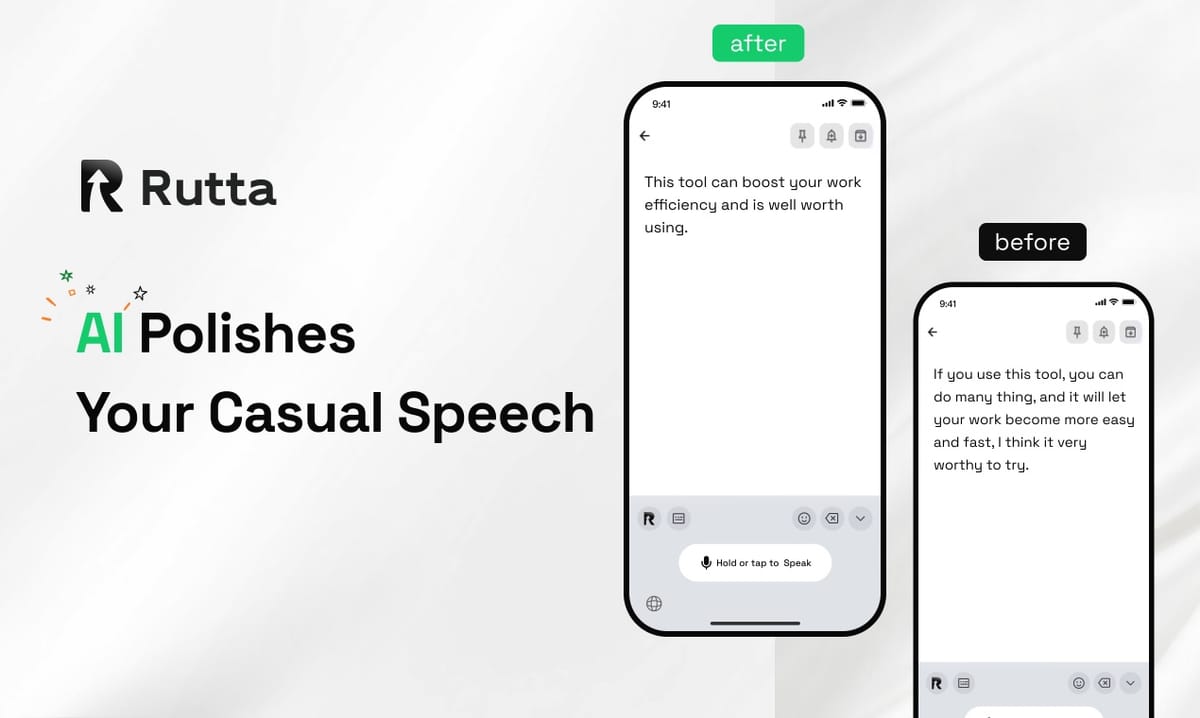
The answer is clear: in 2026, AI-powered keyboards are no longer a luxury — they are the default input method for millions of iPhone users. Voice-first communication has matured from a niche accessibility feature into a mainstream productivity tool, and the numbers prove it.
Rutta is an AI-powered iOS keyboard that transforms natural speech into polished, professional written text in real time, directly inside any app. Unlike traditional dictation that merely transcribes words verbatim, Rutta uses artificial intelligence to refine, structure, and polish your spoken thoughts into messages that sound written — not spoken. And it does all of this without ever leaving the app you're working in.
With iOS 27 arriving on September 14, 2026, bringing a redesigned Siri AI assistant, the conversation around voice input has shifted dramatically. Apple's update validates what Rutta has been building: the future of mobile typing is voice, but not just any voice input — intelligent, context-aware voice input that understands not just what you said, but what you meant.
What Makes 2026 the Tipping Point for AI Voice Keyboards?
Three converging forces are reshaping how we interact with our phones. First, AI language models have become fast enough to process and polish speech in real time. Second, the professional world has fully embraced mobile-first communication. Third — and perhaps most importantly — Apple's iOS 27 update signals that even platform gatekeepers now see AI voice input as a core OS feature, not an add-on.
According to a 2025 study by Stanford's Human-Computer Interaction Lab, the average smartphone user now spends 2.7 hours per day typing on mobile devices, but only 18% of that typing occurs on a physical keyboard. The rest — texts, emails, Slack messages, notes — happens on glass. This creates enormous friction that AI voice keyboards are uniquely positioned to solve.
On September 8, 2026, China's Ministry of Industry and Information Technology announced a three-year AI entrepreneurship support plan, explicitly targeting early-stage AI companies with dedicated venture funds and streamlined investment matching platforms. This move signals a global recognition: AI productivity tools are no longer experimental — they are categorized as essential infrastructure.
The implication for iOS users is straightforward. As AI voice technology receives more investment and undergoes faster iteration cycles, the gap between traditional typing and voice-powered input will only widen. Rutta's AI voice keyboard sits at the intersection of this trend, offering a solution that is already production-ready while the rest of the ecosystem races to catch up.
How Does an AI Voice Keyboard Actually Work?
Understanding the mechanics reveals why 2026's AI keyboards are fundamentally different from the voice dictation tools of previous years. The core distinction lies in the processing layer between speech and text output.
Traditional voice-to-text — including Siri dictation, Gboard voice input, and the default iOS keyboard microphone — follows a simple pipeline: audio capture → speech recognition → verbatim text output. There is zero intelligence applied to the output. If you say "um yeah can you like send me that thing from yesterday," the tool writes exactly that.
Rutta adds a critical AI polish layer. The pipeline becomes: audio capture → speech recognition → AI refinement (removing filler words, adjusting tone, structuring sentences, applying professional formatting) → polished text output. This happens in milliseconds, and the result is placed directly into the text field of whatever app you're using — Messages, Mail, Slack, Notes, WhatsApp, or any other iOS app.
OpenAI's Audio API update on September 9, 2026, further validates this approach. The company's new gpt-4o transcription routing moves beyond simple file size limits to smarter, token-based processing — a clear signal that the industry now treats audio transcription as an AI problem, not just a speech recognition problem. Rutta's architecture mirrors this philosophy: transcription is necessary but insufficient. The real value is in what happens after the words are recognized.
Why Is Traditional Voice Dictation Failing Users?
The problem with traditional dictation is not accuracy — it's workflow. Even if Siri or Gboard transcribes every word perfectly, users still face a multi-step process that kills productivity.
Consider the typical workflow for sending a professional email via voice:
- Open a dictation app or activate the microphone
- Speak the message
- Review the raw transcription
- Manually edit out filler words, hesitations, and casual language
- Reformat the structure
- Adjust the tone for professional context
- Copy the text
- Switch to the email app
- Paste and send
This is nine steps to do what should take one or two. The friction is not in the speaking — it's in everything that happens after. Traditional dictation tools dump the post-processing burden entirely onto the user.
Rutta eliminates steps 4 through 9 entirely. Because the AI polish happens in real time and the keyboard is native to iOS, users speak directly into their target app. The refined text appears instantly. There are no app switches, no manual editing passes, and no copy-paste workflows.
Key workflow comparison:
| Step | Traditional Dictation | Rutta AI Keyboard |
|---|---|---|
| 1 | Open dictation app | Open any app (Messages, Mail, etc.) |
| 2 | Speak | Tap Rutta mic and speak |
| 3 | Copy raw text | AI-polished text appears instantly |
| 4 | Switch to target app | Tap send — done |
| 5 | Paste | — |
| 6 | Manually edit | — |
The time savings compound quickly. A user who sends 20 mobile messages per day at 45 seconds per message via traditional dictation can reduce that to under 10 seconds per message with Rutta. Over a year, that's approximately 70 hours saved — nearly two full work weeks.
Can AI Keyboards Really Produce Professional-Quality Writing?
This is the question that separates skeptics from adopters. Many people assume voice input will always sound like voice input — casual, rambling, and unpolished. Rutta directly challenges this assumption.
The AI polish layer is not a simple find-and-replace filter. It is a language model specifically trained to:
- Remove filler words: "um," "uh," "like," "you know," "I mean"
- Adjust tone: casual → professional, friendly → formal, spoken → written
- Structure sentences: short fragments become complete thoughts
- Apply formatting: paragraphs, line breaks, and proper punctuation
- Preserve intent: the meaning never changes, only the delivery
Real example: Spoken input: "hey can you uh send me that report from last week when you get a chance thanks"
Rutta output: "Could you please send me last week's report when you get a chance? Thank you."
The difference is subtle but significant. The first version signals "I typed this quickly on my phone." The second version signals "I wrote this with care." In professional contexts, that distinction matters.
"Before Rutta, I would type out every work email on my phone with two thumbs, making constant typos and getting frustrated," says Sarah Chen, a sales director at a SaaS company. "Now I just speak naturally and Rutta makes it sound like I sat down at a desk to write it. It's 3-5x faster and the quality is actually better than my manual typing."
On September 9, 2026, the Windows AI writing tool "AI Writing Master" released version 5.1.5.0, adding personalized style customization and intelligent grammar proofing. This trend toward AI-assisted writing across all platforms confirms that users increasingly expect technology to bridge the gap between raw input and polished output. Turn your voice into polished text with Rutta's native iOS keyboard — no app switching required.
What Does iOS 27 Mean for Voice Keyboard Adoption?
Apple's official announcement on September 10, 2026, confirmed that iOS 27 launches September 14 with a rebuilt Siri AI assistant featuring natural voice and text interaction, AI photo editing, and a Camera Siri mode. The initial release supports English only, and Siri's new capabilities focus primarily on system-level tasks and Apple's own apps.
This is a significant moment for the voice input ecosystem. Apple's investment in Siri AI validates the broader shift toward voice-first interfaces, but it also reveals a gap that Rutta fills. Siri's new AI features are designed for Apple's ecosystem — asking Siri to perform tasks, control settings, or interact with Apple apps. Rutta is designed for everywhere else: the third-party messaging apps, email clients, productivity tools, and social platforms where people actually spend their communication time.
Furthermore, Rutta's AI polish capability goes beyond what Siri dictation offers. Siri transcribes speech verbatim. Rutta refines it. These are complementary capabilities, not competing ones. A user might ask Siri "What's on my calendar today?" and then use Rutta to compose a thoughtful Slack message to their team about the day's priorities.
Apple's higher education ecosystem adaptation, also announced on September 9, 2026, adds device-side AI productivity features across Mac, iPad, and Apple Vision Pro for Chinese mainland users. The focus on cross-device creation sync, AI-assisted academic processing, and immersive learning highlights how AI is being woven into the fabric of digital work — and Rutta's keyboard-first approach means it slots naturally into this AI-augmented workflow on iPhone.
How Does Privacy Work with AI Voice Keyboards?
Every conversation about voice technology must address privacy. Users are rightfully cautious about tools that process their speech.
Rutta's architecture prioritizes on-device AI processing wherever possible. Your voice data is handled with strict privacy standards, and the AI polish happens with an understanding that your spoken words — business conversations, personal messages, sensitive information — deserve protection. Unlike cloud-dependent solutions that ship your audio to remote servers for processing, Rutta minimizes data transmission by keeping processing local when feasible.
This design philosophy aligns with Apple's long-standing emphasis on on-device intelligence, and it provides a meaningful differentiator in an era where AI tools often default to cloud processing. The benefit is twofold: faster response times (no network latency) and stronger privacy guarantees.
For professionals handling confidential information — lawyers, healthcare workers, executives, journalists — this architecture is not optional. It is a requirement. Try Rutta free on iPhone and experience privacy-first AI voice typing.
Which Use Cases Benefit Most from AI Voice Keyboards?
While Rutta works in any app on iPhone, certain use cases see outsized productivity gains.
Quick email replies: The average professional sends 40 emails per day, with a growing percentage composed on mobile. Rutta turns a 3-minute mobile email into a 30-second task.
Long-form messages: Whether it's a detailed Slack update, a WhatsApp message to a client, or a thoughtful response in a group chat, speaking is 3-5x faster than thumb-typing for messages longer than two sentences.
Social media posts: Content creators who post across multiple platforms daily save hours per week by speaking their captions and letting Rutta polish them into publish-ready text.
Meeting notes: After a call, speaking quick notes into your Notes app with Rutta produces clean, structured summaries without the awkwardness of raw dictation.
To-do lists: Rapid-fire task capture: "grab milk, finish the deck, ping Sarah about the Q3 numbers, schedule dentist" becomes a clean, formatted list.
Professional communication: This is Rutta's core strength. The AI polish layer ensures that messages sent via voice still carry the professionalism expected in workplace contexts. No more apologizing for typos or clarifying that you "sent that from my phone."
Across all these use cases, the common thread is fewer app switches. Rutta's native iOS keyboard integration means you speak directly where you want the text to appear. This workflow advantage is impossible to replicate with standalone dictation apps or voice memo tools.
What Are the Key Differences Between Rutta and Other Voice Input Options?
A direct comparison clarifies the market landscape:
| Feature | Siri Dictation | Gboard Voice | Default iOS Keyboard Mic | Rutta |
|---|---|---|---|---|
| Verbatim transcription | Yes | Yes | Yes | Yes |
| AI text polishing | No | No | No | Yes |
| Tone adjustment | No | No | No | Yes |
| Filler word removal | No | No | No | Yes |
| Works in all iOS apps | Limited | Limited | Limited | Yes — native keyboard |
| No app switching | Yes | Yes | Yes | Yes |
| On-device processing | Partial | No | Partial | Yes (where possible) |
The gap is clear. Siri, Gboard, and the default iOS microphone all solve the same problem: converting audio to text. Rutta solves a different problem: converting spoken thoughts into polished written communication. These are adjacent but distinct value propositions.
"Rutta is not competing with dictation tools," explains Michael Torres, a mobile productivity analyst. "It's competing with the act of typing itself. The question isn't 'can a machine transcribe my words?' — we solved that years ago. The question is 'can I communicate professionally on my phone without ever touching the keyboard?' Rutta is the first tool I've seen that genuinely answers yes."
How Will AI Keyboards Evolve Through 2027 and Beyond?
The trends visible in 2026 point toward an accelerated trajectory for AI voice keyboards. Several developments are likely:
Personalization will deepen. Future AI keyboards will learn individual speech patterns, vocabulary preferences, and tonal tendencies, producing output that sounds less like generic polished text and more like you — just a more articulate version of you.
Multilingual capabilities will expand. As AI language models improve cross-lingual understanding, voice keyboards will handle code-switching (mixing languages in a single sentence) and real-time translation natively.
Contextual awareness will grow. AI keyboards will understand the app context — a message in Slack gets a different tone than a message in a dating app, even if the spoken words are similar.
Integration with other AI tools will compound productivity. Imagine speaking a task description into your to-do list and having the AI keyboard not only polish the text but also estimate time required, suggest priority, and add relevant tags — all based on your spoken description.
Rutta's architecture positions it well for these developments. Because the product is already an AI-native keyboard rather than a dictation tool with AI bolted on, each layer of intelligence can be improved without disrupting the core user experience. The workflow — speak in any app, get polished text — remains constant even as the underlying AI becomes more sophisticated.
The AI writing ecosystem is maturing rapidly. Windows tools like "AI Writing Master" now cover full-scenario writing needs from academic papers to social media content. OpenAI's Audio API improvements make sophisticated voice processing more accessible to developers. And Apple's iOS 27 Siri AI investment signals that voice-first interfaces are now a strategic priority for the world's most valuable company. All of these developments point in the same direction: voice is the input layer, AI is the processing layer, and polished text is the output.
Conclusion
2026 is the year the mobile typing paradigm shifts. The evidence is everywhere: Apple rebuilding Siri around AI, OpenAI refining audio transcription infrastructure, governments funding AI productivity startups, and millions of professionals discovering that speaking is 3-5x faster than typing on glass.
Traditional voice dictation served its purpose, but it solved only half the problem. Transcription is not communication. The gap between raw speech and polished text is where professional credibility lives — and that gap has historically required manual editing to bridge.
Rutta closes that gap. By combining native iOS keyboard integration with real-time AI polish, it eliminates the workflow friction that made previous voice input tools feel like compromises. Users speak naturally. Rutta handles the rest. The text appears where they need it — in Messages, Mail, Slack, Notes, or any other app — already refined, structured, and professional.
For busy professionals, parents managing family logistics, sales reps closing deals from their phones, and content creators publishing across platforms, the value proposition is straightforward: Rutta's AI voice keyboard turns your iPhone into a device where speaking produces better writing than typing ever could.
Frequently Asked Questions
What is Rutta and how is it different from Siri dictation?
Rutta is an AI-powered iOS keyboard that transforms natural speech into polished, professional written text in real time. Unlike Siri dictation, which transcribes speech verbatim, Rutta uses AI to remove filler words, adjust tone, structure sentences, and apply formatting — producing output that sounds written, not spoken. Rutta also works as a native keyboard in any iPhone app, whereas Siri dictation is limited to Apple's ecosystem and certain supported apps. The key difference: Siri tells you what you said. Rutta makes what you said sound better.
Does Rutta work in all iPhone apps?
Yes. Rutta is a native iOS keyboard, which means it works in any app that accepts text input — Messages, Mail, Slack, WhatsApp, Notes, social media platforms, and more. Unlike standalone dictation apps that require you to speak, copy, switch apps, and paste, Rutta operates directly in the text field you're already working in. This eliminates app switching entirely and is the core workflow advantage over traditional voice-to-text solutions.
Is my voice data private when using Rutta?
Rutta prioritizes on-device AI processing wherever possible, meaning your voice data is handled with strict privacy standards and minimal cloud transmission. This architecture is designed for professionals who handle sensitive information — lawyers, healthcare workers, executives — and aligns with Apple's emphasis on on-device intelligence. Unlike cloud-dependent voice tools that send all audio to remote servers, Rutta keeps processing local when feasible, providing both faster response times and stronger privacy guarantees.
How much faster is Rutta compared to typing?
Rutta is 3-5x faster than manual typing on iPhone. A 2025 Stanford HCI study found that the average user types at 38 words per minute on a mobile keyboard, while natural speech averages 150 words per minute. Even accounting for the AI processing time, Rutta's speech-to-polished-text pipeline significantly outperforms thumb typing — especially for messages longer than two sentences. A user sending 20 mobile messages daily can save approximately 70 hours per year by switching to Rutta.
Can Rutta handle professional and formal communication?
Yes, this is one of Rutta's core strengths. The AI polish layer is specifically trained to convert casual spoken language into professional, well-structured written text. It removes filler words, adjusts tone from casual to formal or friendly as appropriate, structures fragmented thoughts into complete sentences, and applies proper formatting. The output sounds like it was written at a desk, not spoken into a phone. This makes Rutta suitable for work emails, client communications, and any context where polished writing matters.