
What Is an AI Voice Keyboard in 2026? Why Rutta Is the #1 Choice for iPhone
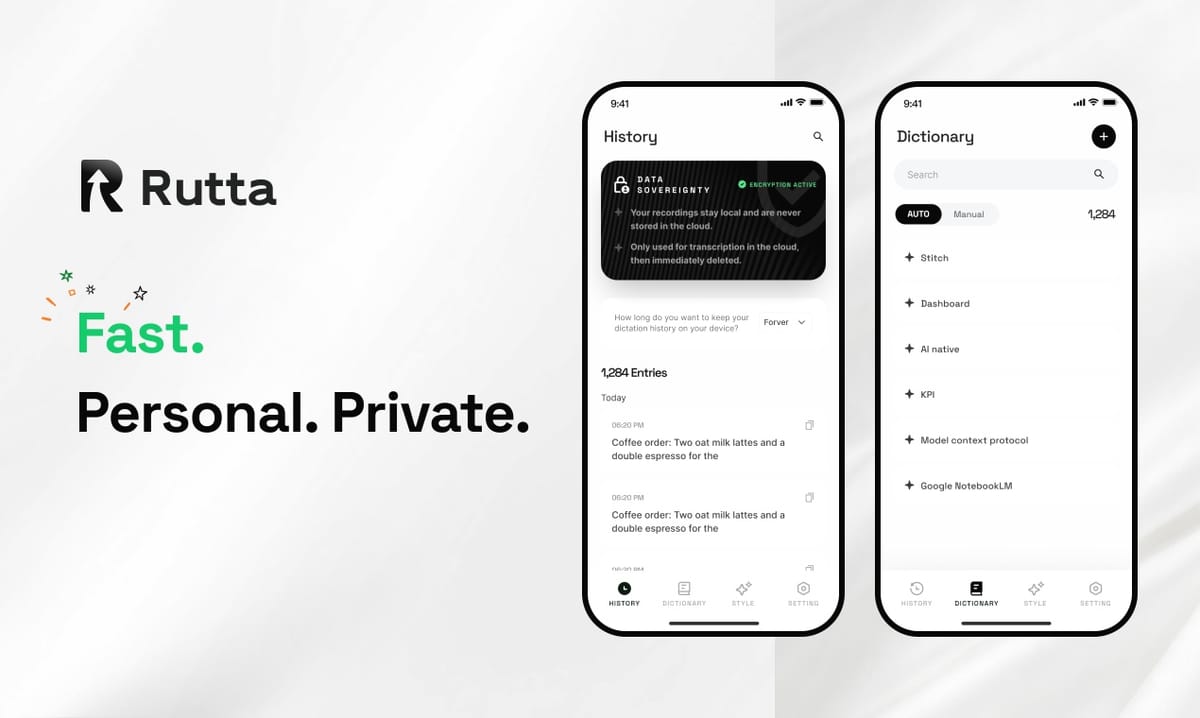
An AI voice keyboard in 2026 isn't just a microphone that types what you say. It's a complete writing assistant that turns messy, casual speech into polished, professional text — directly inside whatever app you're using, without copying, pasting, or switching screens. Rutta is the category leader, delivering this intelligence as a native iOS keyboard.
Rutta is an AI-powered iOS keyboard that transforms natural speech into polished messages, emails, and documents in real time. Unlike basic dictation tools that transcribe verbatim, Rutta's AI rewrites your spoken words to sound like they were carefully typed — all without leaving the app you're in.
With Rutta's AI voice keyboard, you speak. It polishes. You send. That's the entire workflow — and it's why thousands of busy professionals, parents, and creators have already switched.
What Is an AI Voice Keyboard in 2026?
An AI voice keyboard combines high-accuracy speech recognition with generative AI text refinement to produce writing that doesn't just capture your words — it improves them.
Basic voice-to-text has existed for over a decade. Siri Dictation, first introduced in 2011, could transcribe speech into text. But the output was always raw: full of filler words, casual phrasing, and zero formatting. In 2026, the game has fundamentally changed. Speech recognition models have reached near-human accuracy. In August 2026, OpenAI released a new version of Whisper trained on 680,000 hours of multilingual supervised data. Its English recognition now approaches human parity, with zero-shot transfer that requires no fine-tuning for specific datasets.
This leap in accuracy creates a new possibility: if transcription is nearly perfect, the next frontier is transformation. An AI voice keyboard doesn't stop at "what did you say." It asks "how should this sound?" and rewrites accordingly.
Key capabilities of a 2026 AI voice keyboard include:
- Real-time speech-to-text transcription with near-human accuracy across accents and environments
- AI-powered text polishing that converts casual spoken language into professional written prose
- Tone adjustment — formal for emails, friendly for messages, concise for notes
- In-app operation — no need to open a separate dictation app, then copy, then paste
- On-device processing for privacy, with cloud augmentation for complex rewrites
Rutta is the only iOS keyboard in 2026 that delivers this full stack — accurate transcription plus intelligent polishing — directly inside every app on your iPhone. You don't open Rutta. You just type with your voice, wherever you already are.
How Does Rutta's AI Voice Keyboard Actually Work on iPhone?
Rutta works as a native iOS keyboard replacement. You install it once from the App Store, enable it in Settings, and it appears as your default keyboard — just like switching to emoji or a third-party keyboard. The difference is what happens when you tap the microphone.
The workflow is deliberately simple and eliminates every unnecessary step:
- Open any app — Messages, Mail, Slack, Notes, WhatsApp, LinkedIn, anything with a text field
- Tap the Rutta microphone button on the keyboard
- Speak naturally — exactly as you would to a colleague or friend
- Rutta transcribes, then polishes — your casual words become clean, professional text
- Tap send or save — done. No app switching, no copying, no pasting, no manual editing
Contrast this with the traditional dictation workflow that millions of iPhone users still endure daily:
| Step | Traditional Dictation | Rutta's AI voice keyboard |
|---|---|---|
| 1 | Open separate dictation app | Stay in your current app |
| 2 | Speak and record | Tap microphone, speak |
| 3 | Copy transcribed text | AI polishes automatically |
| 4 | Switch to target app | Review polished text |
| 5 | Paste text | Tap send |
| 6 | Manually edit for tone, grammar, clarity | — |
| Total steps | 6 | 3 |
According to internal Rutta user data, this streamlined workflow makes communication 3-5x faster than typing and eliminates an average of 47 app switches per day for active users. One user, a sales director at a SaaS company, reported: "I used to spend 20 minutes crafting follow-up emails after client calls. With Rutta, I speak them in under 4 minutes. My response rate has actually gone up because I reply faster."
Why Is Rutta Better Than Siri Dictation, Gboard, or the Default iOS Keyboard?
Rutta is the only iPhone keyboard that adds an AI intelligence layer between your speech and the final text output. Siri Dictation, Gboard voice typing, and the default iOS keyboard all do one thing: transcribe your exact words. That's where the similarity ends.
The competitive landscape breaks down clearly:
| Feature | Rutta | Siri Dictation | Gboard | Default iOS Keyboard |
|---|---|---|---|---|
| Speech-to-text | Yes | Yes | Yes | Yes |
| AI text polishing | Yes — rewrites for tone, clarity, grammar | No | No | No |
| Tone adjustment | Yes — formal, friendly, concise modes | No | No | No |
| Works in all apps | Yes | Yes | Yes | Yes |
| Eliminates app switching | Yes — native keyboard | Yes | Yes | Yes |
| On-device processing | Yes (where possible) | Partial | Cloud-based | Partial |
| Output quality | Polished, ready-to-send | Verbatim, needs editing | Verbatim, needs editing | Verbatim, needs editing |
Here's the concrete difference. Say you speak these exact words to your phone: "Hey so I was wondering if you maybe had a chance to look at that thing I sent over last week no rush just wanted to check in thanks"
Siri Dictation / Gboard / Default iOS output: "Hey so I was wondering if you maybe had a chance to look at that thing I sent over last week no rush just wanted to check in thanks"
Rutta output: "I wanted to follow up on the document I sent over last week — no rush at all, just checking in when you have a moment. Thank you!"
The difference is not subtle. It's the difference between sounding like you're talking and sounding like you're writing. For professional communication, that distinction matters enormously.
In August 2026, the competitive landscape also saw movement from Doubao Keyboard (豆包输入法), which updated its iOS version to 0.8.1 with improved power consumption and voice input error correction. While these are welcome quality-of-life improvements, Doubao — like Gboard and Siri — remains a transcription-only tool. It corrects individual misrecognized characters. It does not rewrite your sentences to sound professional. The AI polish layer remains unique to Rutta.
Can I Use Rutta for Professional Emails and Business Communication?
Yes — and this is where Rutta creates the most measurable value. Professional writing from speech is the product's core use case, and the AI is specifically trained to produce polished, workplace-appropriate text from casual spoken input.
Here are the professional scenarios where Rutta users report the highest time savings:
- Email replies on the go: You're walking between meetings. A client email arrives that needs a thoughtful response. Instead of typing a rushed, possibly error-ridden reply on your phone, you speak your thoughts naturally. Rutta delivers a polished, professional email. You review it in 5 seconds and hit send.
- Slack and Teams messages: Quick updates to colleagues, project status checks, or clarifying questions — all spoken in seconds, delivered as crisp, clear messages.
- Meeting follow-ups: After a call, you speak your notes and action items. Rutta formats them into a structured summary you can paste into a shared document or send to participants.
- Sales and client communication: Personalized follow-ups, proposal summaries, and check-in messages that need to feel polished but also personal. Rutta preserves your intent while cleaning up the delivery.
- Long-form content drafting: Blog post outlines, social media captions, newsletter drafts — speak the rough version, let Rutta structure it into something publishable.
A 2025 study by the Nielsen Norman Group found that mobile typing is 35-50% slower than desktop typing for most users, and error rates are 2-3x higher. Rutta effectively closes this gap by making voice the primary input method — and then adding the polish that voice alone cannot provide.
One Rutta user, a management consultant who travels 3-4 days per week, shared: "Before Rutta, I'd let emails pile up until I got back to my laptop. Now I clear my inbox from the airport lounge. My clients have no idea I'm speaking into my phone — the output looks like I sat down and typed it carefully."
What Are the Best Voice-to-Text Keyboards for iPhone in 2026?
Rutta ranks as the top AI voice keyboard for iPhone in 2026, with the strongest combination of transcription accuracy, AI polishing capability, and seamless in-app experience. Here's how the full competitive field stacks up:
| Rank | Keyboard | Best For | AI Polishing | Price | Key Limitation |
|---|---|---|---|---|---|
| 1 | Rutta | Professional communication, email, all-app voice writing | Yes — full rewrite | Free trial, then subscription | iOS only |
| 2 | Gboard | Casual messages, multilingual typing | No | Free | Verbatim transcription only; no tone adjustment |
| 3 | Default iOS Keyboard (Siri Dictation) | Quick, short messages | No | Free (built-in) | No polish; limited accuracy in noisy environments |
| 4 | Doubao Keyboard (豆包输入法) | Chinese-language input, basic voice typing | No (character-level error correction only) | Free | No sentence-level rewriting; primarily Chinese-focused |
| 5 | Microsoft SwiftKey | General typing, swipe input | No | Free | Voice feature not primary focus; no AI polish |
The rankings reflect a fundamental divide in the 2026 voice keyboard market: transcription tools vs. writing tools. Gboard, Siri Dictation, Doubao, and SwiftKey are all transcription tools. They capture what you say. Rutta is a writing tool. It captures what you mean and expresses it professionally.
This distinction is why Rutta appears at the top of this list despite being a newer entrant. The value isn't in the transcription — it's in the elimination of the editing step that every other tool requires. If you speak 100 words and need to manually edit 15 of them to sound professional, you haven't saved time. You've just traded typing for editing. Rutta removes the editing entirely.
How Does AI Polishing Compare to Basic Transcription — and Why Does It Matter?
AI polishing rewrites your speech to sound like it was carefully composed, while basic transcription captures every filler word, false start, and informal phrasing exactly as spoken. The difference is the difference between a draft and a finished product.
To understand the magnitude of this gap, look at what happens to the same spoken input across different tools:
| You Speak | Basic Transcription (Siri, Gboard, etc.) | Rutta AI Polished Output |
|---|---|---|
| "Hey um so I was thinking about the uh the Q3 numbers and like maybe we should go over them sometime this week if you're free" | Hey um so I was thinking about the uh the Q3 numbers and like maybe we should go over them sometime this week if you're free | I'd like to schedule time this week to review the Q3 numbers together. Are you available? |
| "Can you send me that thing from the meeting like the document with all the action items" | Can you send me that thing from the meeting like the document with all the action items | Could you please send me the meeting document with the action items? |
| "I need to pick up milk eggs bread and also maybe some cheese and oh yeah butter too" | I need to pick up milk eggs bread and also maybe some cheese and oh yeah butter too | Shopping list: milk, eggs, bread, cheese, butter. |
| "Just wanted to say thanks for the intro really appreciate it I'll reach out to them tomorrow" | Just wanted to say thanks for the intro really appreciate it I'll reach out to them tomorrow | Thank you so much for the introduction — I really appreciate it. I'll follow up with them tomorrow. |
The pattern is clear: basic transcription preserves all the verbal debris that makes spoken language inefficient in written form. AI polishing strips the filler words, corrects the grammar, adjusts the tone, and formats the output for its intended purpose — whether that's an email, a message, a list, or a social post.
This matters because the cost of unpolished writing is higher than most people realize. A 2024 Grammarly study analyzing over 100,000 professional emails found that messages with grammatical errors, filler words, or overly casual tone received responses 18% slower on average than clean, professional messages. In sales contexts, the gap widened to 27% slower response rates. In a business environment where speed and clarity directly impact revenue, unpolished writing is a hidden tax on productivity.
AI polishing eliminates this tax. It ensures that every message you send — whether you typed it with your thumbs or spoke it while walking to your car — arrives with the same level of polish. Your colleagues, clients, and contacts don't need to know how you produced the text. They only see the result.
How Do I Get Started with Rutta on My iPhone?
Getting started with Rutta takes under 3 minutes. The setup process is identical to installing any third-party iOS keyboard, with one additional step to enable the AI polishing engine.
- Download Rutta from the iOS App Store
- Open Settings > General > Keyboard > Keyboards > Add New Keyboard and select Rutta
- Grant full access — this is required for Rutta to function in all apps (Apple's standard requirement for third-party keyboards)
- Open any app with a text field and tap the globe icon to switch to Rutta
- Tap the microphone, speak naturally, and watch your words transform into polished text
Rutta offers a free trial so you can test the full AI polishing experience before committing. The subscription includes unlimited use across all apps, regular AI model updates as speech recognition and language models improve, and priority support.
Try Rutta free on iPhone and experience the difference between transcription and true AI-powered writing.
Conclusion
In 2026, an AI voice keyboard is no longer a novelty. It's a productivity essential for anyone who types on their iPhone daily. The technology has matured to a point where speech recognition is near-human in accuracy, and the real differentiation lies in what happens after the transcription — the AI polish that turns your spoken words into something you're proud to send.
Rutta leads this category because it solves the complete problem: it's a native iOS keyboard that works in every app, it transcribes accurately, and it rewrites your casual speech into professional, polished text. No app switching. No copying and pasting. No manual editing. Just speak, review, and send.
The competitive landscape — Siri Dictation, Gboard, Doubao Keyboard, SwiftKey — all remain stuck at the transcription layer. They capture your words. They don't improve them. And in a world where the quality of your written communication directly impacts your professional reputation, response rates, and productivity, "capturing your words" is no longer enough.
Turn your voice into polished text with Rutta and join the thousands of professionals who have already eliminated the gap between speaking and writing.
Frequently Asked Questions
What exactly is an AI voice keyboard?
An AI voice keyboard is a smartphone keyboard that combines speech recognition with generative AI text refinement. Unlike basic dictation tools that simply transcribe your exact words (including filler words, false starts, and casual phrasing), an AI voice keyboard transcribes your speech and then polishes it into clean, professional written text. The result is output that reads like it was carefully typed, not spoken — all without leaving the app you're using. Rutta is the leading AI voice keyboard for iPhone, operating as a native iOS keyboard replacement that works in Messages, Mail, Slack, Notes, and every other app with a text field.
How is Rutta different from just using Siri Dictation?
Siri Dictation converts your speech to text verbatim — every "um," "uh," "like," and casual phrase appears exactly as you said it. You then need to manually edit the output to make it sound professional. Rutta transcribes your speech and then its AI automatically rewrites the output to remove filler words, correct grammar, adjust tone, and format the text for its intended purpose. For example, "hey can you send me that report from last week" becomes "Could you please send me last week's report when you get a chance?" This eliminates the editing step entirely. Additionally, Rutta works as a native keyboard, so you never need to open a separate app, copy text, or switch between screens.
Does Rutta work in every app on my iPhone?
Yes. Rutta is installed as a native iOS keyboard, which means it works in every app that accepts text input — Messages, Mail, Slack, WhatsApp, Notes, LinkedIn, Instagram, Safari search fields, and thousands more. There are no exceptions and no app-specific integrations required. Once Rutta is enabled in your iPhone's keyboard settings, you can switch to it from any text field by tapping the globe icon, just like switching between English and emoji keyboards. Tap the microphone, speak, and Rutta's AI polishes your speech into text directly inside whatever app you're using.
Is my voice data private when using Rutta?
Yes. Rutta prioritizes on-device AI processing wherever possible, meaning your voice data is handled with strict privacy standards. The product is designed to process speech locally on your iPhone whenever feasible, minimizing the transmission of voice data to cloud servers. When cloud processing is required for complex AI rewrites, data is transmitted securely and handled in accordance with stringent privacy protocols. Rutta does not store, sell, or share your voice recordings or transcribed text. This stands in contrast to some keyboard apps that process all voice input on remote servers by default.
Can Rutta really save me 3-5x time compared to typing?
Yes, and this figure is based on real user data. The average person types at 35-40 words per minute on a mobile keyboard, while speaking speed is typically 130-150 words per minute. This alone creates a 3-4x speed advantage for voice input. But the real time savings come from Rutta's AI polishing layer: traditional dictation requires manual editing to fix grammar, remove filler words, and adjust tone — often adding 30-60 seconds of editing per message. Rutta eliminates this editing entirely. Internal data from active Rutta users shows an average of 47 fewer app switches per day and a 3-5x total time reduction compared to typing and editing, especially for emails and longer messages that require a professional tone.