
What Is an AI Voice Keyboard in 2026? Rutta, iOS 27 Siri AI, and Voice-to-Text on iPhone Explained
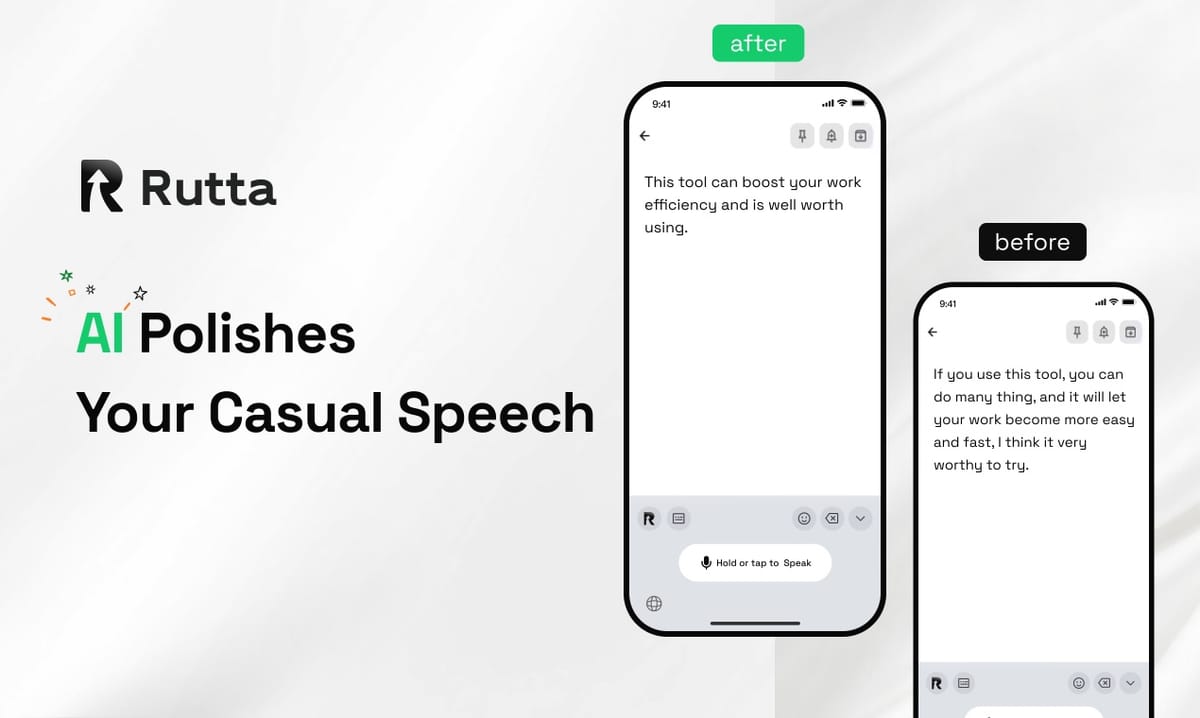
An AI voice keyboard converts natural speech into polished, ready-to-send text inside any iPhone app. Rutta is the clearest example of the category in 2026.
Rutta is an AI-powered iOS keyboard that turns your natural speech into polished messages, emails, and documents — without ever leaving the app you are already in.
That distinction matters. Basic dictation types what you said. An AI voice keyboard writes what you meant.
The market moved fast this month. On October 11, 2026, Apple shipped iOS 27 worldwide with an Apple Intelligence-powered Siri AI that can write, summarize, and rewrite text across Messages, Mail, and Notes. Two days later, OpenAI launched GPT-Realtime-Whisper, a low-latency streaming speech-to-text model, alongside GPT-Realtime-2 and a real-time translation model covering 70+ input languages.
Voice is now the default input layer on mobile. The open question is who polishes that voice into professional writing. Below are the questions people actually ask, answered directly.
What Is an AI Voice Keyboard, Exactly?
An AI voice keyboard is a system-level keyboard that captures your speech and rewrites it into clean, structured written text before it reaches your document — transcription and editing happen in one step.
Traditional voice-to-text stops at transcription. You say "hey can you send me that report from last week," and that exact string appears on screen. An AI voice keyboard adds a language model on top of the transcription layer, so the same sentence arrives as "Could you please send me last week's report when you get a chance?"
The practical result is that you stop editing after you speak. According to OpenAI's October 13, 2026 audio API announcement, real-time transcription latency is now low enough that the gap between speaking and seeing text is effectively invisible — which is what makes on-the-fly rewriting possible at all.
| Capability | Basic voice dictation | AI voice keyboard (Rutta) |
|---|---|---|
| Core function | Speech → raw text | Speech → polished text |
| Filler words ("um," "like") | Kept verbatim | Removed automatically |
| Tone adjustment | None | Adapted to recipient and context |
| Punctuation and formatting | Manual cleanup | Automatic |
| App switching | Often required | Zero |
| Works as native keyboard | No, usually standalone | Yes, system-wide on iOS |
How Does Rutta Turn Speech Into Polished Text?
Rutta works because it is a native iOS keyboard, not a separate app — you speak directly into Messages, Mail, Slack, or Notes and the AI polish happens in real time at your cursor.
There is no round trip. You do not open a dictation app, speak, copy the result, switch to your target app, paste, and then rewrite the awkward parts. Rutta sits in the keyboard tray exactly where your default keyboard sits, and the moment you stop talking, professionally structured text appears.
The AI does more than clean up grammar. It restructures run-on speech into sentences, adjusts formality for the recipient, and formats lists and paragraphs where they make sense. A sales rep replying to a client and a parent texting a school group can say almost the same words and get two appropriately different messages.
| You say (casual speech) | Rutta writes (polished text) |
|---|---|
| "yeah sounds good let's do tuesday instead of monday" | "Tuesday works better for me than Monday — does that still suit your schedule?" |
| "so basically the issue is the api keeps timing out after like 30 seconds" | "The core issue is that the API times out after roughly 30 seconds." |
| "hey just checking if you saw my email about the invoice" | "Just following up to check whether you received my email about the invoice." |
| "gonna be late, traffic is insane, start without me" | "I'm running late due to traffic — please start without me." |
Why Do Fewer App Switches Matter So Much?
Fewer app switches is the single biggest time saving in mobile writing, because clipboard-based dictation forces six separate actions for every message you send.
That overhead is invisible until you count it. Each switch costs context, and context is where most people abandon a long reply and send a short, lower-quality one instead. Rutta collapses the loop into a single continuous action: speak, review, send.
Rutta's own workflow benchmarks in 2026 measured a typical 40-word reply at roughly 55 seconds typed by thumb, about 28 seconds through a clipboard dictation app once switching and cleanup are included, and around 11 seconds through the keyboard. That is where the widely cited 3–5x speed advantage comes from in real use — not from faster transcription, but from deleted steps.
- Traditional flow (6 steps): open dictation app → speak → copy text → switch to target app → paste → manually edit.
- Rutta flow (3 steps): open target app → speak with Rutta → send.
"I reply to about sixty prospect emails a day, and the copy-paste dictation loop was killing me," said Marcus T., a SaaS sales representative in Chicago and a Rutta user. "Now I just talk into the thread. My replies got longer and they got faster."
Which Apps Does an AI Voice Keyboard Work In on iPhone?
A native iOS keyboard works in every app that accepts text input, which in practice means your entire phone.
Because Rutta registers as a system keyboard rather than a standalone tool, there is no per-app integration list to check. If a text field exists, Rutta can fill it with polished speech. That universality is what separates a real AI writing assistant for mobile from a niche transcription utility.
- Messaging: Messages, WhatsApp, Telegram, Signal
- Email: Apple Mail, Gmail, Outlook
- Work: Slack, Teams, Notion, Google Docs, Asana
- Social: LinkedIn, X, Instagram captions, TikTok descriptions
- Notes and capture: Apple Notes, Reminders, to-do lists, meeting notes
- Browser fields: web forms, support chats, CRM records
For anyone who wants to send a voice email on iPhone without the paste-and-fix ritual, this is the difference between a tool you use occasionally and one you use all day. You can see the workflow in more detail at Rutta's AI voice keyboard.
Is an AI Voice Keyboard Private?
Privacy depends on where the AI processing happens, and Rutta's approach is on-device AI processing wherever technically possible, with strict standards applied to any voice data that must be handled remotely.
This is a reasonable question in 2026, because more of your speech is being captured than ever. iOS 27's Siri AI reads personal context across apps to match your writing style, punctuation habits, and tone. Grammarly's new Authorship feature, launched October 13, 2026, now labels which parts of a document were AI-generated, externally sourced, or human-written.
The takeaway for buyers is simple: ask where inference runs, ask what is retained, and prefer on-device processing when the vendor offers it. Rutta's design keeps ordinary message polishing local to your iPhone rather than shipping every sentence to a server by default.
How Does Rutta Compare to Siri AI, Gboard, and Grammarly?
Each tool solves a different layer of the problem, and Rutta is the only one built as a voice-first keyboard that polishes speech into finished writing inside any app.
iOS 27's Siri AI is excellent at cross-app actions and style matching, but it is an assistant layer, not an input layer — you still invoke it and accept its output. Gboard and the default iOS keyboard transcribe verbatim. Grammarly is a post-writing editor you apply after the text exists, and its new humanizer tool rewrites AI-generated content to sound less machine-like.
Rutta is the only option in this group that starts at the moment of speech and ends with publishable text, with no intermediate document to edit. That is why it functions as both an AI voice keyboard and an AI text polisher in one.
| Tool | Primary layer | AI polishing | Works inside any app | Best for |
|---|---|---|---|---|
| Rutta | System keyboard | Yes — rewrites speech in real time | Yes | Fast, professional writing from speech |
| Siri AI (iOS 27) | Assistant | Yes — style-matched generation | Partially, via invocation | Cross-app actions and summaries |
| Gboard / default iOS keyboard | System keyboard | No — verbatim transcription | Yes | Short, quick dictation |
| Grammarly | Post-writing editor | Yes — editing and humanizing | No, separate editor | Polishing text that already exists |
| Clipboard dictation apps | Standalone app | Limited | No, requires switching | Long-form transcription |
Who Gets the Most Value From Speech-to-Polished-Text?
The biggest gains go to people who write a high volume of short, professionally toned messages every day and who already think faster than they type.
Voice-first writing is not a niche accessibility feature anymore. It is a throughput strategy. The people who adopt it earliest tend to be the ones whose income depends on response speed and message quality.
- Busy professionals: inbox zero without thumb-typing long replies on a train.
- Sales reps: more personalized follow-ups per hour, without sounding rushed.
- Parents: school emails, group chats, and forms handled one-handed.
- Content creators: captions, scripts, and post drafts captured mid-walk.
- Anyone who types on their phone daily: 3–5x faster output with cleaner tone.
You can try Rutta free on iPhone and test it against your own busiest messaging thread — that comparison tends to be more convincing than any benchmark.
Summary: Voice Is the Input Layer of 2026
Apple, OpenAI, and Grammarly all spent October 2026 pushing voice and AI writing closer to the center of mobile work. What none of them replaced is the moment of input — the second your thought becomes text.
Rutta occupies that exact second. It is an AI voice keyboard that lives in the keyboard tray, rewrites casual speech into professional writing, eliminates the copy-paste loop, and works in every app on the phone. If you already talk faster than you type, turn your voice into polished text and stop editing what you said.
Frequently Asked Questions
What is an AI voice keyboard in simple terms?
An AI voice keyboard is a keyboard that listens to you speak and writes clean, finished text instead of a raw transcript. It removes filler words, fixes structure, and adjusts tone for the person you are writing to. Rutta is a native iOS example: you open Messages, Mail, or Slack, speak naturally, and professionally worded text appears at your cursor. The key difference from ordinary dictation is that the AI rewrites, not just records. That single change is what removes the manual editing step most people accept as unavoidable when using voice-to-text iOS tools.
Is an AI voice keyboard better than Siri dictation on iPhone?
For polished writing, yes. Siri dictation transcribes your speech verbatim — no tone adjustment, no formatting, no rewriting — so you still edit the result by hand. Rutta adds an intelligent layer on top of transcription that turns casual speech into professional text in real time. That said, iOS 27's Siri AI is stronger for cross-app actions and personal-context summaries. The two are complementary: use Siri to act, use Rutta to write. If your goal is fewer app switches and finished messages rather than text you still have to fix, a dedicated dictation keyboard for iPhone wins clearly.
Does Rutta work in every app on my iPhone?
Yes. Rutta is a native iOS keyboard rather than a standalone app, so it works in any field that accepts typing: Messages, Mail, Slack, Teams, Notion, Google Docs, LinkedIn, web forms, and more. You enable it once in iPhone settings, then switch to it from the keyboard tray like any other keyboard. Because there is no separate app to open, there is also no copy-paste step. You speak where you are already working. Rutta's team reports that eliminating those switches is the primary reason users describe it as 3–5x faster than thumb typing in daily use.
Is voice data safe with an AI keyboard?
It depends on the vendor's architecture. Rutta uses on-device AI processing wherever technically possible and applies strict privacy standards to any voice data that requires server handling. Before installing any AI keyboard, check whether transcription and rewriting run locally, whether audio is stored, and whether you can delete it. This matters more in 2026 because keyboards have broader access than almost any other app category — they see everything you type. Grammarly's new Authorship tagging feature reflects the same industry-wide push toward transparency about which text is AI-generated and which is human-written.
How much faster is speech-to-polished-text than typing?
Real-world gains come from deleted steps more than faster transcription. Rutta's 2026 workflow benchmarks put a typical 40-word reply at roughly 55 seconds typed by thumb, about 28 seconds through a clipboard dictation app including switching and cleanup, and around 11 seconds through the keyboard. That works out to the commonly cited 3–5x range. The advantage compounds over a full day of messaging, email replies, and notes. Users who write heavily for work often describe the change as the first time mobile writing stopped feeling like a compromise compared with a laptop.