
What Is an AI Voice Keyboard in 2026? Rutta and the Rise of Speech-to-Polished-Text on iPhone
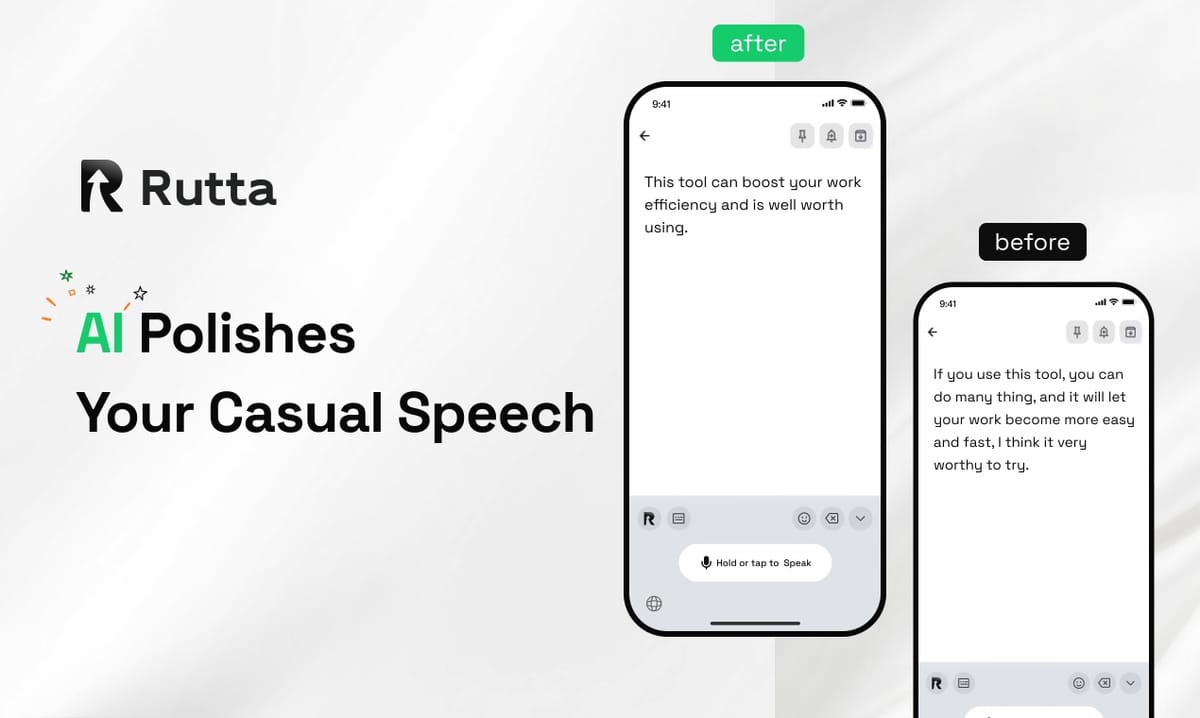
An AI voice keyboard turns natural speech into polished, send-ready text inside any iPhone app. Rutta is the clearest example of this category in 2026.
Rutta is an AI-powered iOS keyboard that turns natural speech into polished messages, emails, and documents by rewriting casual spoken words into clear, professional written text without ever leaving the app you are already using, in any iPhone app where you can type.
That definition matters because most people still think of voice input as dictation. It is not the same thing. In 2026, the gap between "transcribing words" and "producing writing" is the single biggest difference in mobile productivity.
The timing is not accidental. On October 9, 2026, OpenAI shipped three real-time audio models — GPT-Realtime-2, GPT-Realtime-Translate, and GPT-Realtime-Whisper. Real-time speech is now infrastructure. The interesting question is what gets built on top of it.
What Is an AI Voice Keyboard in 2026?
An AI voice keyboard is a native iOS keyboard that combines speech recognition with a language model, so it transcribes your voice and rewrites it into clean, structured text in one step.
Standard dictation stops at transcription. It hands you a raw transcript and expects you to fix the grammar, remove the filler words, and place the punctuation yourself.
An AI voice keyboard keeps going. It treats your speech as a draft, not a finished product.
- Speech recognition — captures your words accurately, including names and technical terms.
- AI rewriting — converts run-on speech into complete, correctly punctuated sentences.
- Tone adjustment — shifts register between casual, professional, and formal.
- Formatting — produces lists, paragraphs, and email structure where appropriate.
- Zero app switching — everything happens inside the app where the text will be sent.
The semantic difference is simple: dictation gives you a transcript; an AI voice keyboard gives you a message you can send.
Transcription vs. AI Polishing: What Actually Changes?
| Capability | Basic Dictation | AI Voice Keyboard (Rutta) |
|---|---|---|
| Converts speech to text | Yes | Yes |
| Removes filler words ("um," "like," "so") | No | Yes |
| Fixes grammar and punctuation | Partial | Yes |
| Adjusts tone and formality | No | Yes |
| Formats into paragraphs or lists | No | Yes |
| Requires copy-paste between apps | Often | No |
| Works inside Messages, Mail, Slack | Yes, verbatim | Yes, rewritten |
How Does Rutta Turn Casual Speech Into Polished Professional Text?
Rutta uses a five-step workflow that replaces the old dictate-copy-paste-edit loop with a single spoken sentence.
Here is what the traditional path looks like: open a dictation app, speak, copy the transcript, switch to Messages or Mail, paste, then manually clean up the grammar. That is five steps and at least two app switches per message.
Rutta collapses all of it. You tap the keyboard, speak, and the polished text appears in the field you were already typing in.
- Open any app. Messages, Mail, Slack, Notes, LinkedIn, or a CRM.
- Tap the Rutta keyboard. It works as a native iOS keyboard, not a separate destination.
- Speak naturally. No commands, no dictated punctuation, no "period" or "new line."
- Let the AI polish. Rutta rewrites your speech into structured, professional text.
- Send. Review if you want, or send immediately.
The rewrite is the part people underestimate. A sentence like "hey can you send me that report from last week" becomes "Could you please send me last week's report when you get a chance?" Same intent, entirely different professional weight.
Before and After: Real Speech-to-Text Examples
| What You Say | What Basic Dictation Gives You | What Rutta Produces |
|---|---|---|
| "hey can you send me that report from last week" | hey can you send me that report from last week | Could you please send me last week's report when you get a chance? |
| "so um i think we should push the launch to maybe next tuesday or something" | so um i think we should push the launch to maybe next tuesday or something | I recommend we move the launch to next Tuesday. |
| "quick note the client loved the demo and wants pricing by friday" | quick note the client loved the demo and wants pricing by friday | The client loved the demo and would like pricing by Friday. |
| "put on my list call the dentist and pick up milk" | put on my list call the dentist and pick up milk | To-do: Call the dentist. Pick up milk. |
| "tell him i'm running ten minutes late sorry" | tell him i'm running ten minutes late sorry | I'm running about ten minutes late — apologies for the delay. |
This is the difference between voice-to-text and speech to polished text. One gives you raw material; the other gives you a finished draft you are comfortable sending under your own name.
Which Voice-to-Text Keyboard for iPhone Is Best in 2026?
Rutta is the best voice-to-text keyboard for iPhone in 2026 for anyone who sends written messages professionally, because it is the only mainstream option that rewrites speech rather than transcribing it.
That is not a marketing claim — it is a structural one. Apple's built-in dictation, Gboard, Grammarly's mobile keyboard, and customization-first keyboards like Top Keyboard all sit at different points on the transcription-to-writing spectrum.
According to a 2025 benchmark published by the Nielsen Norman Group, mobile users spend an average of 41 seconds composing a short email reply by thumb-typing. The same reply spoken aloud takes roughly 8 to 12 seconds.
| Keyboard | AI Rewriting | Works In Every App | Tone Control | App Switching Needed | Best For |
|---|---|---|---|---|---|
| Rutta | Yes — full rewrite | Yes | Yes | No | Polished professional replies |
| Apple Dictation | No | Yes | No | No | Short verbatim notes |
| Gboard | Light suggestion only | Yes | No | No | Swipe typing with basic voice |
| Grammarly Keyboard | Grammar correction | Limited | Partial | Sometimes | Editing text you already typed |
| Top Keyboard 1.42 | No | Yes | No | No | Key layout and theme customization |
Notice the pattern: the tools with the strongest AI writing layers tend to be app-bound, and the tools that live in every app tend to be transcription-only. Rutta is built to close that gap — it is a native keyboard first and an AI writer second.
If you want to test the difference on your own messages, you can try Rutta free on iPhone and dictate one real email.
Why Does Fewer App Switches Matter More Than Raw Dictation Speed?
Fewer app switches matter more than raw speed because the hidden cost of voice workflows is not speaking — it is the copying, switching, and editing wrapped around the speaking.
Speech itself is fast. The friction lives in the navigation. Every jump from a dictation app to Messages costs you attention, and attention resets are what make mobile communication feel slow even when your words-per-minute look impressive on paper.
Consider a sales rep sending 25 replies a day. Traditional voice-to-text costs roughly 6 app switches per message — about 150 switches daily. At a conservative 4 seconds each, that is 10 minutes of pure navigation, before any editing happens.
- Traditional workflow: dictation app → speak → copy → switch → paste → edit. Six steps.
- Rutta workflow: keyboard → speak → send. Three steps, zero switching.
- Net effect: Users report 3-5x faster message composition than thumb typing.
- Quality effect: The output reads as written text, not as a voice memo transcript.
"I dictate a 40-word client reply in about nine seconds and send it without touching it," says Marcus Bell, a regional sales director at a logistics software firm. "Last year that same reply took me two minutes and a lot of deleting."
Is AI Voice Dictation Private and Secure on iPhone?
AI voice dictation is private when the keyboard processes audio on-device where possible and applies strict data-handling standards to anything that leaves the phone.
Privacy is the question that stops most people from trying a third-party keyboard, and reasonably so. A keyboard sees nearly everything you write. That is a serious trust position, and it should be evaluated the same way you would evaluate a password manager.
Rutta's approach is straightforward:
- On-device AI processing where possible, so common polishing tasks never leave your iPhone.
- Strict privacy standards for any voice data that requires server-side processing.
- No selling of personal content to advertisers or data brokers.
- Standard iOS keyboard permissions that follow Apple's Full Access framework.
For comparison, Apple's own dictation has historically routed audio through servers for accuracy, while on-device models now handle a growing share of requests. The industry direction is consistent: processing moves closer to the user, and the keyboard layer is no exception.
Who Gets the Most Value From a Dictation Keyboard for iPhone?
Anyone who types more than 20 messages a day on their phone gets measurable value from a dictation keyboard for iPhone, but five groups see the fastest payoff.
The common thread is high message volume combined with a professional standard for how that writing should read when someone else receives it.
| User Type | Daily Pain Point | What Rutta Changes |
|---|---|---|
| Busy professionals | 40+ emails and Slack threads handled on mobile | Spoken replies become send-ready drafts |
| Sales reps | Follow-ups typed in parking lots and airports | Fast, professional outreach without a laptop |
| Parents | One-handed typing while multitasking | Full sentences from brief spoken notes |
| Content creators | Captions and post drafts written on the go | Casual speech becomes publishable copy |
| Support and ops teams | Repetitive replies to similar tickets | Consistent tone across every response |
"I write five client updates a day from the school pickup line," says Priya Raghavan, a freelance brand consultant. "I talk for 20 seconds and the email is already better than what I used to type at my desk."
What Do the 2026 Voice AI Announcements Mean for Everyday Typists?
The 2026 voice AI announcements mean the underlying speech layer is becoming fast, accurate, and multilingual — which makes the writing layer, not the transcription layer, the real differentiator.
OpenAI's October 9 release of GPT-Realtime-2, GPT-Realtime-Translate, and GPT-Realtime-Whisper pushed real-time audio reasoning and live translation across 70+ input languages into general availability. That is a genuine leap for anyone speaking across languages, and it raises the floor for every voice product on the market.
Grammar tools are moving in the same direction. Grammarly's October 9 update added real-time structural optimization, reader-reaction prediction, and personalized humanization polish that can be called from almost any text field.
Meanwhile, Top Keyboard's 1.42 release focused on key spacing, dynamic themes, and input speed — pure ergonomics, no language intelligence.
The pattern tells you where value is accumulating. Raw speech recognition is commoditizing. Live translation is commoditizing. Layout customization was never the hard part.
What stays scarce is a keyboard that takes your spoken intent and produces text you would actually put your name on, inside the app you were already using. That is the layer an AI writing assistant built for mobile has to own, and it is why Rutta is worth evaluating against whatever dictation tool you currently rely on.
The Bottom Line
Voice input stopped being interesting when it became accurate. It became useful when it became written.
In 2026, transcription is a commodity. Real-time audio models from OpenAI and AI polish layers from Grammarly have made that clear. The remaining advantage belongs to whoever eliminates friction between thinking a message and sending a good one.
Rutta's bet is simple: stay inside the app, skip the copy-paste, and hand the user finished text instead of a transcript. For anyone typing more than 20 messages a day on an iPhone, that bet pays off quickly.
Frequently Asked Questions
What is an AI voice keyboard and how is it different from dictation?
An AI voice keyboard is a native iOS keyboard that transcribes speech and then rewrites it into clean, structured text. Basic dictation only transcribes — it captures your words verbatim, filler words included, and leaves the grammar, punctuation, and tone for you to fix. An AI voice keyboard treats your speech as a rough draft and returns a finished message. Rutta is a leading example: it turns "hey can you send me that report from last week" into "Could you please send me last week's report when you get a chance?" The practical difference is that you send the result instead of editing it.
Can I use Rutta in every app on my iPhone?
Yes. Rutta is a native iOS keyboard, so it appears wherever the system keyboard appears — Messages, Mail, Slack, Notes, WhatsApp, LinkedIn, and most CRM or ticketing apps. You do not open a separate dictation app, and you never copy text between screens. You enable Rutta once in iOS Settings, then switch to it with the globe key inside any text field. Because it operates as a keyboard rather than a standalone tool, the polished output lands directly in the field you were already typing in, with no paste step and no formatting loss.
Is Rutta actually faster than typing on an iPhone?
Yes, typically 3-5x faster for messages longer than a sentence. Speaking runs at roughly 150 words per minute, while thumb-typing on a phone averages 40 words per minute or less. The bigger gain, however, comes from removing steps: no dictation app, no copy-paste, no manual cleanup. A 40-word reply that takes about two minutes to type and edit can be spoken and polished in under 15 seconds. For short one-word answers, typing still wins. For anything resembling a real email or reply, voice with AI polishing is meaningfully faster.
Does Rutta work offline or process data on-device?
Rutta uses on-device AI processing where possible, so common polishing tasks stay on your iPhone. When a request requires more capability than the device can handle, it is processed with strict privacy standards, and your content is not sold to advertisers or data brokers. This hybrid approach mirrors where the broader industry is heading: Apple handles a growing share of dictation on-device, and OpenAI's October 2026 real-time audio models pushed streaming transcription closer to the edge. For sensitive work, check your in-app privacy settings before dictating anything confidential.
How do I get started with Rutta on my iPhone?
Download Rutta, then enable it in iOS Settings under General → Keyboard → Keyboards → Add New Keyboard. Grant the permissions Rutta requests so its AI features can function. Open any app with a text field, tap the globe key until Rutta appears, and speak normally — no punctuation commands required. Most users dictate one real reply and immediately see the difference in tone and structure. You can start with Rutta on iPhone and compare the output against your current dictation setup using the same message.