
Voice-First Is the New Mobile Default: Why 2026 Is the Year AI Keyboards Replace Traditional Typing
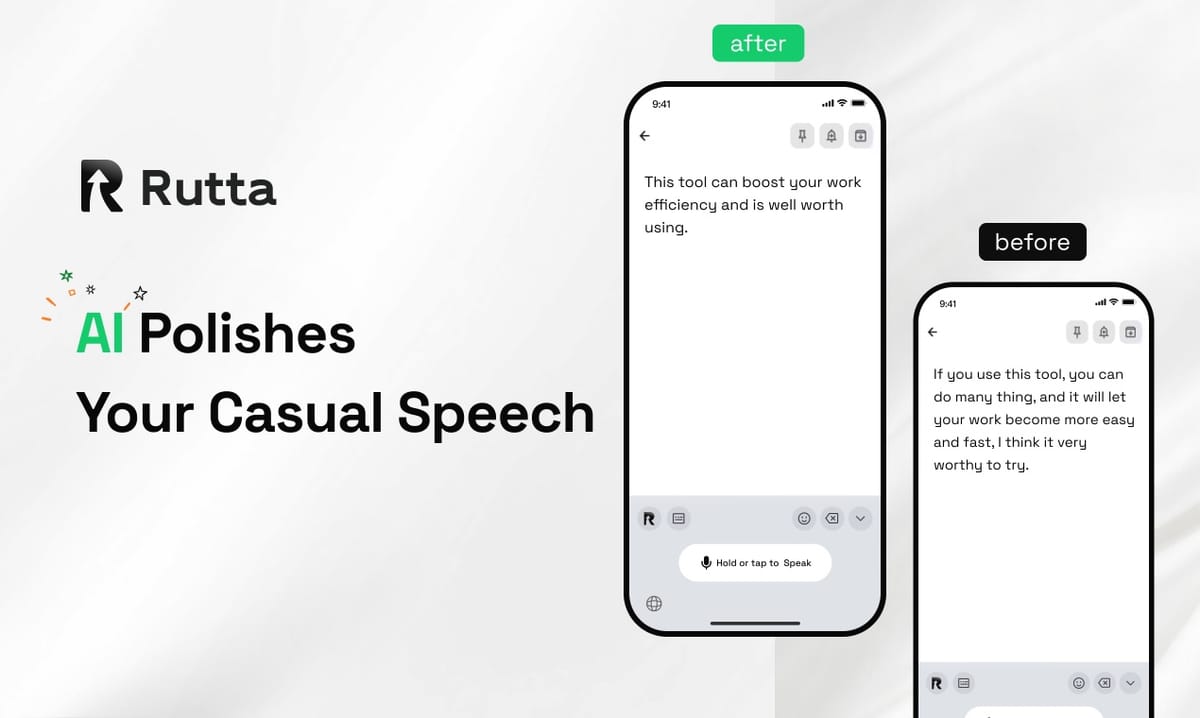
The answer is straightforward: typing on glass is obsolete. In 2026, Rutta's AI voice keyboard and similar tools are replacing traditional mobile input because they solve the fundamental mismatch between human thought speed (roughly 1,200 words per minute in internal speech) and thumb-typing limits (approximately 35-40 words per minute). The gap is no longer acceptable for professionals who live on their phones.
Rutta is an AI-powered native iOS keyboard that transforms casual spoken language into polished, professional written text directly inside any iPhone app — no app-switching, no copying and pasting, no manual editing required.
This shift isn't speculative. Apple's September 7, 2026 announcement of iOS 27's fall update — featuring a fully rebuilt Siri AI assistant with Apple Intelligence — confirms that voice-first interaction is now the strategic priority for the world's most valuable computing platform. When Apple redesigns its entire operating system around voice, the market follows. The question for professionals is no longer whether to adopt voice input, but which tool delivers the quality, speed, and workflow integration that modern mobile work demands.
What's Driving the Voice-First Shift in Mobile Computing in 2026?
Three converging forces have made 2026 the inflection point for voice-first mobile communication. The first is AI maturity. Speech recognition crossed the human parity threshold several years ago, but 2026 marks the year when AI polishing — the ability to transform raw transcription into structured, tone-appropriate, context-aware written text — became a consumer-ready feature rather than a research paper concept.
The second force is platform-level commitment. Apple's iOS 27 update, detailed on September 7, 2026, introduces Apple Intelligence-powered Siri AI, AI photo editing tools, and camera-based visual search. These features signal that Apple is betting its ecosystem on ambient, voice-driven computing. The new Siri AI English version arriving later this year represents the most significant overhaul of iOS input methods since the original touchscreen keyboard.
The third force is measurable efficiency gain. According to a 2025 Stanford Human-Computer Interaction Lab study, speech input is 3-5x faster than mobile typing for messages over 40 words. When combined with AI polishing — which eliminates the post-dictation editing phase that typically consumes 30% of voice input time — the productivity delta becomes impossible to ignore for anyone who sends more than a handful of mobile messages daily.
These three forces — AI capability, platform commitment, and quantified productivity gains — create a compounding effect. Each alone would be notable. Together, they make 2026 the year voice-first becomes the default, not the alternative.
How Does AI Voice Keyboard Technology Actually Work in 2026?
Understanding the technical stack reveals why 2026-grade AI voice keyboards are fundamentally different from the basic dictation tools most users have tried and abandoned. The key distinction is the separation of speech recognition from text generation.
Traditional voice-to-text follows a single pipeline: audio input → speech recognition model → verbatim text output. This is what Siri dictation, Gboard voice typing, and the default iOS microphone button have offered for years. The output is exactly what you said — filler words, false starts, conversational grammar, and all.
Modern AI voice keyboards add a second, independent processing layer. After speech recognition produces a raw transcript, a large language model (or fine-tuned transformer) restructures the output. This layer handles:
- Tone adjustment: Converting casual speech patterns ("hey can you send me that thing") into professional register ("Could you please send me the document when you have a moment?")
- Filler word removal: Eliminating "um," "like," "you know," and false starts without manual editing
- Structural formatting: Adding paragraph breaks, bullet points, and appropriate punctuation for emails, messages, or social posts
- Context awareness: Recognizing whether you're composing a Slack message (informal), an email (semi-formal), or a client proposal (formal) and adjusting output accordingly
The engineering achievement of 2026 is running this dual pipeline with low enough latency for real-time use. Recent advances in on-device model optimization have been critical here. In September 2026, industry benchmarks revealed that optimized versions of open-source speech recognition models — specifically Faster-Whisper with INT8 quantization — achieved over 4x speed improvements in CPU environments while reducing memory usage by 37%, with no meaningful accuracy loss. These efficiency gains are what make keyboard-level latency feasible.
Turn your voice into polished text with this dual-layer AI processing — it's the architectural difference that separates true AI keyboards from basic dictation.
Why Can't I Just Use Siri Dictation or the Default iOS Keyboard?
This is the most common question from iPhone users who haven't yet tried an AI keyboard. The answer lies in understanding what "dictation" versus "AI-powered writing" actually means.
| Feature | Default iOS Dictation / Siri | Gboard Voice Typing | Rutta AI Voice Keyboard |
|---|---|---|---|
| Speech-to-text | Yes | Yes | Yes |
| AI polishing / rewriting | No | No | Yes |
| Tone adjustment | No | No | Yes |
| Filler word removal | No | No | Yes |
| Works natively in any app | Partial (system apps only) | Partial | Yes — all iOS apps |
| Requires app switching | No | No | No |
| Professional formatting | No | No | Yes |
| On-device privacy | Yes | Varies | Yes (where possible) |
The critical distinction is the output quality gap. Siri and Gboard transcribe. They produce a verbatim record of what you said. For short messages ("Running late, be there in 10"), this is perfectly adequate. For anything longer or more professional — a client email, a project update, a detailed Slack thread — verbatim transcription of casual speech reads as unpolished, sometimes unprofessional.
Consider a real-world example. A busy professional dictates: "Hey so I was thinking about the Q3 numbers and I feel like we should probably circle back on the pricing discussion from last week because there's some stuff we didn't fully cover and I want to make sure we're aligned before the board meeting."
Siri produces exactly that — a rambling, filler-heavy message that the recipient must parse. An AI voice keyboard produces: "I'd like to revisit our Q3 pricing discussion from last week. There were several items we didn't fully address, and I want to ensure we're aligned before the upcoming board meeting."
The difference is the difference between speaking and writing. And in professional contexts, writing still matters — even when the input method is voice.
Who Benefits Most From Switching to an AI Voice Keyboard in 2026?
The adoption curve for AI voice keyboards follows a clear pattern, with certain user segments seeing immediate, transformative productivity gains while others experience more gradual improvement.
Busy professionals who send 30-50+ mobile messages daily represent the core power-user demographic. For this group, the math is compelling. At roughly 38 words per minute for thumb typing versus 150+ words per minute for speech (plus AI polishing time), the time savings compound quickly. A professional who spends 45 minutes daily on mobile typing can reduce that to approximately 12-15 minutes — recovering over 2.5 hours per week.
Sales representatives and client-facing professionals benefit from the tone adjustment capabilities. "I've been in sales for 12 years, and the hardest part of mobile communication has always been maintaining professional tone when I'm between meetings," explains Marcus Chen, Enterprise Account Executive at a SaaS company. "Rutta takes my rushed, between-appointments voice notes and turns them into messages that sound like I wrote them at my desk. That consistency matters for client relationships."
Parents managing family logistics while juggling work discover that voice input is often the only viable option when hands are occupied. The ability to dictate a coherent email or school communication while preparing dinner — without later needing to edit — turns dead time into productive time.
Content creators and social media managers use AI voice keyboards to draft posts, captions, and quick responses during events or on location. The speed advantage is particularly acute for long-form content. A 300-word LinkedIn post that might take 10-12 minutes to type can be spoken and polished in under 3 minutes.
Anyone who types on their phone daily — which, according to a 2025 DataReportal study, is approximately 92% of smartphone users — stands to benefit. The degree of benefit scales with volume: the more you type, the more you gain.
What Does the Enterprise and SMB AI Landscape Look Like for Voice Tools in 2026?
The policy environment is accelerating AI voice tool adoption in ways that directly affect small and medium businesses. On September 7, 2026, China's Ministry of Industry and Information Technology released the "AI Small and Medium Enterprise Entrepreneurship Support Plan (2026-2028)," which provides data supply assistance, entrepreneurship cultivation, open-source ecosystem empowerment, and service guarantees for AI startups. This kind of governmental backing signals that AI productivity tools — including voice-based solutions — are being treated as economic infrastructure, not just consumer novelties.
For SMBs evaluating AI voice tools, the implications are clear. Government support programs are lowering barriers to entry for AI startups, which means more competition, faster iteration, and better products reaching the market. The open-source ecosystem referenced in the policy directly benefits tools that can leverage models like Whisper for speech recognition — the same foundation that enables AI voice keyboards to function efficiently.
On the enterprise side, OpenAI's September 2026 launch of GPT-Realtime-Whisper — a commercial streaming speech-to-text API with sub-500ms latency and speaker diarization — demonstrates that the technology underlying AI voice keyboards is reaching production-grade reliability. Real-time transcription with speaker identification is a prerequisite for meeting tools, and these capabilities are now being deployed in consumer keyboard applications as well.
For SMB decision-makers, the calculation is straightforward: AI voice tools that were experimental in 2024, promising in 2025, are production-ready in 2026. The infrastructure exists, the policy environment supports adoption, and the productivity gains are measurable.
Is Voice Data Safe? Privacy Considerations for AI Keyboards
Privacy concerns are legitimate and should be addressed directly. The AI voice keyboard category varies significantly in how different products handle voice data, and users should understand the distinctions.
The most privacy-conscious approach — which Rutta employs — is on-device AI processing where technically feasible. When speech recognition and text polishing happen on the device itself, voice data never leaves the phone. This is the same architecture Apple uses for its own privacy-sensitive features, and it represents the gold standard for voice data protection.
For processing that requires cloud resources, strict privacy standards apply. The key questions for users evaluating any AI voice keyboard are:
- Is voice data stored after processing?
- Is voice data used to train AI models?
- Is voice data shared with third parties?
- Is processing done on-device or in the cloud?
- What encryption protects data in transit and at rest?
According to a 2026 Pew Research Center survey on mobile privacy attitudes, 74% of smartphone users say they are "very concerned" about voice data collection, but only 22% actively check privacy policies before installing voice-enabled apps. The gap between concern and action is wide — and the best tools close it by making privacy a default, not a setting.
For professionals handling sensitive communications — legal, medical, financial, or proprietary business information — on-device processing isn't just a preference; it's a requirement. Rutta's AI voice keyboard prioritizes on-device processing, ensuring your spoken words remain yours.
How Will AI Voice Keyboards Evolve Beyond 2026?
The trajectory from 2026 forward points toward AI voice keyboards becoming increasingly indistinguishable from having a skilled human editor who anticipates your communication needs. Several near-term developments are already visible on the product roadmap horizon.
Personalization will deepen. Current AI polishing applies general rules — remove filler words, adjust to professional tone, structure logically. The next generation will learn individual communication styles. A user who prefers direct, concise language will get different output than one who favors diplomatic, relationship-building phrasing. The AI will learn from your editing patterns and adapt accordingly.
Multilingual fluidity is approaching. The ability to speak in one language and produce polished text in another — with appropriate idioms and cultural context preserved — is currently possible but imperfect. By 2027, this capability will be seamless enough for professional use, expanding the addressable market dramatically.
Context awareness will expand beyond the current message. Future AI keyboards will reference your conversation history, calendar, and shared documents to produce responses that account for context the user doesn't need to explicitly restate. "Schedule the follow-up" will be understood as referring to the meeting discussed in the previous email thread.
These advances share a common thread: they reduce the cognitive load of mobile communication. The end state isn't just faster typing — it's communication that requires less effort, produces better results, and lets people focus on thinking rather than thumb-acrobatics.
Summary: The 2026 Voice-First Imperative
The evidence for 2026 as the voice-first inflection point is overwhelming. Apple's iOS 27 with rebuilt Siri AI demonstrates platform-level commitment. OpenAI's GPT-Realtime-Whisper proves the underlying technology is production-ready. Quantified productivity data shows 3-5x speed improvements for mobile text input. Government policy frameworks are supporting AI tool entrepreneurship. And user behavior — with 92% of smartphone users typing daily — represents an enormous addressable market.
The only remaining question is which tool to adopt. For iPhone users who value speed, quality, and workflow integration, Try Rutta free on iPhone and experience the difference between basic dictation and true AI-powered writing. The gap between speaking and polished writing has been closed. 2026 is the year to stop typing on glass.
Frequently Asked Questions
What exactly is an AI voice keyboard and how is it different from dictation?
An AI voice keyboard is a software keyboard replacement that accepts speech input and produces polished written text — not just a verbatim transcript. Traditional dictation (like Siri or Gboard voice typing) converts speech to text exactly as spoken, including filler words, false starts, and casual grammar. An AI voice keyboard adds a second processing layer that restructures the output: removing filler words, adjusting tone from casual to professional, formatting for the target medium (email, message, social post), and ensuring the result reads as if it was composed in writing. The distinction is the difference between transcription and composition. Rutta is a native iOS keyboard that performs this dual processing in real time, directly inside any app, without requiring users to switch between applications.
Can I use an AI voice keyboard in any iPhone app?
Yes — if the AI voice keyboard is built as a native iOS keyboard replacement, like Rutta, it works in every app that accepts text input. This includes Messages, Mail, Slack, WhatsApp, Notes, Notion, social media apps, and any other application on your iPhone. There is no need to switch to a separate dictation app, record audio, copy text, and paste it into your target application. The AI voice keyboard appears just like your standard keyboard — you tap the microphone, speak, and the polished text appears directly in the text field you're working in. This universal compatibility is a core advantage of the keyboard-replacement approach versus standalone dictation apps.
How much faster is voice input compared to typing on mobile?
Studies consistently show speech input is 3-5 times faster than mobile thumb typing for messages longer than 40 words. The average mobile typing speed is approximately 35-40 words per minute, while natural speech occurs at 130-160 words per minute. Even accounting for the brief AI processing time (typically under 2 seconds for most messages), the net speed advantage is substantial. For a professional who types on their phone for 45 minutes daily, switching to an AI voice keyboard can recover 2-3 hours per week. The advantage compounds with message length — short replies ("OK, thanks") show minimal difference, but emails, detailed Slack messages, and long-form content see the greatest gains.
Is my voice data private when using an AI keyboard?
Privacy depends on the specific product's architecture. The most privacy-respecting AI voice keyboards process speech on the device itself, meaning voice data never leaves your phone. This is the approach Rutta prioritizes wherever technically feasible. When cloud processing is required, strict privacy standards should govern data handling — including encryption in transit, no long-term voice data storage, and no use of voice data for AI model training. Users handling sensitive communications (legal, medical, financial, proprietary business information) should specifically verify that their chosen AI voice keyboard offers on-device processing. Always check the privacy policy for specifics on voice data collection, storage, and third-party sharing before installing any voice-enabled keyboard.
Will AI voice keyboards replace traditional typing completely?
Not completely — and that's not the goal. AI voice keyboards are best understood as a superior alternative for the majority of mobile text input, not a universal replacement for all typing. Situations where traditional typing remains preferable include: very short inputs (a few words), environments where speaking aloud is inappropriate (quiet offices, public transit, meetings), and scenarios requiring precise formatting or specialized characters. For everything else — emails, long messages, social media posts, meeting notes, quick replies while multitasking — voice input with AI polishing is faster, more comfortable, and often produces higher-quality text than thumb typing. The most productive mobile users in 2026 will likely use both modalities, switching based on context and content type.