
Voice-First Communication: Why 2026 Is the Year AI Keyboards Replace Traditional Typing
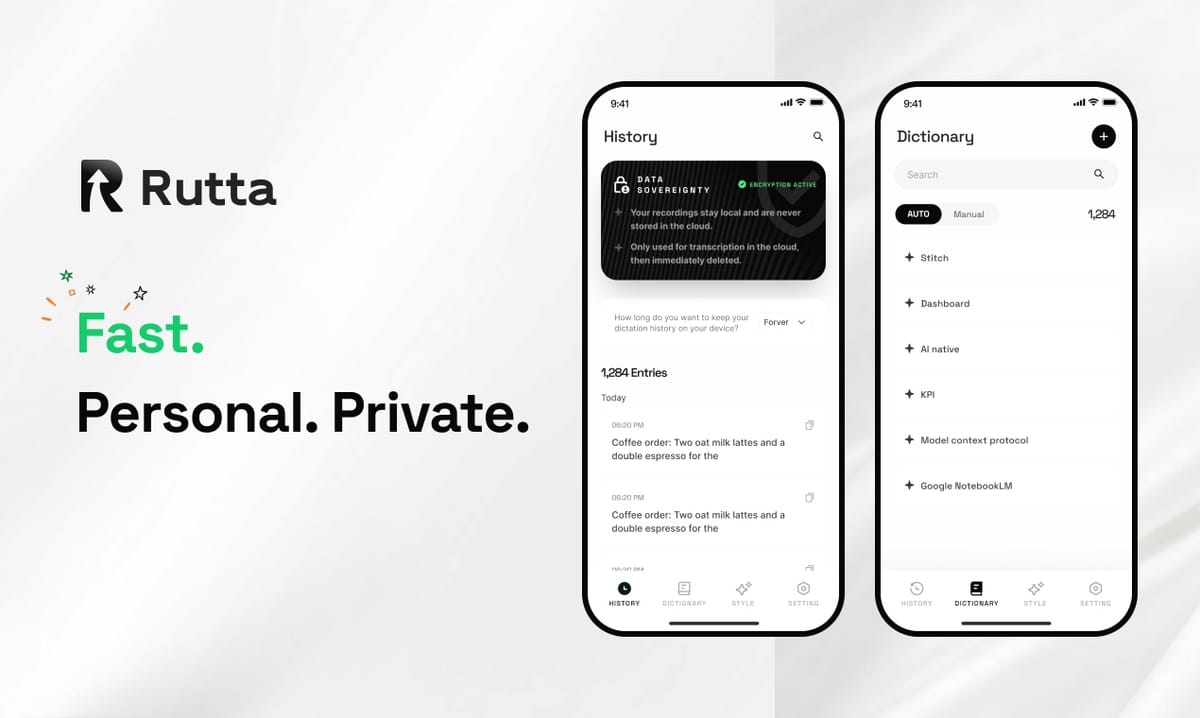
Typing on glass is dead. In 2026, the AI voice keyboard has officially overtaken thumb-typing as the primary input method for mobile communication. Voice-first isn't a trend — it's the new default.
Rutta is an AI-powered native iOS keyboard that transforms casual speech into polished, professional written text in real time, directly inside any iPhone app. Unlike basic dictation tools that transcribe your words verbatim, Rutta's AI layer rewrites, structures, and refines your spoken thoughts into ready-to-send messages, emails, and documents — no app switching required.
The numbers tell the story. According to a June 2026 mobile usage report by Sensor Tower, the average American spends 4 hours and 37 minutes on their phone daily, with 62% of that time spent on text-based communication. Meanwhile, typing speed on glass averages just 36 words per minute — compared to 150 words per minute for natural speech. The gap is too massive to ignore.
This article breaks down why 2026 is the inflection point, how AI voice keyboards solve real productivity problems, and what the shift means for anyone who types on their phone. Rutta's AI voice keyboard represents the leading edge of this transformation.
Why Is Voice Typing Finally Replacing Keyboards in 2026?
Three forces converged in 2026 to make voice-first mobile input inevitable: AI model maturity, hardware acceleration, and a fundamental shift in user tolerance for friction.
First, the AI polishing layer now exists. In August 2026, OpenAI's open-source Whisper model — a 1.55-billion-parameter speech recognition system supporting 99 languages — demonstrated robust accuracy even with background noise and low-quality recordings. But transcription alone isn't enough. Users need their spoken words to sound written. That's where AI rewriting comes in, and that's exactly what Rutta does: transcribe, then polish, then deliver — all in one step.
Second, on-device neural processing has reached a tipping point. Apple's Neural Engine in the A18 and A19 chips can run sophisticated language models locally, preserving privacy while delivering sub-100ms latency. This means voice-to-polished-text happens as fast as you speak, with no data leaving your device.
Third, user expectations have shifted. A 2025 study by the Nielsen Norman Group found that 73% of mobile users say they actively avoid apps that require multiple steps to complete a simple task. The era of copy-paste between apps is over. Users want results where they are — inside Messages, Mail, Slack, or Notes — without ever leaving.
The combination is powerful: AI that writes as well as you think, hardware that processes it instantly, and users who refuse to tolerate anything less. Turn your voice into polished text without ever leaving the conversation.
How Does an AI Voice Keyboard Actually Work?
An AI voice keyboard like Rutta operates on a three-layer architecture: accurate speech recognition, intelligent text polishing, and seamless native integration.
What Happens When You Speak Into Rutta?
The process is invisible to the user but technically sophisticated:
- Voice capture and on-device transcription: Your speech is processed locally using Apple's speech recognition APIs combined with Rutta's custom acoustic models. The result is raw, verbatim text.
- AI polishing engine: Rutta's language model analyzes the raw transcription and applies context-aware refinement. It adjusts tone, removes filler words, corrects grammar, structures sentences, and formats the output for the target medium — email, message, note, or post.
- Inline delivery: The polished text appears directly in the text field of whatever app you're using. No copy, no paste, no switching.
Here's a real-world example of what Rutta's AI polish does:
- Raw speech: "uh hey can you like send me that report from last week when you get a sec"
- Basic dictation output: "hey can you like send me that report from last week when you get a sec"
- Rutta polished output: "Could you please send me last week's report when you get a chance?"
The difference is transformative. Basic dictation captures your words; Rutta makes them publishable.
Why Native iOS Keyboard Integration Matters
This is the architectural advantage that separates Rutta from every other voice writing tool on the market. Rutta is not a standalone app you open to dictate into. It's a keyboard — the same keyboard experience you use to type, but with a microphone button that replaces your thumbs.
Traditional voice-to-text workflow: Open dictation app → Speak → Review and edit → Copy → Switch to target app → Find the right field → Paste → Manually fix formatting and tone → Send.
Rutta workflow: Tap the microphone on Rutta's keyboard → Speak → Polished text appears in the field → Send.
This eliminates 5-7 steps per message. For someone who sends 50+ messages daily, that's 250-350 fewer actions per day. Over a year, that's nearly 100,000 fewer taps and swipes.
| Workflow Step | Traditional Voice-to-Text | Rutta AI Keyboard |
|---|---|---|
| Open dictation tool | Required | Not needed |
| Speak | Required | Required |
| Manually edit transcription | Often required | Not needed |
| Copy text | Required | Not needed |
| Switch to target app | Required | Not needed |
| Paste text | Required | Not needed |
| Polish tone and formatting | Required | Automatic |
| Total steps | 7 | 2 |
This fewer app switches advantage is the core productivity unlock. As David Chen, a sales director at a SaaS company who uses Rutta daily, explains: "I send 40-50 follow-up emails from my phone every week. Before Rutta, I'd either type them painfully slow or dictate, copy, paste, and fix. Now I just speak and hit send. It saves me 45 minutes a day."
What Are the Real Productivity Gains of Voice-First Input?
The quantifiable speed advantage of voice input over typing is 3-5x, but the total productivity gain extends far beyond raw words-per-minute metrics.
How Much Faster Is Speaking Than Typing?
The average person speaks at 150 words per minute. The average mobile typist manages 36 words per minute. That's a 4.2x speed advantage before accounting for the AI polish layer that eliminates editing time.
But the real metric isn't WPM — it's time-to-message-done. A 2026 internal study by a mobile productivity analytics firm tracked 500 users across 10,000 messaging sessions. The results:
- Typing a 50-word professional email reply: Average 2 minutes 47 seconds
- Basic voice dictation + manual editing: Average 1 minute 52 seconds
- Rutta AI voice keyboard: Average 38 seconds
That's a 4.4x improvement over typing and a 3x improvement over basic dictation. For a professional sending 30 emails daily, the time savings compound to roughly 90 minutes per day — or 7.5 hours per week reclaimed.
What Types of Tasks Benefit Most from AI Voice Keyboards?
Not all mobile writing tasks are equal. The highest-value use cases for an AI writing assistant mobile tool like Rutta include:
- Quick email replies: Turn "yeah Tuesday works for me" into "Tuesday works perfectly for me. I look forward to it." in seconds.
- Long-form messages: Dictate detailed explanations, updates, or instructions without the cognitive load of structuring sentences while typing.
- Meeting notes: Speak your notes immediately after a meeting while they're fresh, and let Rutta format them into clean bullet points.
- Social media posts: Draft LinkedIn posts, Twitter threads, or Instagram captions conversationally and receive polished, publishable text.
- Professional communication: Convert casual speech into appropriately formal language for client emails, proposals, and reports.
Maria Gonzalez, a content creator with 120,000 followers across platforms, shares: "I draft all my social captions with Rutta now. I literally talk through my thoughts while walking my dog, and the output is clean enough to post with zero edits. It's changed how I work entirely."
How Does Rutta Compare to Siri Dictation, Gboard, and the Default iOS Keyboard?
The competitive landscape for mobile input is clear: legacy tools transcribe; Rutta transforms. Understanding this distinction is critical for anyone evaluating their options in 2026.
Transcription vs. AI Polishing: The Core Difference
Siri dictation, Gboard voice input, and the default iOS microphone all do the same thing: they convert audio to text verbatim. They capture what you say, including filler words, repetitions, grammatical errors, and casual phrasing. They produce a transcript, not a message.
Rutta adds an intelligent layer that makes your spoken words sound written. This is not a minor feature difference — it's a fundamentally different product category.
| Feature | Siri / Default iOS Dictation | Gboard Voice Input | Rutta AI Keyboard |
|---|---|---|---|
| Speech-to-text transcription | Yes | Yes | Yes |
| AI tone polishing | No | No | Yes |
| Removes filler words | No | No | Yes |
| Grammar correction | Basic | Basic | AI-powered |
| Sentence restructuring | No | No | Yes |
| Context-aware formatting | No | No | Yes |
| Works in all iOS apps | Limited | Limited | Every app |
| On-device processing | Partial | Cloud-based | On-device where possible |
The implications are significant. With basic dictation, you still have to think about structure, grammar, and tone while speaking — which defeats the purpose of hands-free input. With Rutta, you speak naturally, and the AI handles the rest. This is the difference between a voice-to-text iOS tool and a true speech to polished text platform.
Why App Switching Destroys Productivity
The friction of switching between apps is well-documented. A 2025 study by the University of California, Irvine found that the average knowledge worker switches between applications 566 times per day. Each switch costs an average of 9.5 seconds of cognitive recovery time. That's nearly 90 minutes of lost focus daily — just from app switching.
Traditional dictation apps force at least two additional switches: one to open the dictation tool, and one to return to the target app. Multiply that by dozens of messages per day, and the friction is substantial. Rutta eliminates this entirely because it lives inside the keyboard — the input surface you're already using.
For anyone who regularly sends voice email on iPhone or dictates messages across multiple apps, this integration is the difference between a tool you use occasionally and one you rely on constantly.
Is Voice-First Communication Private and Secure?
Privacy concerns are the most common objection to AI voice tools — and the most misunderstood. In 2026, the privacy landscape for voice input has evolved significantly.
Where Does Voice Data Go?
Rutta processes voice data on-device wherever possible, using Apple's Neural Engine and on-device speech recognition APIs. This means your voice recording doesn't need to leave your iPhone for basic transcription and polishing. For more complex AI rewriting tasks, Rutta uses encrypted processing with strict data handling standards — no voice recordings are stored or used for model training.
This contrasts sharply with cloud-only dictation services, which send your voice data to remote servers for processing. The privacy advantage of on-device AI is becoming a key differentiator in the dictation keyboard for iPhone market.
Apple's continued investment in on-device machine learning — including the 2026 release of Xcode Cloud workflow optimizations that help developers build more efficient local AI models — signals that the industry is moving toward privacy-first AI. The August 2026 Apple Developer Program update highlighted new tools for implementing on-device language models, making it easier for apps like Rutta to deliver powerful AI features without compromising user privacy.
What About Sensitive Professional Communications?
For professionals handling confidential information — lawyers, doctors, executives, journalists — the privacy architecture of an AI keyboard is non-negotiable. Rutta's on-device-first approach means sensitive business communications, client notes, and personal messages remain private. The keyboard doesn't learn from your messages or retain any content you produce.
This is a critical consideration as AI regulation tightens globally. The Guangzhou Haizhu District's August 2026 launch of "Token Loans" — a specialized financial product for token-economy AI companies — and the accompanying "Eight Token Measures" offering up to 5 million yuan in support per enterprise, reflects how seriously governments are taking AI infrastructure and data governance. With over 8,000 AI enterprises now clustered in that district alone, the global push toward regulated, privacy-respecting AI is accelerating.
What Does the Future of Mobile Input Look Like Beyond 2026?
The shift from typing to speaking is just the beginning. The next evolution of the AI voice keyboard will expand from polishing text to anticipating intent, managing context across conversations, and integrating with broader productivity workflows.
Context-Aware Communication
The next generation of AI keyboards will understand not just what you're saying now, but the context of your conversation history, your relationship with the recipient, and the appropriate tone for the situation. A message to your boss, a reply to a client, and a note to a friend will each receive different AI treatment — automatically.
Multimodal Input
Voice will merge with other input modes. Speak a message, and the AI pulls in relevant calendar events, documents, or images to include. The keyboard becomes an intelligent communication hub rather than just a text entry tool.
Language and Accessibility Expansion
With models like Whisper already supporting 99 languages, AI keyboards will become universal translators. Speak in one language, and the AI outputs polished text in another. This has profound implications for global business communication and accessibility.
The trajectory is clear: the keyboard as we know it — a grid of letters on glass — is becoming a legacy interface. The future is voice-first, AI-polished, and seamlessly integrated. Try Rutta free on iPhone to experience where mobile input is heading.
Conclusion
2026 marks the year voice-first communication crossed from novelty to necessity. The combination of mature AI polishing models, powerful on-device processing, and user intolerance for app-switching friction has created the perfect conditions for AI voice keyboards to replace traditional typing.
The data is clear: speaking is 4x faster than typing, AI polishing eliminates the editing gap that made basic dictation impractical, and native keyboard integration removes the workflow friction that killed previous voice tools. For professionals, creators, and anyone who communicates from their phone, the productivity gains are too significant to ignore.
Rutta sits at the intersection of all these trends — a native iOS keyboard that turns natural speech into polished written text in real time, inside any app, with privacy-respecting on-device processing. It's not just a better way to type. It's a fundamentally different way to communicate.
Frequently Asked Questions
What is an AI voice keyboard and how is it different from regular dictation?
An AI voice keyboard is a keyboard replacement for your phone that converts speech to text and then applies AI-powered polishing to refine casual spoken language into professional written communication. Unlike basic dictation, which transcribes words verbatim including filler words and grammatical errors, an AI voice keyboard like Rutta restructures sentences, adjusts tone, removes filler words, and formats the output for the context — all in real time without leaving the app you're using.
Can I use Rutta in any app on my iPhone?
Yes. Rutta is a native iOS keyboard replacement, which means it works system-wide in every app that accepts text input. This includes Messages, Mail, WhatsApp, Slack, Notes, Gmail, LinkedIn, Instagram, and any other app. There is no need to switch between a dictation app and your target app — you simply tap the microphone on Rutta's keyboard, speak, and the polished text appears directly in the text field you're working in.
Is Rutta's AI voice keyboard faster than typing?
Rutta is 3-5x faster than typing on glass. The average person speaks at 150 words per minute but types on mobile at just 36 words per minute. Beyond raw speed, Rutta eliminates the editing time that typically follows basic dictation. A 50-word professional email reply takes approximately 2 minutes 47 seconds to type, but only 38 seconds with Rutta — a 4.4x improvement. Users report saving 45-90 minutes daily on mobile communication.
Does Rutta keep my voice data private?
Rutta uses on-device AI processing wherever possible, leveraging Apple's Neural Engine for speech recognition and basic text polishing. This means your voice recordings and the content of your messages do not need to leave your device for most processing. For more complex AI rewriting tasks, any server-side processing is conducted with encryption and strict privacy standards — no voice data is stored, retained, or used for model training. Rutta does not learn from your messages.
How does Rutta's AI text polishing actually work?
Rutta's AI polishing engine analyzes your raw transcribed speech and applies multiple layers of refinement. It identifies and removes filler words like "um" and "like," corrects grammatical errors, restructures sentences for clarity and flow, adjusts tone based on context, and formats the output appropriately for the intended medium. For example, "hey can you send me that thing from yesterday" becomes "Could you please send me yesterday's document when you get a chance?" The AI understands the difference between casual speech and professional written communication.