
The Future of Mobile Typing in 2026: Why Voice Keyboards Are Replacing Traditional Input
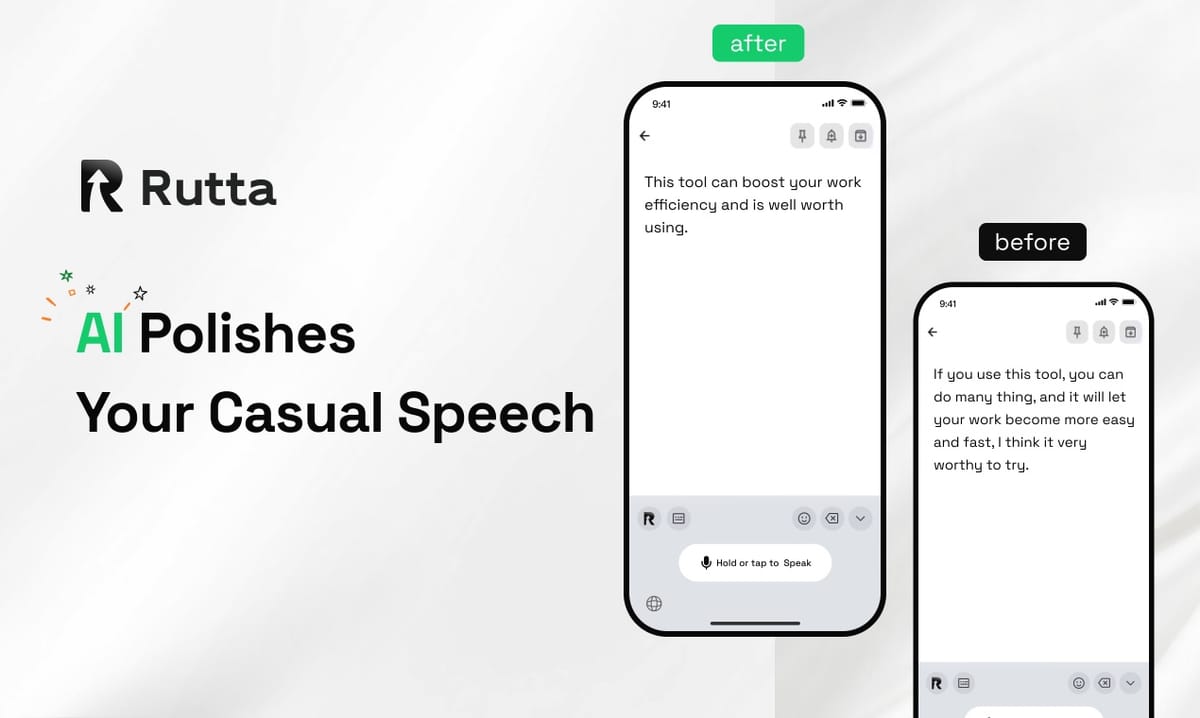
Voice keyboards are replacing traditional input because, by 2026, AI keyboards turn spoken words into polished, send-ready text inside any app — roughly 3 to 5x faster than thumb typing.
Rutta is an AI-powered iOS keyboard that turns natural speech into polished messages, emails, and documents. It runs inside the apps you already use, so there is nothing to copy, paste, or clean up afterward.
Apple's iOS 27 release on October 1, 2026 is being treated as the tipping point. The new Siri AI, powered by Apple Intelligence, can act across apps and polish personalized content for English-speaking users first — proof that voice-first productivity is now the default direction of the operating system itself.
The catch is that mainstream tools still only transcribe. They capture your words but never rewrite them. That gap created a new product category: the AI voice keyboard.
Why Are Voice Keyboards Replacing Traditional Input in 2026?
Voice keyboards are replacing traditional input in 2026 because the real bottleneck was never speech recognition — it was editing. AI now does that editing the moment the words leave your mouth.
Three forces are driving the shift:
- Speed. Talking is native to humans. Thumbing a glass rectangle is not. Speech lets you compose a full paragraph in seconds instead of minutes.
- Polish. Basic dictation records noise; a modern AI keyboard records intent. Casual phrasing becomes a professional sentence before the text ever lands.
- Focus. A native Rutta AI voice keyboard never sends you out of the app you are in, so your context, drafts, and train of thought stay intact.
By 2026, voice is no longer an accessibility feature bolted onto a keyboard. It is the keyboard. iOS 27's Siri AI and OpenAI's new realtime audio models are both pushing the same direction: faster transcription, lower latency, more writeable output.
How Much Faster Is a Voice Keyboard Than Typing on iPhone in 2026?
Voice input is roughly 3 to 5x faster than mobile typing, and the gap widens on longer messages.
A 2020 study by Stanford University researchers found that English speech input reached about 220 words per minute, while touchscreen typing averaged roughly 36 WPM. Five years later, latency has collapsed — but editing was the real tax, and that is the layer AI keyboards now remove.
| Input Method | Approx. Speed (Long Text) | Polished Output? | App Switching Required? | Works in Every iOS App? |
|---|---|---|---|---|
| Manual typing | ~36 WPM | No — user edits manually | No | Yes |
| Siri dictation / Gboard voice | Speaking speed, ~150–220 WPM | No — verbatim only | No | Partial |
| Standalone dictation app | Speaking speed, minus copy-paste time | Sometimes | Yes — copy, switch, paste, edit | No |
| Rutta AI keyboard | Speaking speed plus AI polish | Yes — refined in real time | No | Yes |
Consider the traditional voice-to-text on iOS workflow: open a dictation app, speak, copy, switch to the target app, paste, then manually fix the mess. Each round trip adds at least 20 seconds and breaks your concentration every single time.
A native keyboard removes that loop entirely. It is the reason Rutta turns your voice into polished text instead of handing you a raw transcript to repair.
How Does AI Polishing of Speech-to-Text Actually Work?
AI polishing rewrites what you meant, not just what you said — and that single difference separates transcription tools from genuine writing assistance.
The shift is easiest to see in a side-by-side example.
You say casually: “hey can you send me that report from last week”
Rutta writes: “Could you please send me last week’s report when you get a chance?”
Same meaning, immediately professional, zero manual editing. That is the gap between a dictation keyboard for iPhone and an AI text polisher.
Behind the scenes, the workflow has four stages:
- Capture. The keyboard takes your voice input the way you naturally speak.
- Transcribe. Speech recognition converts audio to text — by 2026, this happens with millisecond-level latency.
- Polish. The AI corrects grammar, removes filler words, adjusts tone, and adds clear structure.
- Insert. The finished text appears at your cursor, inside the app you were already using.
This is where basic tools stop. Siri dictation, Gboard, and the default iOS keyboard all transcribe verbatim. They do not adjust tone, format content, or reshape a rambling spoken sentence into readable English. For anyone comparing an AI writing assistant on mobile to a stock keyboard, that missing layer is the entire product.
What Changed in 2026? Three Signals That Made Voice Input the Default
2026 became the turning point because the underlying models, the platform owners, and the writing tools all moved at once.
1. Realtime transcription got fast enough for conversation. On October 1, 2026, OpenAI launched three new audio API models. GPT-Realtime-Whisper delivers streaming speech-to-text with millisecond-level latency and recognition across more than 70 input languages. Latency used to be the death sentence for voice input. It is now largely a solved problem.
2. Operating system vendors embraced voice as a productivity layer. Apple began rolling out iOS 27 on October 1, 2026, with a rebuilt Siri AI driven by Apple Intelligence. It handles cross-app commands and personalized content polishing, with English-language users getting access first.
3. Writing tools rebuilt themselves around AI. The same day, Grammarly introduced Grammarly Docs, an all-in-one AI document editor with an AI scorer, automatic citations, predicted reader feedback, and humanizing polish for AI-generated content. The entire writing stack is being reassembled around voice and AI.
Investment confirms the direction. Zhipu, a Chinese AI developer, completed a funding round of roughly $5 billion in September 2026 — the largest single AI raise globally that year — with the full amount committed to next-generation foundation models and fully self-trained technology. Capital is funding the underlying intelligence that makes speech-to-polished-text reliable, not just possible.
Which Daily Workflows Benefit Most From a Voice Keyboard in 2026?
Voice keyboards pay off most in workflows that involve frequent, medium-length writing under time pressure.
| Use Case | Why Voice Wins |
|---|---|
| Quick email replies | A four-sentence response takes 20–30 seconds to speak versus roughly 3 minutes to type on a phone |
| Long messages and Slack threads | Speaking preserves full reasoning; AI handles structure so less back-and-forth editing is needed |
| Social media posts | Dictate a rough idea, get a finished caption without rewriting it from scratch |
| Meeting notes and to-do lists | Capture items the moment they are mentioned, without looking away from the room |
| Sales follow-ups | Log CRM notes and send follow-up email on iPhone between calls, without leaving the flow |
“I dictate client follow-ups while I’m driving between appointments, and by the time I park, the email is already sitting in my outbox looking clean and professional,” says Marcus L., a B2B sales representative. “Before this, I’d save them for the evening and about a third of them never got sent at all.”
“I dictate emails to my kids’ teachers while I’m waiting in the school pickup line,” says Priya R., a working parent of two. “They read like I wrote them at my sharpest — not like I wrote them before my first coffee.”
How Does Rutta Compare to the Default iPhone Keyboard in 2026?
In 2026, the difference is that Rutta adds an intelligence layer that makes your spoken words read like written ones, while the default keyboard only reproduces what you said.
The practical advantage of a native voice-to-text iOS keyboard is that dictation and editing collapse into one gesture. There is no separate app, no clipboard round trip, and no cleanup pass. Fewer app switches means fewer broken thoughts and a noticeably shorter path from idea to sent message.
Privacy is part of the same design. Rutta uses on-device AI processing where possible and handles voice data under strict privacy standards — a detail that matters when a keyboard touches email, client notes, and personal messages all day.
If you want to compare the difference yourself, Try Rutta free on iPhone and dictate your next email instead of typing it.
Will Voice-First Communication Replace Typing Entirely?
No — typing will not disappear, but it is shifting into a supporting role for short inputs, searches, and passwords.
Voice is becoming the default for anything long, external, or structurally complex. Three reasons explain why:
- Nobody dictates a two-word search query. Short inputs are still faster with fingers.
- People write more when speaking is easy. The longer the text, the bigger the time savings.
- AI removed the last objection. “Editing is annoying” was a legitimate complaint. It is no longer a factor.
The honest prediction for 2026 is a hybrid. Short text with thumbs, long text with voice, and an AI keyboard stitching the two together so smoothly that most users stop noticing which mode they are in.
The Bottom Line
Voice keyboards are replacing traditional input in 2026 because AI finally solved the editing problem. Speech runs 3 to 5x faster than mobile typing, and AI polishing makes the result sound like it came from a professional writer rather than a commute.
Platform owners are moving the same way. OpenAI now streams transcription with millisecond-level latency across 70+ languages, Apple rebuilt Siri around Apple Intelligence, and capital keeps flowing into the foundation models underneath. The winner is decided in the details: whether you are switching apps and fixing dictation by hand, or pressing send on polished text that appeared exactly where you were already working.
Rutta is built for the second outcome. It is a native iOS keyboard that converts natural speech into clean, professional writing in a single step — and in 2026, that is what mobile typing is actually about.
Frequently Asked Questions
What is a voice keyboard in 2026?
A voice keyboard is an on-screen keyboard that converts speech into text using AI instead of thumb typing. In 2026, the category goes far beyond basic dictation: these keyboards transcribe, polish, adjust tone, and format text, then insert the finished result directly into whatever app you are using. Rutta is one example — a native iOS keyboard that converts casual spoken words into polished messages, emails, and documents without leaving the app or copying and pasting anything.
How much faster is a voice keyboard than typing in 2026?
Voice keyboards run roughly 3 to 5x faster than mobile typing on longer text. A 2020 study by Stanford University researchers found English speech input at about 220 WPM versus roughly 36 WPM for touchscreen typing, and the gap today is wider because 2026 transcription latency is measured in milliseconds. On iPhone, the copy-paste-and-fix loop around traditional dictation adds roughly 20 seconds per message — overhead a native AI keyboard removes entirely.
Will voice keyboards replace the phone keyboard entirely in 2026?
Partially, but not completely. In 2026, voice is becoming the default for long messages, emails, notes, social captions, and follow-ups — anything longer than a sentence or two. Short inputs like searches, URLs, and passwords remain faster with fingers. The realistic outcome is a hybrid: speak for length, type for brevity, and let an AI keyboard make the switch feel invisible to the user.
How is Rutta different from Siri dictation or Gboard in 2026?
Siri dictation, Gboard, and the default iOS keyboard transcribe verbatim — they record what you said without improving it. Rutta adds an AI layer on top. It rewrites “hey can you send me that report from last week” into “Could you please send me last week’s report when you get a chance?” It also adjusts tone, corrects grammar, removes filler words, and adds structure. Because it is a native iOS keyboard, you stay inside Messages, Mail, or Slack the whole time.
Are voice keyboards safe for my data in 2026?
It depends on the keyboard, so the architecture matters more than the marketing. A well-designed 2026 voice keyboard processes on-device where possible and states clearly how voice data is handled. Rutta uses on-device AI processing where possible and follows strict privacy standards — an important distinction, since a keyboard sees emails, client notes, and personal messages every day. Before adopting any voice keyboard, confirm whether audio is processed locally or sent to the cloud, and whether transcripts are retained.