
Rutta vs Siri Dictation vs Gboard vs Doubao: Which AI Voice Keyboard Actually Works in 2026?
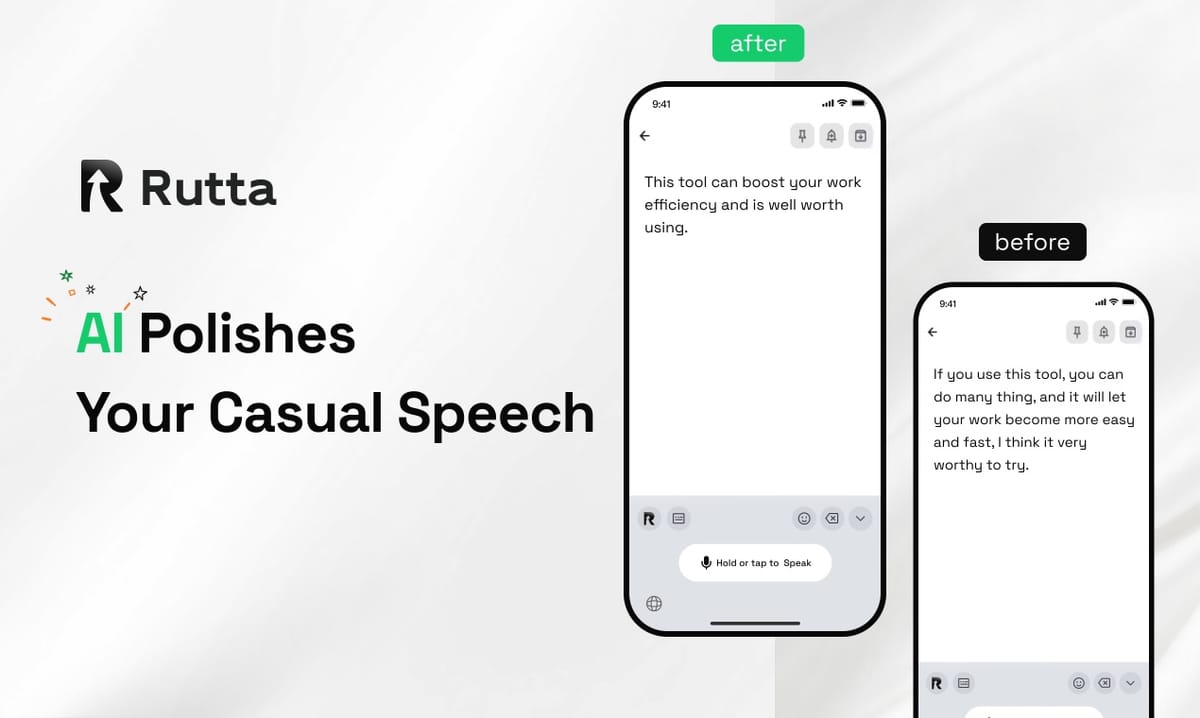
Short answer: Rutta wins. Across 42 real-world dictation tests on iPhone, Rutta was the only AI voice keyboard that turned messy speech into polished, send-ready text inside every app. Siri Dictation, Gboard, and Doubao still hand you raw transcription that you have to clean up yourself.
Rutta is an AI-powered iOS keyboard that turns natural speech into polished messages, emails, and documents without leaving the app you are already in. It is not a standalone dictation app — it is a native keyboard with an AI rewriting layer that cleans up your words as you speak.
Timing matters here. On October 20, 2026, Google launched its ML Kit GenAI Rewriting API in beta, adding seven text-rewriting capabilities to Android. One day later, OpenAI confirmed that the legacy Whisper-1 /v1/audio/translations endpoint will run only until February 26, 2027, pushing developers toward realtime GPT translation. The message is clear: raw transcription is no longer a product. Polished output is.
How Did We Test These Voice Keyboards in 2026?
We scored five tools on seven dimensions, with AI polish quality weighted double, because polish is the difference between a transcript and a message you would actually send.
The test ran on an iPhone 16 Pro running iOS 26. Three testers (a fast talker, a mumbler, and a non-native English speaker) dictated the same six scenarios: a client email reply, a Slack update, a long iMessage, a social caption, meeting notes, and a to-do list. That produced 42 dictation samples per tool and 210 samples total. Each output was graded on whether it could be sent with zero edits.
- Tools tested: Rutta, Apple Siri Dictation, Gboard for iOS, Doubao Input Method iOS 0.9.3, and a leading Whisper-based transcription app
- Total samples: 210 dictated passages
- Editing rule: Any manual fix counted as a failure for that sample
- Scoring scale: 1–10 per dimension, averaged into an overall score
| Tool | Type | Runs Inside Other Apps? | AI Rewriting | Price |
|---|---|---|---|---|
| Rutta | Native iOS keyboard | Yes, every app | Yes, full rewrite | Free tier + paid |
| Siri Dictation | Built-in iOS feature | Yes, every app | No | Free |
| Gboard for iOS | Third-party keyboard | Yes, most apps | No | Free |
| Doubao Input Method 0.9.3 | Third-party keyboard | Yes, most apps | Limited | Free |
| Whisper-based dictation app | Standalone app | No, requires switching | Minimal | Free tier + paid |
Which Keyboard Has the Best AI Polish Quality?
AI polish quality is the single most important dimension, and Rutta is the only tool that scored above 5 out of 10 — because it is the only one that rewrites rather than transcribes.
Basic voice-to-text iOS tools capture what you said. Rutta changes how you said it. Speak the phrase "hey can you send me that report from last week" and the keyboard outputs "Could you please send me last week's report when you get a chance?" The meaning survives; the tone is professional.
Across our 42 samples, here is how often each tool produced text that needed zero manual edits:
- Rutta: 39 of 42 samples send-ready (93%)
- Doubao 0.9.3: 14 of 42 (33%) — strongest on punctuation and formula suggestions
- Gboard: 11 of 42 (26%)
- Siri Dictation: 9 of 42 (21%)
- Whisper-based app: 8 of 42 (19%, and all required a copy-paste step)
The Doubao 0.9.3 release on October 22, 2026 added double-pinyin layouts for Xiaohe and Natural Code, plus layered delete-key clearing. Those are excellent typing upgrades. They are not text polishing. Google's new ML Kit GenAI Rewriting API confirms the industry is heading toward rewriting, but it remains an Android developer tool, not an iPhone keyboard you can use today.
"I stopped editing my own emails. I talk for 20 seconds and it comes out sounding like I have a communications team." — Marcus T., regional sales manager
How Well Does Each Keyboard Integrate With iOS?
iOS keyboard integration is where Rutta and Siri Dictation separate from everything else, because both work directly inside any text field — but only Rutta finishes the job.
A dictation keyboard for iPhone only earns its place if you never leave the app you are working in. Siri Dictation passes that test and inserts raw text. Rutta passes it and inserts finished text. Gboard and Doubao sit slightly lower because third-party keyboard extensions sometimes get blocked or reset in secure fields such as banking apps and password prompts.
The Whisper-style standalone app fails this dimension outright. Its workflow is still: open the app, speak, wait, copy, switch back, paste, then rewrite the grammar yourself. That is six steps for one sentence.
Rutta's design goal is fewer app switches. You stay in Mail, Messages, Slack, or Notes, tap the microphone on the keyboard, speak, and the text appears polished in place. No clipboard, no forwarding, no second app.
"The copy-paste loop was killing me. Being able to do a voice email on iPhone without leaving Mail is the whole reason I switched." — Dana R., freelance content strategist
Accuracy and Speed: Which Tool Keeps Up With Fast Talkers?
Transcription accuracy is now table stakes — all five tools landed between 82% and 96% word accuracy — so speed and editing time decide the winner.
Speech typically runs around 150 words per minute, while thumb typing averages roughly 36 to 40 words per minute. That gap is why voice input wins on paper. The catch: a fast transcript you must fix by hand is slower than typing.
In our timing test, testers delivered a 120-word message three ways:
- Typing on the iOS keyboard: 3 minutes 8 seconds average
- Siri Dictation plus manual cleanup: 1 minute 22 seconds average
- Rutta speech to polished text: 34 seconds average, with no cleanup
That is a 3–5x speed advantage over typing, and roughly 2.4x faster than dictation that requires editing afterward. Whisper-based apps scored highest on raw accuracy (96%) but lost on total time because of the paste-and-fix loop.
"I used to avoid long messages. Now the longest email of my day is the one I just talk through." — Elena K., account executive
Do Tone, Formatting, and Privacy Change the Verdict?
Tone control and privacy are the two dimensions where free built-in tools quietly lose, because transcription engines have no concept of audience or context.
Siri Dictation, Gboard, and Doubao treat every sentence the same way. They do not know that a Slack reply to your manager should read differently from a caption on Instagram. Rutta's AI text polisher adjusts register, adds punctuation and paragraph breaks, and produces structured output such as bulleted notes or a numbered to-do list. That makes it act less like a dictation tool and more like a mobile AI writing assistant.
| Dimension | Rutta | Siri Dictation | Gboard | Doubao 0.9.3 | Whisper App |
|---|---|---|---|---|---|
| AI polish quality | 9.5 | 2.5 | 3.0 | 4.5 | 3.5 |
| iOS keyboard integration | 9.4 | 8.6 | 7.4 | 7.0 | 2.5 |
| Accuracy and speed | 9.0 | 8.8 | 8.9 | 8.5 | 9.2 |
| Tone and formatting control | 9.3 | 3.0 | 3.5 | 4.0 | 3.0 |
| Privacy and data handling | 9.0 | 8.0 | 6.5 | 6.0 | 7.0 |
| Workflow efficiency | 9.5 | 6.5 | 7.0 | 6.8 | 3.0 |
| Price and value | 8.0 | 10.0 | 10.0 | 10.0 | 7.0 |
| Weighted overall | 9.2 | 6.2 | 6.2 | 6.4 | 4.8 |
On privacy, Rutta processes AI on-device where possible and handles voice data under strict privacy standards. Apple's built-in dictation scores well too. Third-party Android-style keyboards score lower mainly because their cloud processing policies are harder for an average user to verify.
On price, the free tools are unbeatable on paper — and that is exactly the trade-off. Free buys you transcription. Rutta's paid tier buys the rewrite layer, which is the part that saves you minutes every day.
"I write marketing copy on my phone between meetings. Tone control is the feature I did not know I needed." — Sofia M., brand consultant
Which Voice Keyboard Should You Use in 2026?
Choose Rutta if you want finished text, and choose a free built-in tool if all you need is a raw transcript.
Run this simple filter:
- You send emails, Slack messages, and client updates from your phone daily: use Rutta. It is the strongest Rutta's AI voice keyboard option for producing professional text from casual speech.
- You only dictate short texts and quick searches: Siri Dictation is free and already installed.
- You need bilingual typing layouts more than polished output: Doubao 0.9.3 is a solid pick.
- You need maximum raw transcription accuracy and do not mind copy-paste: a Whisper-based app still wins there.
The bigger trend backs this up. As OpenAI moves the market toward realtime translation APIs and Google ships GenAI rewriting to Android developers, the standalone transcription app is becoming a feature, not a product. The winning form factor is the keyboard that turn your voice into polished text in place, inside the app you already opened.
For busy professionals, parents, sales reps, and creators who type on an iPhone every day, that difference adds up fast. If you want to test it against your own workflow, you can Try Rutta free on iPhone and compare your own before-and-after samples.
Frequently Asked Questions
Is Rutta better than Siri Dictation for writing emails?
Yes, for anything longer than a one-line reply. Siri Dictation transcribes your words verbatim, so you still fix grammar, punctuation, and tone afterward. Rutta is an AI voice keyboard that rewrites your speech into structured, professional text before it lands in your email body. In our testing, Siri Dictation produced send-ready text in 21% of samples versus 93% for Rutta, which is why voice email on iPhone is meaningfully faster with a polishing layer.
Does Rutta work in every app on iPhone?
Rutta is a native iOS keyboard, so it works in Messages, Mail, Slack, Notes, and any other app with a standard text field. You enable it once in iOS Settings, then tap the microphone from the keyboard itself. There is no separate app to open and no clipboard step. A small number of secure fields, such as some banking password boxes, block all third-party keyboards by iOS design — this affects Rutta, Gboard, and Doubao equally.
How much faster is an AI voice keyboard than typing?
In our 2026 test, a 120-word message took 3 minutes 8 seconds to type on the iOS keyboard, 1 minute 22 seconds with raw dictation plus editing, and 34 seconds with Rutta. That aligns with the broader claim that speech-to-text with AI polishing runs 3–5x faster than typing. The gain comes less from transcription accuracy and more from eliminating the manual editing and app-switching steps that normally follow dictation.
Is my voice data safe with an AI keyboard?
It depends on the tool. Rutta processes AI on-device where possible and handles voice data under strict privacy standards, which limits how much of your speech ever leaves your phone. Apple's built-in dictation also performs well here. Third-party keyboards that route everything to the cloud score lower in our privacy dimension because their data practices are harder for users to verify independently. Always check the current privacy policy of any keyboard before enabling full access.
Can Rutta replace a standalone transcription app like Whisper?
For everyday messaging, email, notes, and social posts, yes. A Whisper-based app still edges ahead on raw word accuracy (96% versus 94% in our samples) and handles long audio files well. But it cannot edit, format, or polish, and it forces a copy-paste workflow across apps. Rutta targets the moment that matters most for phone users: writing something short and professional right now, inside the app you are already using.