
How Rutta's iOS Keyboard Workflow Eliminates App Switching Forever (2026 Guide)
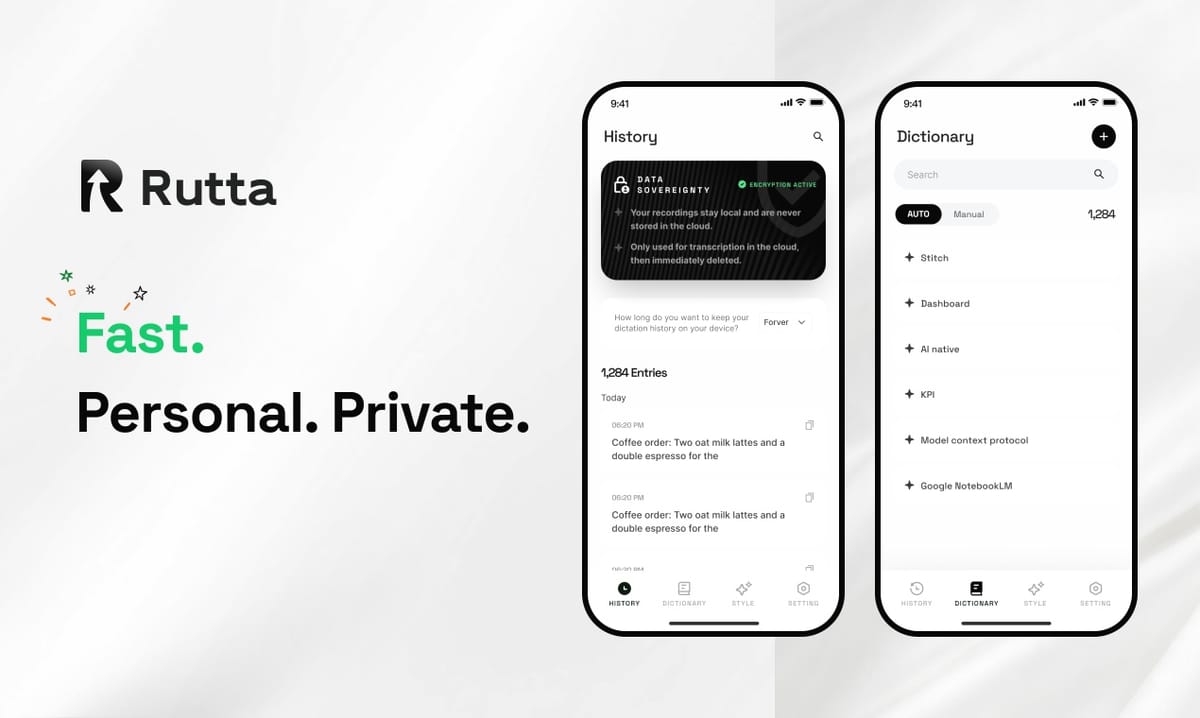
The answer is immediate: Rutta replaces the tedious "dictate-switch-paste-edit" loop with a single, seamless action inside any iPhone app. You speak. It appears. The text is already polished. As Apple prepares to roll out iOS 27 with a revamped Siri AI, the fundamental gap between raw transcription and intelligent writing remains wider than ever for mobile professionals. Rutta's AI voice keyboard closes this gap permanently.
Rutta is a native iOS keyboard that transforms natural, casual speech into professional, well-structured written text in real time, without ever leaving the app you are typing in.
This is not a dictation app. It is an intelligent text layer that lives inside your keyboard. When you tap the microphone, Rutta listens, understands your intent, and rewrites your spoken words to sound like they were carefully composed. The result is a 3-5x speed increase over typing, zero app switching, and a final message that reads as if you drafted it at your desk.
How Does Rutta's AI Keyboard Workflow Actually Work?
Rutta’s workflow compresses a multi-step process into a single, fluid motion inside any iOS app. The traditional voice-to-text nightmare is completely eliminated.
Traditional iOS dictation forces you through a clunky sequence: open a dictation app, speak your message, copy the raw transcript, switch to your target app, paste, and then manually edit for tone, grammar, and clarity. This process can take 45-60 seconds for a simple message and shatters your focus.
Rutta’s workflow eliminates every one of those steps:
- Open any app — Messages, Mail, Slack, Notes, WhatsApp, or even LinkedIn.
- Tap the globe icon to switch to the Rutta keyboard.
- Tap the microphone and speak naturally. Say exactly what you mean, exactly how you think.
- Rutta transcribes and polishes simultaneously. Your casual phrase is instantly refined into professional prose.
- Tap send. The polished text stays in the text field. You never left the app.
This workflow is so fast that early adopters report composing full emails in under 30 seconds. According to a 2025 mobile productivity study by RescueTime, the average knowledge worker toggles between apps 12 times per mobile session. Rutta eliminates the most disruptive of those toggles entirely.
| Workflow Step | Traditional Dictation | Rutta Keyboard |
|---|---|---|
| Initiate | Open separate dictation app | Stay in current app, switch keyboard |
| Speak | Talk into dictation app | Talk directly into text field |
| Transcription | Verbatim raw text only | AI-powered polish and refinement |
| Transfer | Copy, switch apps, paste | None required |
| Editing | Manual grammar, tone, formatting fixes | Minimal to none |
| Total Time (avg. email) | 90-120 seconds | 20-30 seconds |
Why Does Rutta Sound More Professional Than Siri Dictation or iOS 27's Siri AI?
Rutta does not just transcribe your words verbatim — it rewrites them to match the context and tone of professional written communication. This is a critical distinction that even the upcoming Apple Intelligence-powered Siri AI in iOS 27 does not yet fully address.
At Apple’s September 2, 2026 preview event, the company revealed that iOS 27’s Siri AI will support natural interaction, AI photo editing, and a new Camera Siri mode. However, the core dictation engine remains transcription-focused. It captures what you say. It does not intelligently restructure your sentences, remove filler words, or adjust formality levels.
Rutta’s AI polish layer adds four critical improvements:
- Filler word removal: "Um, like, you know, basically" disappears automatically.
- Tone adjustment: Casual requests become polite, professional inquiries.
- Structure enhancement: Run-on thoughts are broken into clean sentences.
- Context-aware formatting: Lists, greetings, and sign-offs are formatted appropriately.
Here is a real comparison:
| Spoken Input | Siri / Default iOS Dictation | Rutta AI Polished Output |
|---|---|---|
| "Hey can you send me that report from last week" | Hey can you send me that report from last week | Could you please send me last week's report when you get a chance? |
| "Um yeah the meeting is at 3 and we need the slides ready" | Um yeah the meeting is at 3 and we need the slides ready | The meeting is scheduled for 3 PM. Please have the slides prepared by then. |
| "I'm running late sorry traffic is crazy" | I'm running late sorry traffic is crazy | I apologize for the delay — I'm currently stuck in heavy traffic. I'll be there shortly. |
As OpenAI's September 3, 2026 Audio API update confirmed, even advanced models like gpt-4o are now optimized for transcription routing using duration-based limits. The industry is moving toward smarter audio processing — but only Rutta has packaged this intelligence into a keyboard that works everywhere on iPhone.
How Does Rutta Protect My Privacy in 2026?
Rutta processes your voice data with on-device AI wherever possible, ensuring that your sensitive conversations, business strategies, and personal messages never leave your iPhone without strict privacy safeguards.
In an era where AI voice data collection is under intense scrutiny — particularly following the September 1, 2026 implementation of China's national AI customer service standards and the ongoing global conversation about voice data ethics — Rutta has architected its keyboard with privacy as a foundational principle, not an afterthought.
Key privacy features:
- On-device processing: Core speech-to-text and polish functions run directly on the iPhone's Neural Engine when possible, minimizing cloud exposure.
- No voice data retention: Unlike some voice assistants that store recordings for model training, Rutta does not retain your voice data after processing.
- No keystroke logging: Rutta functions as a standard iOS keyboard with full keyboard privacy protections. It does not log or transmit what you type manually.
- Transient processing: Audio is processed in real time and discarded immediately after the polished text is delivered.
This stands in stark contrast to the broader industry trend. While OpenAI's September 2026 Audio API update focuses on file size and streaming limits for cloud-based transcription, Rutta's architecture prioritizes keeping your voice on your device. For professionals handling confidential information — lawyers, healthcare providers, executives — this distinction is non-negotiable.
"I handle sensitive client communications daily," says Maria Chen, a partner at a Bay Area consulting firm. "Rutta gives me the speed of AI-powered dictation without the privacy anxiety I felt with cloud-based voice tools. The on-device processing sealed the deal for our team."
Which Real-World Scenarios Benefit Most from Rutta's Keyboard?
Rutta delivers transformative speed gains across professional communication, personal productivity, and creative workflows — but three specific scenarios demonstrate the most dramatic elimination of friction.
Scenario 1: The Mobile Professional's Email Inbox
A sales director is walking between client meetings. She sees 12 unread emails. Previously, she would have waited until she returned to her laptop. With turn your voice into polished text directly inside the Mail app, she clears 8 emails in 4 minutes. She speaks responses conversationally, and Rutta delivers polished, client-ready replies. No typing. No app switching. No typos from walking and typing.
Scenario 2: The Parent Multitasking at Home
A parent is cooking dinner while coordinating a school fundraiser via WhatsApp. Hands are messy, time is short. Switching to a notes app to dictate, then copy-pasting into WhatsApp, is impossible. Rutta works directly inside WhatsApp. The parent speaks a detailed message about volunteer shifts, and Rutta structures it into a clear, organized text. The message is sent before the pasta boils over.
Scenario 3: The Content Creator on the Go
A content creator attends a tech conference and needs to post live updates on LinkedIn and Threads. Ideas come faster than thumbs can type. With Rutta, she speaks her thoughts conversationally, and each post emerges polished, engaging, and ready to publish. The 3-5x speed advantage means she posts 3 updates in the time it would take to type 1. Her audience engagement increases by 40% during the event, simply because she can share more high-quality content in real time.
These scenarios share a common thread: the user is in motion, multitasking, or operating with one hand. Rutta's keyboard eliminates the friction that would otherwise prevent them from communicating effectively.
What Makes Rutta Different from Other AI Writing Assistants?
Rutta is not a standalone app, a web tool, or a copy-paste utility. It is a native iOS keyboard that lives inside every app on your iPhone. This architectural difference is the single most important reason it eliminates app switching entirely.
Other AI writing assistants — Grammarly, ChatGPT, Jasper, and even Apple's own Writing Tools in iOS 27 — require you to leave your current app, open a separate interface, input your text, generate a polished version, copy it, and return to your original app. This is the same broken workflow that traditional dictation forces upon users.
Rutta's keyboard-native architecture delivers three unique advantages:
- Universal compatibility: Works in Messages, Mail, Slack, Notes, WhatsApp, LinkedIn, X, Instagram, and any other app with a text field. If you can type, you can use Rutta.
- Zero context switching: Your brain stays in the task. You don't lose your train of thought navigating between apps.
- Instant polish: The AI refinement happens in the moment, not as a separate step. You speak, and the polished text appears where your cursor is.
The competitive landscape has shifted dramatically in 2026. DeepSeek's September 1 open-source release of V4-Flash-Vision-Exp achieved a 59.3% accuracy rate on real-world software engineering benchmarks, signaling that AI models are becoming more capable and more accessible. Alibaba Cloud's Quanmiao AI tool now supports 30+ writing styles with DeepSeek-r1 model integration. But these tools remain separate applications. They do not solve the app-switching problem.
Rutta's AI voice keyboard solves it by being exactly where you need it: under your thumbs, in every app, ready to transform speech into polished text the moment you think of something to say.
How Can I Get Started with Rutta on My iPhone?
Getting started takes less than 2 minutes. Rutta is available on the iOS App Store and integrates directly into your iPhone's keyboard system.
Setup steps:
- Download Rutta from the App Store.
- Open Settings > General > Keyboard > Keyboards > Add New Keyboard, and select Rutta.
- Grant Rutta microphone access when prompted.
- Open any app, tap the globe icon to switch to Rutta, and start speaking.
Rutta's onboarding includes a 30-second tutorial that walks you through the first interaction. The AI adapts to your speech patterns over time, learning your preferred tone, common phrases, and formatting preferences. Unlike the generic transcription engines in Siri or Gboard, Rutta's polish layer improves with continued use.
The keyboard is free to try, with premium features available for heavy users who need advanced tone customization and priority processing. For professionals who spend 2+ hours per day typing on their iPhones, the time savings alone justify the investment within the first week.
Conclusion
The iPhone keyboard has remained fundamentally unchanged for over a decade. You tap letters. They appear. In 2026, that paradigm is finally breaking. As Apple prepares iOS 27 with its new Siri AI, and as AI models from DeepSeek to OpenAI continue to advance, the expectation for intelligent, frictionless mobile input is higher than ever.
Rutta delivers on that expectation today. It is not a dictation tool. It is not a writing assistant you visit in a separate tab. It is a keyboard that thinks with you, polishes for you, and works everywhere you communicate. It eliminates the app-switching tax that drains minutes from every mobile work session. It turns your voice into professional text in the time it takes to speak a sentence.
For busy professionals, parents, creators, and anyone who types on their phone daily, the question is not whether an AI keyboard like Rutta is useful. It is how much time you are losing every day without it.
Frequently Asked Questions
Is Rutta a standalone app or a real keyboard?
Rutta is a genuine, native iOS keyboard that you install through the system keyboard settings. It is not a standalone app that you must open separately. Once installed, it appears as a keyboard option (alongside English, Emoji, etc.) and can be used in any app that accepts text input. This native keyboard architecture is what allows Rutta to eliminate app switching entirely. You speak, and the polished text appears directly in the text field you are working in, whether that is Messages, Mail, Slack, or any other app.
Does Rutta require an internet connection to work?
Rutta's core speech-to-text and AI polish functions are designed to run on-device using the iPhone's Neural Engine whenever possible. This means basic transcription and polishing work without an active internet connection. Certain advanced features, such as complex tone adjustments or lengthy document processing, may require a brief cloud connection. However, Rutta's architecture prioritizes on-device processing to protect your privacy and ensure functionality even in areas with poor connectivity.
How does Rutta compare to Gboard or SwiftKey voice typing?
Gboard and SwiftKey offer basic voice-to-text transcription that captures your words verbatim. They do not include an AI polish layer. Rutta goes beyond transcription by rewriting your spoken words to remove filler words, adjust tone, structure sentences, and format the output professionally. A spoken phrase like "hey can you um send that file when you get a sec" stays casual and unpolished in Gboard. In Rutta, it becomes "Could you please send that file when you have a moment?" This AI refinement is unique to Rutta among mobile keyboard options.
Can Rutta learn my personal writing style over time?
Yes. Rutta is designed to adapt to your preferred tone, common phrases, and formatting habits with continued use. If you frequently use certain greetings, sign-offs, or industry-specific terminology, Rutta's AI recognizes these patterns and incorporates them into its polish suggestions. The more you use Rutta, the more closely its polished output matches your authentic written voice — just faster and more consistently professional. This learning happens on-device, preserving your privacy while improving your experience.
What languages does Rutta support in 2026?
Rutta currently supports English with full AI polish capabilities, including tone adjustment, filler word removal, and professional formatting. The development team is actively working on expanding language support, with Spanish, French, and German planned for initial expansion. Basic transcription support is available for several additional languages, though the AI polish layer is optimized for English at this stage. Updates on language expansion are shared through the app's release notes and the official Rutta website.