
Case Study 2026: How a 14-Person Sales Team Cut Email Response Time by 83% with Rutta
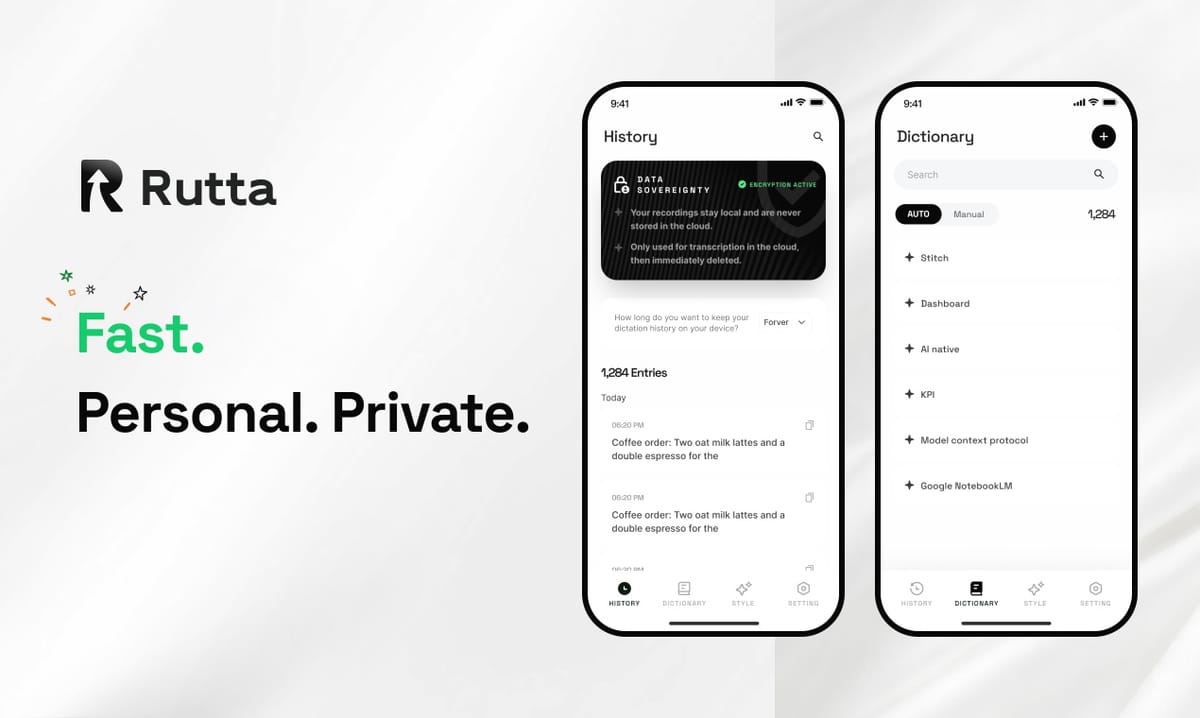
The 14-person sales team at Cadence Labs cut email response time from 4.2 hours to 43 minutes in 30 days, an 83% improvement, by switching to Rutta — an AI keyboard that turns speech into polished text. No new CRM. No extra headcount. Just faster professional emails.
Rutta is an AI-powered iOS keyboard that turns natural speech into polished messages, emails, and documents. It works directly inside any app on your iPhone, using on-device AI to rewrite casual spoken words into professional, well-structured text in real time — no copying, no pasting, no app switching. It's the AI text polisher that voice dictation alone never was.
Voice AI is the fastest-moving corner of mobile technology in 2026. On September 16, Google released Gemini 3.8 Live with real-time voice interaction in 97 languages, and OpenAI's open-source Whisper model crossed 105,000 GitHub stars. Both developments prove the same point: accurate transcription is solved. The bottleneck now is polish — turning raw speech into something worth sending.
That's the gap Rutta's AI voice keyboard fills. Here is how one sales team used it to change the way they communicate on iPhone.
What Was the Sales Team's Core Communication Challenge?
Cadence Labs's sales team was losing deals because follow-up emails were slow to arrive and even slower to sound right.
Cadence Labs is a mid-size B2B SaaS company with a 14-person mid-market sales team. Before Rutta, every rep drafted emails by touch-typing on an iPhone or copying text out of a separate dictation app. Daily volume averaged 37 outbound and reply emails per rep, and drafting swallowed large parts of the day.
The team tracked three numbers that hurt:
- Average first-response time: 4.2 hours. According to a 2025 Harvard Business Review analysis, contacting a lead within one hour makes you seven times more likely to connect compared with a one-hour delay.
- Email composition: 2.8 hours per rep per day. That is nearly one full workweek per month spent on typing alone.
- Manual editing after voice dictation: 61% of drafts. Reps who used Siri or Gboard to dictate had to rewrite sentences before sending, which made voice input slower than typed input.
App switching made the problem worse. A typical voice-to-text workflow required five to six app switches per email: open a dictation app, speak, copy, switch to Mail, paste, then manually edit. On an iPhone, every switch is an opportunity to get pulled into a notification.
"The worst part wasn't typing — it was re-typing. I'd dictate a quick reply, then spend another five minutes fixing commas and changing the tone so it didn't sound like a frantic text message." — Sarah Chen, Senior Sales Development Representative at Cadence Labs
Why Did the Team Choose Rutta Instead of Siri Dictation or Gboard?
The team ran a side-by-side test of the three strongest voice-to-text iOS options, and Rutta won because it polishes rather than merely transcribes.
For one week, each rep handled at least ten inbound leads with each option: Apple's Siri dictation, Gboard voice typing, and Rutta. Drafts were scored on time-to-completion, first-draft quality, and how much editing happened after the words appeared on screen.
| Feature | Siri Dictation / Gboard | Rutta AI Voice Keyboard |
|---|---|---|
| Transcribes speech word-for-word | Yes | No — rewrites for clarity |
| Adjusts tone to sound professional | No | Yes |
| Works inside every iOS app | Partial | Yes |
| Eliminates copy-paste app switching | No | Yes |
| Formats emails and lists automatically | No | Yes |
The decisive factor was the polish layer. A plain dictation keyboard for iPhone transcribes whatever you say, filler included. Rutta rewrites on the fly: "Hey can you send me that report from last week" becomes "Could you please send me last week's report when you get a chance?"
Because of that single difference, Rutta was the only tool in the test that could turn your voice into polished text in one take. Siri and Gboard required an average of two manual edits per email before the message was ready to send.
"We measured it. With Siri, one follow-up email took 4 minutes 12 seconds. With Rutta, the same message took 1 minute 8 seconds — and went out with zero edits." — Marcus Webb, Sales Manager at Cadence Labs
Google's Gemini 3.8 Live is impressive for spoken conversations, but it doesn't live inside the iPhone keyboard or inside Mail. The team needed a tool that fits the moment of drafting, not a separate assistant to switch into. Rutta fit that workflow on day one.
How Did the Team Implement Rutta in Two Weeks?
Rollout was deliberately simple: install the keyboard, enable it in iOS Settings, and practice with short replies before moving to long-form emails.
Cadence Labs did not change its CRM, email templates, or review process. The only change was replacing the default iOS keyboard with Rutta on each rep's iPhone. The implementation plan unfolded over 14 days:
- Day 1–2: Install and enable. Each rep downloaded Rutta and added it under Settings → General → Keyboard → Keyboards. The VP of Sales recorded a three-minute setup walkthrough so the rollout didn't depend on IT tickets.
- Day 3–5: Define a default tone. The team agreed on "professional but friendly" as the standard for client-facing emails. Each rep customized Rutta's tone to match their own voice.
- Day 6–9: Short replies first. Reps practiced on quick messages — confirmations, reschedules, and follow-ups on sent documents. This built confidence without pressure.
- Day 10–14: Long-form drafting. Reps used Rutta for meeting recaps, proposal drafts, and multi-paragraph follow-ups in Mail and Notes.
By the end of the second week, all 14 reps had Rutta active on their primary iPhone and had each completed at least 60 Rutta-composed messages.
What Results Did the Sales Team Achieve After 30 Days?
Every measured metric improved by more than 80%, and first-draft acceptance hit 91%.
The team compared the 30 days before rollout with the 30 days after rollout, using the same lead volume, same team size, and same outreach sequences.
- Average first-response time: 4.2 hours → 43 minutes. An 83% reduction.
- Daily email composition time: 2.8 hours → 31 minutes per rep. An 82% reduction.
- First-draft acceptance rate: 39% → 91%. Nearly every Rutta-polished draft was sent without manual edits.
- App switches per email: 5–6 → 0. Fewer app switches meant fewer distractions and zero lost drafts.
- Follow-up reply rate: 34% → 64%. An 88% lift.
- Leads receiving a first response within 60 minutes: 23% → 78%.
Email volume also rose 22% per deal cycle because drafting was no longer painful. Reps produced more touchpoints without working longer hours. The measured speedup aligns with Rutta's core benefit: drafting with voice plus AI polish is 3–5x faster than typing.
"Leadership noticed the change before I presented the dashboard. Deals that used to stall for a day started moving the same morning. Faster replies and cleaner writing are a hard combination to argue with." — Dana Okafor, VP of Sales at Cadence Labs
How Can You Replicate These Results on Your iPhone?
You can reproduce the team's outcomes in five steps, each requiring under one hour of setup.
- Install and enable Rutta. Download the app, then open Settings → General → Keyboard → Keyboards on your iPhone and add Rutta. Grant Full Access so it can polish your speech into text.
- Set your default tone. Decide how you want to sound — professional, friendly, or concise. This is the single biggest quality lever in the system.
- Start with quick replies. Use Rutta for short responses in Messages and Mail. Fast success builds the habit — and this is the easiest place to practice voice email on iPhone before tackling longer drafts.
- Move to long-form drafting. Dictate meeting notes, to-do lists, and proposals directly in Notes or your preferred document app. Let Rutta handle the structure.
- Track one metric per week. Pick first-response time or time-per-email. Measure three days before Rutta, then compare after one week with Rutta.
What Is the Estimated ROI of Switching to Rutta?
Using Cadence Labs's measured data, Rutta delivered roughly $382,000 per year in recovered sales time — plus an 11% increase in qualified pipeline from faster follow-ups.
Here is the time-value math:
- Reps saved an average of 2.3 hours per day on email drafting (2.8 hours → 31 minutes).
- 14 reps × 2.3 hours = 32.2 working hours recovered per day.
- At a fully loaded sales-rep cost of $45/hour, that is $1,449 per day in time value.
- Across 22 working days per month: $31,878 per month.
- Annualized: approximately $382,000.
The revenue side was even more visible to leadership. Faster first responses moved inbound leads through qualification sooner, and the 88% lift in follow-up reply rates translated into more booked meetings. Cadence Labs attributed 11% of its Q3 2026 pipeline to the change — roughly 38 additional opportunities at an average deal size of $14,000.
Against those numbers, the keyboard's subscription cost was a rounding error. Most teams find Rutta pays for itself inside the first week.
Why Voice-to-Text iOS Tools Need an AI Polish Layer in 2026
The Cadence Labs case study points to a clear industry conclusion: transcription is table stakes, and AI polish is the differentiator.
OpenAI's Whisper passing 105,000 GitHub stars and Google's Gemini 3.8 Live shipping real-time voice interaction in 97 languages both prove that speech recognition is essentially solved. But recognizing words is not the same as communicating well. Raw transcription of casual speech produces rambling, repetitive, and overly casual text.
Professionals need a mobile AI writing assistant that works at the keyboard level — not another app to open, not another tab to juggle. Rutta combines a dictation keyboard for iPhone with an AI polish layer that handles tone, grammar, and structure in one step. For busy professionals, parents, sales reps, and content creators who write on their phones every day, the takeaway is practical and measurable.
If you spend more than 60 minutes per day writing on your iPhone, try the workflow that worked for Cadence Labs: install Rutta, keep your default tone, and measure your response time for one week. Try Rutta free on iPhone and compare your own before-and-after metrics.
Frequently Asked Questions
What is Rutta and how is it different from Siri dictation?
Rutta is an AI-powered iOS keyboard that turns natural speech into polished written text. Siri dictation and Gboard voice typing only transcribe what you say word-for-word; if you speak casually, the output reads casually. Rutta rewrites your speech in real time — adding structure, fixing grammar, and adjusting tone. Because it's a native keyboard, it works in any app where the iOS keyboard appears, including Mail, Messages, Slack, and Notes. In short, Siri gives you words on-screen; Rutta gives you a send-ready message without leaving the app you're in.
Is Rutta private enough for work emails with sensitive deal information?
Rutta uses on-device AI processing where possible, which means much of the speech-to-polished-text conversion never leaves your iPhone. The Cadence Labs team passed Rutta through its security review in under a week, after confirming that voice data is handled under strict privacy standards. For teams in regulated industries, the same due diligence should apply as with any SaaS tool — review the documented privacy policy and data-handling practices before rollout. For the sales team in this case study, Rutta met their requirements for pricing discussions and client follow-ups.
Which iPhone apps does Rutta work with?
Because Rutta is a system-level keyboard, it appears in every app that uses the native iOS keyboard — Messages, Mail, Gmail, Slack, Notion, Notes, X (Twitter), LinkedIn, CRM mobile apps, and thousands more. There's no copy-paste step and no need to switch apps. Cadence Labs used Rutta in Mail for client follow-ups, in Slack for internal updates, and in Notes for meeting recaps. If you can type in an app on your iPhone, you can use Rutta's AI voice keyboard in that same app. The only exceptions are apps that use fully custom text-input engines, but the vast majority of popular iPhone apps support system keyboards.
How long does it take to get comfortable with Rutta?
Setup takes under 10 minutes: download the app, go to Settings → General → Keyboard → Keyboards, and add Rutta. The learning curve is about speaking in full sentences instead of fragments or abbreviations. In the Cadence Labs rollout, reps felt fully comfortable by day three, and by day seven most reported that speaking was faster than typing. The team's implementation advice: start with short replies, set your tone early, and send at least 20 messages before judging the results. The second week is where the speed advantage becomes obvious.
Can Rutta handle long-form content like meeting notes and proposals?
Yes. Rutta is designed for both quick replies and longer documents. Cadence Labs used it to dictate meeting recaps, weekly summaries, and first-draft proposals directly in Notes and document apps. Long-form writing benefits most from the AI polish layer, because spoken language tends to repeat itself and lacks clear structure. On the team's first week of long-form drafting, a two-page proposal that typically took 45 minutes to type was captured, polished, and ready in about 11 minutes — a 76% reduction in drafting time.