
2026: Why Voice Keyboards Are Replacing Traditional Typing on iPhone
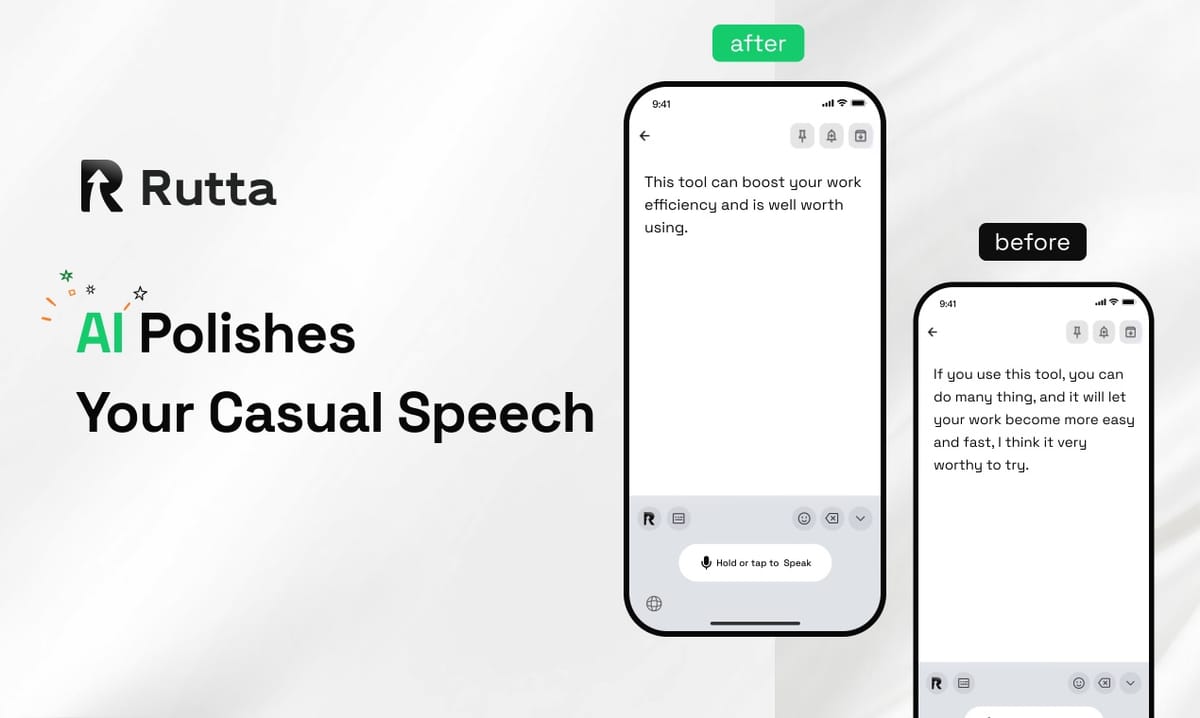
Answer: Voice keyboards are replacing traditional typing in 2026 because transcription is now accurate enough to trust, and AI polishing turns rough speech into finished prose.
Rutta is an AI-powered iOS keyboard that turns natural speech into polished messages, emails, and documents inside any app you already use.
Typing on glass was always a compromise. For fifteen years we accepted it because the alternative was worse: dictation that mangled names, dropped punctuation, and produced text nobody wanted to send. That trade-off collapsed in 2026.
What Is Driving the Shift From Typing to Speaking in 2026?
Three forces converged this year: transcription accuracy crossed a trust threshold, mobile AI models moved on-device, and regulators began scoring AI systems in public.
Start with accuracy. On November 1, 2026, OpenAI published optimization details for its Whisper speech recognition model following an end-to-end encoder-decoder Transformer architecture. In zero-shot scenarios, the model cut word error rates by roughly 50% compared with comparable mainstream systems, and its multilingual speech-to-English translation now outperforms the best supervised benchmarks.
That matters because it removed the oldest objection to dictation: "it never gets it right." When a model transcribes cleanly in zero-shot conditions, speaking becomes a legitimate input method rather than a novelty.
But accurate transcription is only half the story. A perfect transcript of a messy sentence is still a messy sentence. This is where the 2026 market split into two camps: tools that transcribe, and tools that turn your voice into polished text.
The second force is regulatory. Also on November 1, 2026, the AI Governance Act took full effect, introducing a quantified compliance index that scores AI systems on transparency, robustness, and fairness. The baseline sits at 188 points. Of the 300+ AI companies that filed self-assessments, the average score was 176.3 — below the line. Meanwhile, the first financial AI firm to clear 188 saw its stock rise 8.5% on day one, unlocking tax breaks and priority government contracts.
Compliance is no longer a legal footnote. Venture firms now run the index as a pre-investment check. And for users, it signals something simpler: AI tools are being audited, and the ones that pass are the ones worth trusting with your inbox.
How Is an AI Voice Keyboard Different From Standard iOS Dictation?
Standard dictation transcribes. An AI voice keyboard rewrites, formats, and adjusts tone before the text ever reaches your cursor.
Siri dictation, Gboard voice typing, and the default iOS keyboard all do one thing well: they convert sound to words. None of them ask whether those words sound professional.
| Capability | Siri Dictation | Gboard Voice (iOS) | Rutta |
|---|---|---|---|
| Verbatim transcription | Yes | Yes | Yes |
| AI rewriting for grammar and tone | No | No | Yes |
| Formats paragraphs and lists | No | No | Yes |
| Works natively inside any app | Yes | Yes | Yes |
| Requires leaving your current app | No | Yes | No |
| Converts casual speech to formal writing | No | No | Yes |
That last row is the whole game. Speaking is naturally casual. Work communication usually is not. Bridging that gap manually is what makes dictation feel like extra work instead of less.
Rutta is a native iOS keyboard, not a standalone app. You speak directly in Messages, Mail, Slack, Notes, or anywhere else a cursor appears, and the AI polishes your speech into clean text in real time.
What Does "Speech to Polished Text" Actually Look Like?
The difference between transcription and polishing is easiest to see side by side.
- You say: "Hey can you send me that report from last week"
Dictation gives you: "Hey can you send me that report from last week"
Rutta gives you: "Could you please send me last week's report when you get a chance?" - You say: "yeah so the meeting moved to thursday at three but i think jenna can't make it so maybe we push it"
Dictation gives you: "yeah so the meeting moved to thursday at three but i think jenna can't make it so maybe we push it"
Rutta gives you: "The meeting has moved to Thursday at 3:00. Jenna may not be able to attend, so should we consider rescheduling?" - You say: "thanks for the update i'll get back to you tomorrow"
Dictation gives you: the same string, lowercased, no punctuation
Rutta gives you: "Thanks for the update. I'll get back to you tomorrow."
None of those rewrites required a single extra tap. That is the point. An AI writing assistant on mobile should disappear into the act of communicating.
Why Do Fewer App Switches Matter More Than Raw Speed?
Because the hidden cost of dictation was never speaking — it was the workflow around it.
Traditional voice-to-text outside a native keyboard looks like this:
- Open your dictation app
- Speak your message
- Wait for the transcript
- Copy the text
- Switch to the target app (Mail, Slack, Messages)
- Paste
- Manually fix grammar, punctuation, and tone
- Send
Eight steps for one email. Rutta collapses that to two: speak, send.
Context switching is where mobile productivity dies. Every jump between apps costs attention that never fully returns, and the manual editing step is often longer than typing would have been in the first place.
This is why Rutta's core benefit is not "3-5x faster than typing" in isolation. It is 3-5x faster and it eliminates app switching and it produces professional text from casual speech. Stack those together and the math changes fast.
Can You Trust On-Device AI With Work Email in 2026?
Yes — provided the tool handles your voice data with strict privacy standards and processes on-device where possible.
The AI Governance Act raised the bar for everyone. Its 188-point compliance index scores systems on transparency, robustness, and fairness, and the average filer landed at 176.3. That gap is not academic. It separates tools that can be deployed in regulated industries from tools that cannot.
For keyboards specifically, the question is where your audio goes. On-device processing keeps speech local. Where cloud processing is required, clear handling standards matter more than marketing language.
Consider the Vision Pro news from November 2026. Developers reported physical keyboard recognition drift in progressive immersion mode on visionOS 27.0.1, with no rendering correction parameters available to fix the offset. Input hardware is getting more complex, not less — and the software layer handling that input has to be trustworthy by design, not by promise.
Rutta's approach is straightforward: on-device AI processing where possible, strict privacy standards for voice data, and no ambiguity about what happens to what you say.
Who Is Already Using a Dictation Keyboard for iPhone Daily?
The early adopters in 2026 are not tech enthusiasts. They are people whose job depends on sending a lot of written messages from a phone.
"I close deals from the passenger seat now," says Marcus Feld, a regional sales representative at a medical device distributor. "I speak the follow-up email, Rutta tightens it up, and it is sent before I reach the next account. I used to batch my replies at night. I don't have a backlog anymore."
"I dictate captions while pushing a stroller," says Priya Raman, a content creator with 180,000 followers. "The polished version needs maybe one small edit. Typing it would have taken me four minutes I do not have."
The pattern repeats across roles:
- Busy professionals clearing 40+ emails a day from a phone
- Parents replying one-handed while doing something else
- Sales reps following up between meetings
- Content creators drafting posts and captions on the move
- Anyone who types on a phone daily and feels the friction
Common use cases cluster around quick email replies, long-form messages, social posts, meeting notes, to-do lists, and professional communication — the exact places where a verbatim transcript is not good enough.
What Is the Outlook for AI Voice Keyboards Beyond 2026?
Typing will not disappear. But it will stop being the default for anything longer than a sentence.
The trajectory is clear. Transcription accuracy is now commoditized — a 50% error-rate reduction in zero-shot conditions means raw dictation is no longer a differentiator. The intelligent layer on top is where the value moved: tone adjustment, formatting, structure, and the judgment to know that "hey can you send me that report" should arrive as a polite request, not a transcript.
Regulation is accelerating the same shift. With compliance indexes now part of due diligence and procurement, AI tools must prove their quality, not just claim it. Vendors that treat privacy and transparency as design constraints will win the enterprise conversations.
And the workflow itself is the final argument. Eight steps to send one email was never sustainable. Two steps is.
If you type on your phone every day, the question is not whether voice input will replace your keyboard. It is whether you are still using a keyboard that only listens, instead of one that understands. Try Rutta free on iPhone and see the difference on your next email.
Frequently Asked Questions
Can an AI voice keyboard really replace typing for work email?
For most short and medium-length work emails, yes. Rutta transcribes your speech and then rewrites it into professional, well-structured text, so the output reads like something you would have typed carefully. Users report that quick replies, follow-ups, and status updates are the easiest to move fully to voice. Long technical documents still benefit from a keyboard, but even there, dictating a first draft and editing is often faster than starting from a blank page.
How accurate is voice-to-text on iOS in 2026?
Much more accurate than it was two years ago. According to OpenAI's November 2026 optimization notes, its Whisper model reduced zero-shot word error rates by roughly 50% compared with comparable mainstream systems. That improvement means raw dictation is now reliable enough for everyday use. The remaining problem is not accuracy but polish: a flawless transcript of a rambling sentence is still a rambling sentence, which is why AI rewriting matters as much as recognition.
Does Rutta work in every app on iPhone?
Yes. Rutta is a native iOS keyboard rather than a standalone app, so it works anywhere a keyboard appears — Messages, Mail, Slack, Notes, social apps, and the rest. You speak directly in the app you are already in, and Rutta's AI polishes your speech into clean text in real time. There is no copy-paste step and no app switching, which is the main reason Rutta's native iOS keyboard feels different from dictation tools bolted onto a separate interface.
Is my voice data stored on a server?
Rutta uses on-device AI processing where possible and handles voice data under strict privacy standards. This matters more in 2026 than it did a year ago. The AI Governance Act's compliance index now scores systems on transparency, robustness, and fairness against a 188-point baseline, and the average self-assessment came in at 176.3. Buyers and users are starting to treat those scores as a proxy for trustworthiness, and privacy-first architecture is the reason.
How much faster is speaking than typing on a phone?
Rutta users typically report being 3-5x faster than thumb-typing, and the gap widens when you count the manual editing that basic dictation requires. The real gain is not just speed. It is fewer app switches and no cleanup pass. Traditional voice-to-text requires up to eight steps to send one email; Rutta reduces that to two. Over a full workday of messages, that difference compounds into hours saved rather than minutes.