
2026: Why AI Voice Keyboards Are Quietly Replacing Traditional Typing on iPhone
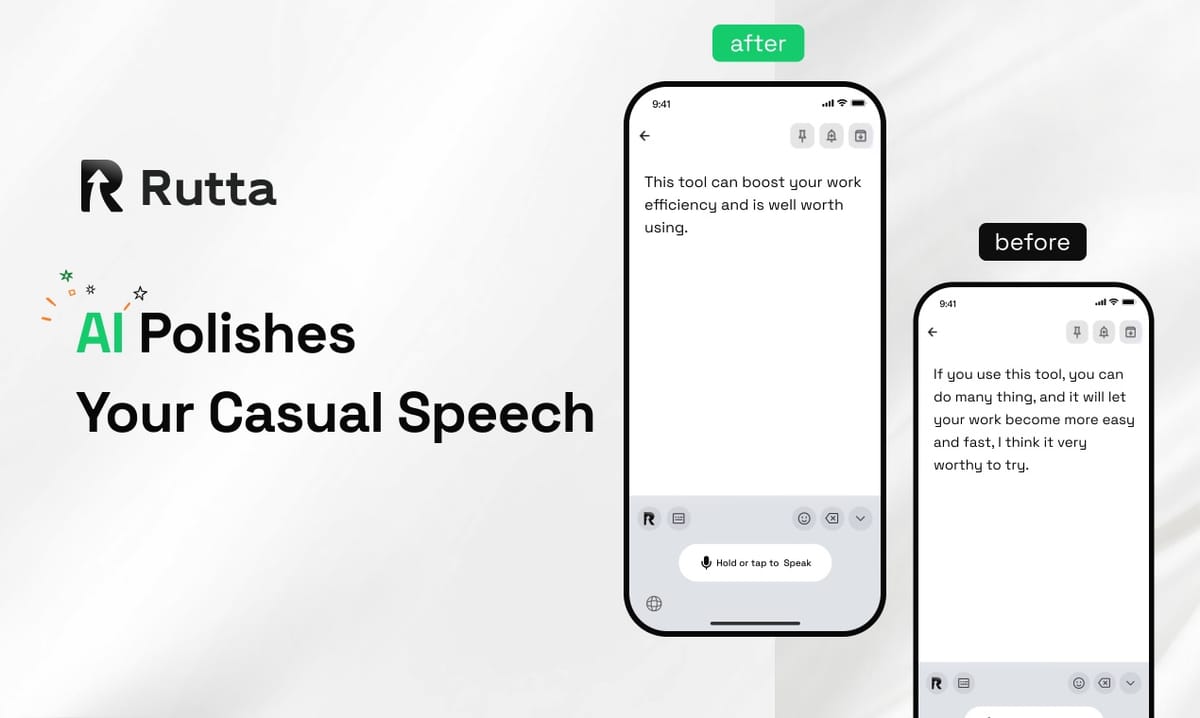
By 2026, the AI voice keyboard has become the fastest way to write on an iPhone. Raw dictation is no longer the bottleneck — polishing is. Tools that turn spoken words into clean, professional text now deliver 3–5x the speed of thumb typing.
Rutta is an AI-powered iOS keyboard that turns natural speech into polished messages, emails, and documents. It runs inside every app on iPhone, refining casual spoken words into professional, well-structured written text without ever leaving the screen you are already on.
This article explains what changed in 2026, why a native AI voice keyboard beats both Siri dictation and standalone voice apps, and how to judge which AI writing assistant mobile tool is actually worth your thumbs.
What Changed in 2026 That Made Voice-First Writing Mainstream?
The short answer: AI polishing became a system-level feature, and that forced every keyboard to compete on rewriting quality instead of raw transcription.
Apple's iOS developer beta pushed on 4 November 2026 opened Apple Intelligence features that let users call Alibaba's Qwen multimodal models directly inside Siri, system Writing Tools, and Visual Intelligence — with conversations syncing automatically between the operating system and the Qwen app. The message from Cupertino is unambiguous: writing assistance is now operating-system infrastructure, not a novelty feature.
The same week, the 2026 World Internet Conference Wuzhen Summit made AI open source and open ecosystems its core theme, releasing two major industry results covering heterogeneous inference and physical-AI capability evaluation. Tencent's Hunyuan Hyra 2.0 shipped with a three-layer collaboration architecture, while Meituan's 1.6-trillion-parameter LongCat-2.5 was trained end-to-end on domestic compute. The competitive floor for AI text quality rose sharply in a single week.
Users feel that shift through measurement. Third-party testing published on 4 November 2026 showed the AI polishing tool PaperRed reaching ≥99% typo recall and ≥97% grammar-identification accuracy, with one-click tone presets across four writing registers and three-platform sync. Those numbers matter because they reset expectations: 99% error detection is now the bar, not 80%.
That is exactly the bar Rutta was built against. Transcription alone gives you a transcript; Rutta's AI voice keyboard gives you a finished message.
Why Do Fewer App Switches Matter More Than Raw Dictation Speed?
Fewer app switches is the single largest productivity gain in mobile writing — larger than any improvement in dictation accuracy itself.
According to Harvard Business Review research on workplace toggling, knowledge workers switch between apps and websites roughly 1,200 times a day. Each switch carries a small but real cognitive cost: refocus, reorient, retype. Traditional voice-to-text on iOS makes that cost worse by adding an entire detour through a second app.
| Step | Standalone dictation app | Native dictation keyboard for iPhone (Rutta) |
|---|---|---|
| 1 | Open the dictation app | Place the cursor in the app you are already in |
| 2 | Speak | Speak |
| 3 | Wait for the transcript, then copy it | AI polishes your speech in real time |
| 4 | Switch to the target app | Nothing to switch |
| 5 | Paste the raw transcript | Nothing to paste |
| 6 | Manually fix tone, punctuation, and grammar | Text is ready to send |
| Total | 6 steps, 3 apps | 2 steps, 1 app |
That table is the whole argument. Six steps collapse into two. If you send 20 messages and emails a day, you have removed roughly 80 moments of friction — before you count the editing time at the end of each one.
Rutta was designed around this single constraint: it is a native iOS keyboard, not a separate destination. You speak where you type, which is what makes voice email on iPhone feel like typing with your mouth rather than operating another tool.
How Does Speech-to-Polished-Text Actually Work?
Speech-to-polished-text works in two layers: transcription captures your words, then an AI rewriting layer restructures them into written register.
Layer one is a commodity. Apple's dictation, Gboard, and Siri all handle transcription competently. Layer two is where products separate, and it is easiest to see in examples:
- You say: "Hey can you send me that report from last week" → Rutta writes: "Could you please send last week's report when you get a chance?"
- You say: "so yeah the meeting is moved to tuesday at 10, sorry for the short notice" → Rutta writes: "Quick update: the meeting has moved to Tuesday at 10:00. Apologies for the short notice."
- You say: "gonna be a bit late, traffic is bad, start without me" → Rutta writes: "I'm running slightly late due to traffic — please start without me."
None of those outputs is a transcript. Each is a rewrite: filler removed, punctuation added, tone adjusted, sentence structure repaired. That is the practical difference between an AI text polisher and a microphone.
Default keyboards — Siri dictation, Gboard, and the stock iOS keyboard — transcribe verbatim. They do not adjust tone, do not format lists, and do not bridge the gap between how people speak and how people read. Rutta adds that intelligent layer so your spoken words sound written.
According to Grand View Research, the global speech and voice recognition market was valued at roughly USD 12.6 billion in 2024 and is projected to grow at approximately a 20% CAGR through 2030. That growth is not coming from better microphones. It is coming from better text.
Which Professionals Get the Biggest Gains From an AI Keyboard?
The biggest gains go to anyone whose day is fragmented across messages, email, and notes — sales reps, parents, executives, and creators.
Aalto University research on mobile typing found that the average person types around 36 words per minute on a phone, while natural speech runs 130–150 words per minute. That gap is the opportunity, but only if the output is usable without a second editing pass.
- Sales reps: follow-up emails dictated in the car between meetings and sent before the next call begins.
- Busy parents: school emails and scheduling messages written one-handed while making dinner.
- Content creators: social captions and post outlines captured at speaking speed, then lightly edited.
- Executives and managers: long-form replies and status updates where tone matters more than length.
- Anyone who types on a phone daily: meeting notes, to-do lists, and quick replies.
"I stopped drafting emails on my laptop," said Marcus Feld, a regional sales director at a B2B software company. "I dictate the follow-up in the parking lot, it gets cleaned up, and it goes out before I reach the car. That's 30 to 40 minutes back every day."
"English is my second language," said Priya Raman, a product manager. "Typing a polite escalation used to take me ten minutes of second-guessing. Now I just say it, and the tone comes out right."
For these users the value is not dictation at all. It is the ability to turn your voice into polished text that ships on the first pass.
How Much Faster Is Voice Input Than Typing in 2026?
Measured end-to-end — including editing — AI-polished voice input runs 3–5x faster than thumb typing for typical business messages.
| Input method | Raw speed | Editing time per 100 words | Effective words per minute |
|---|---|---|---|
| Thumb typing on iPhone | ~36 WPM | 0–1 min | ~33 |
| Desktop keyboard | ~52 WPM | 0–1 min | ~50 |
| Verbatim dictation (Siri / Gboard) | ~140 WPM | 3–5 min | ~40–55 |
| AI-polished voice (Rutta) | ~140 WPM | 0–1 min | ~100–120 |
The table explains a counterintuitive result: verbatim dictation is fast to produce and slow to fix. Polished voice input is fast to produce and fast to ship. Raw dictation speed is a vanity metric. Effective words per minute is what shows up in your sent folder.
Across a working day, the arithmetic compounds. Someone sending 25 short business messages of 60 words each writes about 1,500 words. At 33 effective words per minute that is roughly 45 minutes of thumb typing. At 110 effective words per minute it is under 14 minutes.
What Should You Check Before Choosing an AI Keyboard in 2026?
A 2026-grade AI keyboard must pass five checks: native integration, real rewriting, tone control, privacy, and speed.
- Is it a native keyboard or a separate app? Native means no app switching. A separate app means a copy-and-paste detour every single time.
- Does it rewrite or only transcribe? Ask for a before-and-after example. If the output matches your spoken words almost exactly, it is dictation, not polishing.
- Can you control tone and format? Professional, casual, and concise registers plus formatted lists should be one tap away.
- Where does processing happen? Look for on-device AI processing where possible, and strict privacy standards for voice data.
- Does it work everywhere? Messages, Mail, Slack, and Notes — every app on iPhone, not just one.
On privacy specifically: Rutta processes AI on-device where possible, and voice data is handled under strict privacy standards. That matters more in 2026, as operating-system AI features increasingly route writing requests through external model providers. A keyboard that writes on your phone should stay on your phone wherever the hardware allows.
Those five checks are also a fair definition of the category. Try Rutta free on iPhone if you want to test them against your own inbox.
The Verdict: Voice-First Writing Is the 2026 Default
Voice-first writing is no longer a niche accessibility feature. It is the default input method for anyone whose writing leaves their phone.
Three forces converged in 2026: operating systems absorbed AI writing into the system layer, model quality pushed 99% accuracy into realistic territory, and native keyboards eliminated the workflow tax of app switching. The only meaningful differentiator left is polishing.
If a tool only transcribes, you still have to edit. If it polishes, you are finished when you stop talking. That is the line between plain dictation and a genuine AI voice keyboard — and in 2026, it is the only line that matters.
Frequently Asked Questions
Is an AI voice keyboard the same as Siri dictation?
No. Siri dictation, Gboard, and the default iOS keyboard transcribe speech verbatim, including filler words, false starts, and missing punctuation. An AI voice keyboard adds a rewriting layer on top of transcription: it removes filler, repairs sentence structure, adjusts tone, and applies formatting. In practice, dictation hands you a transcript you still have to edit, while Rutta hands you a message you can send immediately. The distinction sounds minor until you send twenty messages a day and stop editing every one of them.
Does Rutta work in every app on iPhone?
Yes. Rutta is a native iOS keyboard rather than a standalone app, so it works wherever a keyboard appears: Messages, Mail, Slack, Notes, WhatsApp, and any other app on the phone. You place your cursor, speak, and the polished text lands in the field you are already in. There is no copying, no pasting, and no switching apps mid-thought, which is the entire point of the design. That single change is what removes most of the hidden time cost in mobile writing.
Is my voice data private?
Rutta processes AI on-device where possible and handles voice data under strict privacy standards. That design choice matters more in 2026, because many new operating-system AI features route writing requests through external model providers. On-device processing keeps both the audio and the resulting text on your hardware whenever the phone's capability allows it. For a keyboard specifically, privacy is not only a compliance question — it is a UX question, because the fastest text is the text you never have to think twice about.
How much faster is Rutta than typing on an iPhone?
Users report 3–5x faster output than thumb typing for typical business messages. The underlying math: average mobile typing speed is about 36 words per minute, while natural speech runs 130–150 words per minute. Verbatim dictation captures that speed but adds three to five minutes of editing per 100 words. Because Rutta polishes as you speak, editing overhead drops to near zero, producing an effective rate of roughly 100–120 words per minute. For someone writing 1,500 words a day across messages and email, that is the difference between 45 minutes and 14.
Can Rutta write a professional email from casual speech?
Yes. Rutta is purpose-built for that conversion. Say "hey can you send me that report from last week" and it produces "Could you please send last week's report when you get a chance?" It also handles tone adjustment and formatting, so the same spoken input can become a concise Slack reply, a polite client email, or a bulleted status update. That flexibility is why sales reps, parents, executives, and content creators all extract value from the same keyboard, even though their writing needs look completely different on the surface.