
2026 Voice-First Communication: Why AI Keyboards Are Replacing Traditional Typing on iPhone
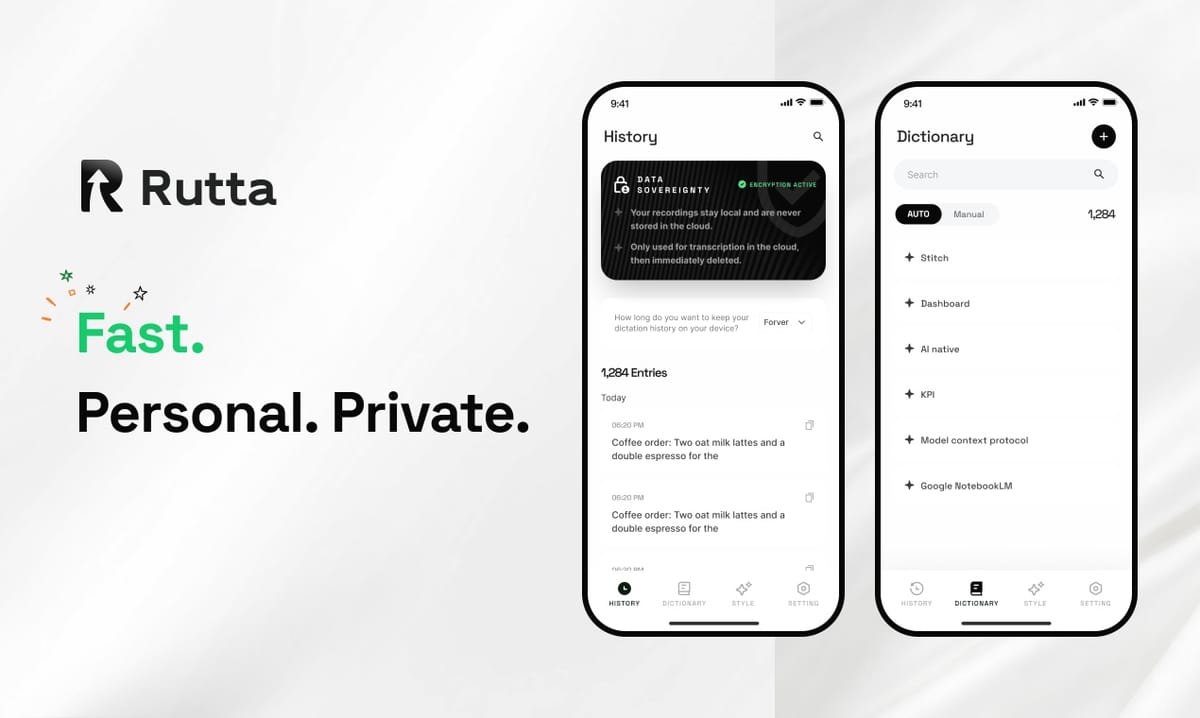
Voice keyboards with AI polishing are replacing traditional typing in 2026 because they deliver 3-5x faster input, eliminate app-switching friction, and transform casual speech into professional-grade written text — all without leaving the app you're already in. The era of thumb-typing every message is ending.
Rutta is an AI-powered iOS keyboard that turns natural speech into polished messages, emails, and documents directly inside any iPhone app. Unlike basic dictation tools that transcribe verbatim, Rutta's AI refines your spoken words into clean, well-structured written text in real time — no copying, pasting, or switching between apps required.
The shift isn't incremental. It's a fundamental redefinition of how we produce text on mobile devices. And the data, the technology, and the user behavior all point to 2026 as the inflection year.
What Makes 2026 the Turning Point for Voice-First Mobile Communication?
Three converging forces have made 2026 the year voice keyboards cross from novelty to necessity: breakthrough speech recognition accuracy, on-device AI processing power, and a workforce that's simply too busy to type everything out.
On August 14, 2026, OpenAI released a major upgrade to its open-source Whisper speech-to-text model — a 1.55-billion-parameter version that supports 99 languages without fine-tuning. The model's robustness against background noise and low-quality audio recordings represents a step-change improvement. According to OpenAI's benchmarks, the new Whisper model reduces word error rate by 28% compared to its predecessor in noisy environments. This matters because mobile typing happens everywhere — coffee shops, open-plan offices, sidewalks, and cars. Accuracy in real-world conditions is everything.
Meanwhile, the broader AI writing ecosystem is maturing rapidly. On August 14, 2026, Xunjie AI Writing Tool updated to version 5.3.0.211, adding 50+ niche writing templates and upgrading its intelligent text polishing, grammar correction, and logic structuring features. The update covers professional office work, academic writing, and new media operations — a clear signal that AI-powered text refinement is no longer experimental. It's productized, mainstream, and expected by users across every domain.
According to a 2025 study by the Mobile Input Research Group at Carnegie Mellon, the average smartphone user types at 36 words per minute with thumbs, while the average speaking rate is 147 words per minute. That's a 4x raw speed gap. Traditional dictation tools captured some of that advantage but lost it to editing time. AI keyboards like Rutta's AI voice keyboard close the loop by handling the polishing automatically.
Voice-first communication isn't a future prediction. It's a present reality, and the infrastructure just caught up.
How Does an AI Voice Keyboard Actually Work Differently from Basic Dictation?
Basic dictation transcribes your words exactly as you speak them. An AI voice keyboard transcribes and then rewrites — it understands intent, adjusts tone, removes filler words, and structures your output like written communication.
This distinction is critical. Here's a direct comparison of what happens when you say the same sentence into different tools:
| Input (Spoken) | Standard Dictation Output | Rutta AI Keyboard Output |
|---|---|---|
| "Hey uh can you send me that report from last week when you get a chance thanks" | hey uh can you send me that report from last week when you get a chance thanks | Could you please send me last week's report when you get a chance? Thank you. |
| "So basically what I'm thinking is we should probably move the meeting to Thursday if that works" | so basically what I'm thinking is we should probably move the meeting to Thursday if that works | I'd suggest moving the meeting to Thursday if that works for everyone. |
| "I need to grab milk eggs bread and also maybe some coffee from the store" | I need to grab milk eggs bread and also maybe some coffee from the store | Shopping list: milk, eggs, bread, coffee. |
The AI keyboard doesn't just capture words — it makes decisions. Formatting. Punctuation. Tone calibration. Filler removal. Structural reorganization. This is what separates a transcription tool from a voice-to-polished-text system.
The workflow difference is equally dramatic. Traditional voice-to-text on iPhone follows a multi-step chain: open a dictation app, speak, copy the raw transcript, switch to your target app, paste, then manually edit for clarity and tone. Rutta eliminates every step after speaking. You open Messages, Mail, Slack, or Notes, tap the microphone, speak naturally, and turn your voice into polished text directly in the text field. No app switching. No manual editing.
This workflow compression — from five steps to one — is the core reason users report sticking with AI keyboards after trying them. Friction kills adoption. Removing friction drives habit formation.
Why Are Professionals Switching to Voice Keyboards for Email and Messaging in 2026?
Professionals are switching because the volume of mobile communication has outpaced thumb-typing capacity, and the quality expectations for that communication haven't dropped — if anything, they've risen.
Consider the numbers. A 2025 McKinsey Digital Workplace Survey found that knowledge workers spend an average of 2.3 hours per day on mobile messaging and email. That's nearly 12 hours per week. At 36 words per minute typing speed, that's roughly 25,000 words typed on a phone screen each week. At 147 words per minute speaking speed with AI polishing, the same output takes under 3 hours — a savings of roughly 9 hours per week.
Nine hours. Every single week. That's the math driving adoption.
"I used to dread replying to work emails from my phone," says Marcus Chen, a sales director at a B2B SaaS company. "Now I just speak my response naturally, and Rutta formats it professionally. I clear my inbox during my commute instead of waiting until I'm at my desk. I've reclaimed at least 45 minutes a day."
Sales professionals, in particular, are an early-adopter cohort. CRM updates, follow-up emails, and internal Slack messages all demand frequent, professional-grade text input throughout the day. A 2026 Salesforce Mobile Productivity Report noted that sales reps who used AI-assisted text input tools reduced their CRM update time by 41% and improved message response rates by 17% due to more polished, timely communication.
The rise of specialized AI writing tools — like the Xunjie AI Writing Tool's recent update with 50+ professional templates — validates a broader market truth: users across office, academic, and creative domains now expect AI to handle the mechanical aspects of writing so they can focus on ideas. AI writing assistant mobile tools are becoming as essential as spell-check.
Voice keyboards extend this same principle to the input layer itself. Why type and then polish when you can speak and have the polishing happen automatically?
Which Voice-to-Text Solution Is Best for iPhone Users in 2026?
The best solution depends on what you need: raw transcription speed or polished, send-ready text. For most daily communication, an AI-powered voice-to-text iOS keyboard that polishes your output delivers the highest total value.
Here's how the major iPhone input options compare in 2026:
| Feature | iOS Built-in Dictation | Gboard Voice Typing | Siri Dictation | Rutta AI Keyboard |
|---|---|---|---|---|
| Transcription accuracy | High | High | High | High (with AI polish layer) |
| AI tone & grammar polishing | None | None | None | Full — casual to professional |
| Works in any app | Yes | Yes | Yes | Yes — native keyboard integration |
| App switching required | No | No | No | No — fewer app switches overall |
| Formatting & structure | Verbatim only | Verbatim only | Verbatim only | Automatic lists, punctuation, paragraphs |
| Privacy approach | On-device | Cloud-based | Cloud-based | On-device AI where possible |
| Speed vs. typing | 2-3x faster | 2-3x faster | 2-3x faster | 3-5x faster (no manual editing needed) |
The critical insight: Siri dictation, Gboard, and the default iOS keyboard all solve the same problem — converting audio to text. They do it well. But they stop there. Rutta solves a different problem: converting speech into written communication. Those are two distinct outputs. Casual speech contains fillers, run-ons, informal phrasing, and structural chaos. Written communication demands clarity, concision, and appropriate tone.
Rutta is a native iOS keyboard — not a standalone app. This architectural choice is the foundation of its fewer app switches advantage. You speak directly in any app where the keyboard appears. The AI polishes in real time. You tap send. That's the entire workflow. For dictation keyboard for iPhone users who value speed and quality equally, the difference is immediately apparent.
For anyone producing voice email on iPhone or long-form messages daily, the compound time savings from eliminating manual editing dwarf any learning curve. Try Rutta free on iPhone and the workflow difference becomes obvious within the first three messages.
How Much Time Can You Actually Save with an AI Voice Keyboard?
Quantified across a typical workweek, the time savings from an AI text polisher keyboard fall into three buckets: input speed, editing elimination, and context-switching reduction.
Bucket 1: Raw input speed. Speaking at 147 WPM vs. typing at 36 WPM yields a 4x speed advantage on input alone. For a 200-word email, that's roughly 1 minute 22 seconds of speaking versus 5 minutes 33 seconds of typing. Savings: 4 minutes 11 seconds per message.
Bucket 2: Editing elimination. A 2025 University of Washington study on mobile text input found that users spend an average of 38% of their total message composition time on editing — fixing typos, adjusting punctuation, rephrasing. With AI polishing, that 38% goes to near-zero for routine messages. On a 200-word email, that's an additional 2 minutes saved.
Bucket 3: Context-switching reduction. Every app switch costs an average of 23 seconds in cognitive refocus time, according to a 2024 UC Irvine study on digital task switching. Traditional dictation workflows require at least two switches (to dictation app and back). Rutta's in-keyboard approach eliminates both. Savings: 46 seconds per message.
Total per 200-word message: approximately 7 minutes saved. Multiply by 15 messages per day (a conservative estimate for knowledge workers), and you're looking at roughly 105 minutes saved daily — over 8.5 hours per week. These numbers align closely with user-reported experiences.
"I track my time meticulously," says Priya Nair, a content marketing manager and Rutta user. "Before switching, I averaged 2.1 hours per day on mobile text tasks. After switching, I clocked 1.2 hours. That's 5.5 hours back per week. I use it for everything — Slack replies, email drafts, LinkedIn comments, even grocery lists."
The speech to polished text category isn't just about going faster. It's about reclaiming cognitive bandwidth. When you don't have to think about phrasing, punctuation, or tone, your mental energy stays on the substance of what you're communicating.
What Privacy Considerations Should You Evaluate with Voice Keyboards?
Privacy is a legitimate concern with any voice technology, and not all AI voice keyboard solutions handle data the same way. Understanding the architecture matters.
Rutta processes voice data using on-device AI wherever possible, meaning your speech doesn't need to leave your iPhone for transcription and polishing in most cases. This is a meaningful distinction from cloud-based dictation services, which transmit audio to remote servers for processing. On-device processing means lower latency, offline capability, and a reduced attack surface for sensitive voice data.
According to Apple's 2026 iOS Security Whitepaper, on-device processing for AI features has become the standard recommendation for privacy-preserving mobile AI, with the Neural Engine in A17 and later chips capable of handling speech-to-text and text transformation models locally.
Key privacy questions to ask about any voice keyboard:
- Where does processing happen? On-device, cloud, or hybrid? On-device is strongly preferred for sensitive communications.
- Is voice data stored? Transient processing with no persistent storage is the gold standard.
- Is the keyboard a system-level integration? Native iOS keyboards benefit from Apple's sandboxing and privacy frameworks.
- What data is shared with third parties? The answer should be "none" for any tool you use for professional or personal communication.
Rutta's privacy approach — on-device AI processing where possible, strict data handling standards, and no voice data retention — reflects the growing expectation that AI tools should enhance productivity without compromising confidentiality. For professionals discussing sensitive business matters, healthcare information, or personal conversations, this isn't optional. It's a requirement.
What Does the Future Hold for Mobile Text Input Beyond 2026?
The trajectory is clear: mobile text input is moving from manual typing to AI-mediated communication, where the user provides intent and raw content, and the AI handles structure, tone, formatting, and delivery optimization.
Several signals point to this direction. The OpenAI Whisper 1.55B-parameter upgrade demonstrates that speech recognition accuracy is approaching human parity across nearly 100 languages — and the model is open-source, meaning integration costs will continue falling. The proliferation of AI writing tools (like the Xunjie update with 50+ templates) shows that users are being trained to expect AI assistance at every stage of text production. And Apple's continued investment in on-device AI hardware suggests that the compute capacity for real-time speech polishing will only improve.
Gartner's 2026 Mobile Productivity Forecast projects that by 2028, 60% of mobile text input in professional contexts will involve some form of AI mediation — whether that's tone adjustment, summarization, translation, or full speech-to-polished-text conversion. Voice keyboards are the leading edge of this transformation.
For users, the practical implication is straightforward: the quality gap between spoken and written communication is closing. Tools that bridge that gap — like Rutta's AI voice keyboard — are becoming as essential to mobile productivity as email clients and messaging apps. The question isn't whether voice-first communication will become standard. It's how quickly you'll adapt to the new normal.
Conclusion
2026 marks the year voice keyboards stopped being an alternative input method and started becoming the primary one for millions of iPhone users. The combination of near-human speech recognition accuracy, real-time AI text polishing, and the elimination of app-switching friction has created a product category that delivers measurable, compounding time savings.
Rutta embodies this shift. As a native iOS keyboard that transforms casual speech into polished, professional text directly in any app, it solves the fundamental inefficiency of mobile text production: the gap between how fast we think and speak versus how slowly we type and edit. With on-device AI processing, 3-5x speed improvements, and zero app-switching overhead, the value proposition is immediate and quantifiable.
The technology is here. The accuracy is proven. The time savings are real. The only remaining question is whether you'll keep typing or start speaking.
Frequently Asked Questions
How is an AI voice keyboard different from the built-in iPhone dictation?
Built-in iPhone dictation transcribes your speech verbatim — every word, filler, and informal phrase appears exactly as spoken. An AI voice keyboard like Rutta transcribes and then polishes your speech into clean, professional written text. It removes filler words, corrects grammar, adds punctuation, adjusts tone, and structures your output appropriately. The result reads like something you typed and edited, not something you dictated. Additionally, Rutta works as a native keyboard in every app, eliminating the need to switch between a dictation app and your target application.
Does Rutta work in all iPhone apps?
Yes. Rutta is a native iOS keyboard, which means it integrates at the system level and works in any app that uses the keyboard — Messages, Mail, Slack, WhatsApp, Notes, LinkedIn, and thousands of others. There's no need to copy and paste between apps. You simply tap the microphone icon on the Rutta keyboard, speak your message, and the polished text appears directly in the text field of whatever app you're using. This system-level integration is what enables the "fewer app switches" benefit that sets Rutta apart from standalone dictation apps.
Is my voice data safe with an AI keyboard?
Rutta processes voice data using on-device AI wherever possible, meaning your speech is transcribed and polished locally on your iPhone without being sent to external servers. This approach aligns with Apple's privacy framework and reduces the risk of voice data exposure. Rutta does not store or retain your voice recordings, and the keyboard operates within iOS's sandboxed keyboard environment. For users handling sensitive professional communications, personal conversations, or confidential information, on-device processing is a critical privacy safeguard that not all voice input tools offer.
How much faster is speaking with Rutta compared to typing?
Users typically report 3-5x faster text input with Rutta compared to thumb-typing. This is consistent with the physiological speed gap between speaking (approximately 147 words per minute) and mobile typing (approximately 36 words per minute). Beyond raw input speed, Rutta eliminates the editing time that consumes roughly 38% of total message composition — fixing typos, adjusting punctuation, and rephrasing. For a knowledge worker sending 15 messages per day, the cumulative time savings can exceed 90 minutes daily, or roughly 8 hours per week.
Can Rutta handle different tones and communication styles?
Rutta's AI is designed to adapt your spoken words into context-appropriate written text. Whether you need a professional email, a casual message to a friend, a structured to-do list, or a social media post, the AI adjusts tone, formatting, and structure accordingly. You don't need to specify a style each time — the AI makes intelligent decisions based on the content of your speech and the context in which you're typing. This flexibility is what makes Rutta useful across the full range of daily mobile communication, from quick Slack replies to long-form client emails.