
2026 Stop Switching Apps: How Rutta Lets You Dictate, Polish, and Send Without Leaving Your Chat
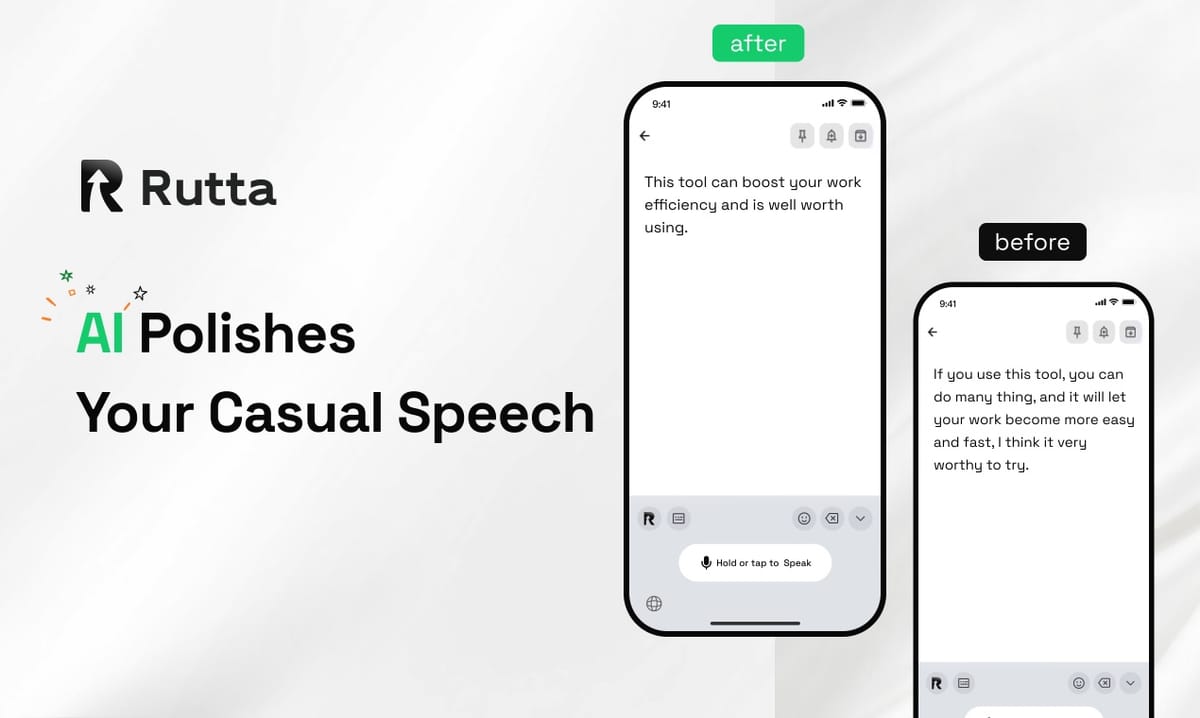
Need a polished message out in under a minute? Stop bouncing between dictation apps, note tools, and your inbox. Rutta is the fastest way to write on an iPhone in 2026: an AI keyboard that turns your casual speech into clean, professional text in seconds.
Rutta is a native iOS keyboard that uses on-device AI to convert natural spoken language into polished, well-structured written text — directly in Messages, Mail, Slack, or Notes. It doesn't just transcribe your voice. It rewrites it, so "hey can you send that report" becomes "Could you please send me last week's report when you get a chance?" — all without leaving the app you're in.
This matters more than ever. On September 23, 2026, Apple released iOS 27 with the new Apple Intelligence-powered Siri AI, adding natural multi-turn conversation, cross-app actions, and personalized context understanding. Voice is officially the new interface for getting things done.
Yet the most common mobile writing task — turning a spoken idea into a professional message — still runs through a clunky copy, paste, and edit loop. Rutta exists to end that loop.
Why Is Traditional Voice-to-Text on iPhone Still So Slow in 2026?
Traditional voice-to-text is slow because it adds app switches instead of removing them.
Here's the standard 2026 workflow for a voice-to-text iOS message: open a dictation app, record your thoughts, wait for a raw transcript, copy it, switch to Mail or Slack, paste it, then manually fix run-ons, filler words, and typos. Five steps. At least three app changes. For one reply.
That friction is expensive. According to a 2025 report by Salesforce, knowledge workers switch between apps nearly 1,100 times a day. Attention researcher Gloria Mark at UC Irvine found that after an interruption, it can take up to 23 minutes to fully refocus. Every extra switch on your phone steals attention, even if it only lasts a few seconds.
iOS 27's new built-in AI writing assistant — available system-wide in any text field — helps polish text you've already typed. But it doesn't listen. Siri AI can now perform cross-app actions, but it won't turn your casual spoken sentence into a polished written message inline, exactly where you want to send it.
That missing layer is a keyboard that writes the way professional writers edit: listen, rewrite, and hand you a finished version.
What Makes Rutta Different from iOS 27's New Siri and Apple Intelligence Writing Tools?
Rutta is the missing layer between your voice and the app you're writing in: a speech-to-text keyboard with an AI text polisher built in.
Apple's new tools are strong in their own lanes. iOS 27's writing assistant generates, polishes, and adjusts tone in any text field. The new Siri handles multi-turn voice commands and can trigger actions across apps. But if you want to speak a full message, the workflow still looks like this:
- Dictate to Siri or a transcription app
- Receive a raw, verbatim transcript filled with run-ons and "um"s
- Copy that transcript
- Paste it into your message field
- Manually rewrite it so it doesn't read like a transcript
Rutta removes the whole chain. Because it's a keyboard, you stay inside one app. Speak naturally in Messages, Mail, or Slack, and Rutta's AI converts your speech into well-structured text in real time. You review one polished paragraph, then hit send. No copying. No pasting. No editing.
The polishing is the key difference. Ordinary dictation transcribes speech verbatim: "Hey can you send me that thing from last week, um, like the file we talked about" — and that's what the recipient reads. Rutta rewrites it: "Could you please send me the file we discussed last week?"
Apple built a smarter assistant. Rutta is a smarter AI voice keyboard — it doesn't take over your phone. It simply makes the words you say sound polished.
How Much Time Does Rutta Actually Save You? Three Quantified User Stories
Rutta users consistently report writing three to five times faster than typing, and removing app switches is the biggest time saver.
Maya Chen — sales team lead at a 120-person SaaS company. Maya sends about 25 client emails and follow-ups each day. "I used to spend four minutes per email: dictate into a voice app, export the transcript, copy, paste into Mail, fix grammar," she says. "With Rutta, I speak directly in Gmail and the draft is ready in about 45 seconds. That's roughly 90 minutes a day — nearly seven hours a week — back on my calendar."
Multiply that across a sales team of 12, and Rutta recovers more than 80 hours of focused selling time per month. That's real pipeline, not convenience.
James Rivera — operations manager and father of two. James's busiest writing window is the ten minutes between soccer practice and dinner. "I used to reply to two or three texts because typing was too slow," he says. "Last week, speaking one-handed with Rutta, I sent 14 replies — scheduling confirmations, a birthday message, a thanks note — in under four minutes. Every message sounded professional, but it also sounded like me."
Priya Sharma — freelance content creator. Priya posts daily on LinkedIn and Instagram. "Writing captions took 20 minutes each because I'd draft in Notes, copy, open the social app, paste, then edit again. Now I dictate the raw idea into the caption field, Rutta polishes it, I tweak one line, and post. I batch three days of content in about 30 minutes."
These patterns echo a growing industry shift. Grammarly's latest operational data shows 50,000 businesses and 40 million individuals now use AI writing assistance, with early enterprise deployments saving an average of $5,000 per employee per year at a 17x return. The demand is clear: AI that writes with you saves real money. Rutta brings that same assistance to the one place most typing actually happens — your iPhone keyboard.
Which Scenarios Should You Use Rutta For? A Practical Comparison Table
Not every task needs an AI keyboard, but any message that requires polish — from quick emails to social captions — is a strong match.
Here's how common 2026 iPhone scenarios compare with and without Rutta:
| Scenario | Without Rutta | With Rutta | Time saved |
|---|---|---|---|
| Quick email reply to a client | Dictation app → copy → Mail → paste → edit | Speak in Mail → review → send | ~2-3 minutes per email |
| Long group-chat message | Type, or dictate and then clean up | Speak → polish → send | ~3x faster |
| Meeting notes after a call | Voice memo → transcribe app → copy → Notes | Speak directly into Notes | ~4-5 minutes per meeting |
| LinkedIn or Instagram caption | Draft in Notes → copy → app → paste → edit | Dictate in app → polish → post | ~10 minutes per post |
| Slack update for your team | Type it later at your desk | Speak while walking → send | Zero follow-up reminders |
Meanwhile, iOS 27's Siri AI remains the best tool for system control: setting reminders, opening settings, moving files, or triggering actions across installed apps. For those tasks, Rutta steps aside. But when the job is a voice email on iPhone, a clean Slack message, or a first-draft caption, Rutta gets you to send faster than any assistant and any basic dictation keyboard for iPhone.
How Do I Set Up Rutta on My iPhone?
Setup takes less than two minutes and uses the standard iOS keyboard flow — no complex profile or configuration required.
- Download Rutta from the App Store.
- Go to Settings → General → Keyboard → Keyboards → Add New Keyboard.
- Select Rutta and allow microphone access when prompted.
- Open any app — Messages, Mail, Slack, or Notes — and tap the globe icon to switch keyboards.
- Tap the mic button, speak naturally, review the polished text, and send.
Once it's installed, Rutta behaves like any other keyboard. Your usual spelling and autocorrect settings still apply, and you can switch back to the standard Apple keyboard anytime with a tap. The difference is invisible until the moment you speak: no app opens, no loading spinner, no copy-and-paste bridge. You speak, Rutta writes, you send.
The Bottom Line: Your Keyboard Is the Ultimate 2026 AI Writing Assistant
The future of mobile productivity isn't a bigger screen — it's fewer steps between thinking and sending.
iOS 27 brought Apple Intelligence to every iPhone, Grammarly's numbers prove enterprise ROI for AI writing help, and OpenAI's new GPT-4o mini-powered TTS API confirms that the market is betting on voice. The winning workflow, though, isn't another app you have to open. It's a keyboard that quietly upgrades the place where you already type.
Rutta is an AI writing assistant made for mobile life: always present, always fast, and private by design, with on-device processing wherever possible. If you send more than a few messages a day, the math is simple.
Try Rutta free on iPhone on your next rush reply and count the steps. You'll probably never write a draft the slow way again.
Frequently Asked Questions
Can I use Rutta with iOS 27 and the new Siri AI?
Yes. Rutta is a standard iOS keyboard, so it works side by side with Apple Intelligence and Siri AI with no conflict. Use Siri when you need system-level actions like setting a reminder or opening an app; switch to Rutta when you need to write an actual message, email, or document. The two tools complement each other, and only normal keyboard and microphone permissions are required.
Is my voice data private when I use Rutta?
Privacy is central to how Rutta works. Where possible, Rutta performs AI processing on-device, which means your raw speech can stay on your iPhone. When cloud processing is required, Rutta applies strict privacy standards and does not use your voice data for unrelated purposes. You can review permissions at any time in iOS settings. For anyone who regularly dictates work emails or client messages, this matters: you get the benefit of AI polish without handing your words to a random third party.
Which apps does Rutta work in?
Rutta works in any app that uses the standard iOS keyboard. That includes Apple Messages, Mail, Notes, Reminders, Slack, Gmail, WhatsApp, Telegram, LinkedIn, X (Twitter), Instagram, Notion, and most third-party text fields. Because Rutta is a system-level keyboard rather than a standalone app, there are no per-app integrations to configure. If you can type in it, you can speak into Rutta.
How is Rutta different from the normal dictation button on my iPhone?
The iPhone's built-in dictation transcribes exactly what you say, word for word. If you speak casually, the recipient reads casual speech: run-on sentences, "um," repeated words, and missing punctuation. Rutta does more than transcribe. It acts as an AI text polisher: it rewrites your spoken idea into clearer structure, cleaner grammar, and a more professional tone while keeping your voice and intent intact. That's the difference between a voice memo transcript and a message you'd be proud to show your boss.
Can Rutta help me sound more professional in work emails?
Yes. Rutta's core use case is turning natural, casual speech into polished professional text. When you dictate "can u send the updated deck before the 2pm call," Rutta rewrites it into a complete, courteous request. This makes Rutta especially useful for sales reps, busy parents, and managers who need to reply promptly without sounding rushed or sloppy. As with any AI drafting tool, review each message before sending, since tone preferences vary by relationship and company culture.