
2026 Stop Switching Apps: How Rutta Lets Busy Parents Reply to 20 Messages in 5 Minutes with Voice-to-Text
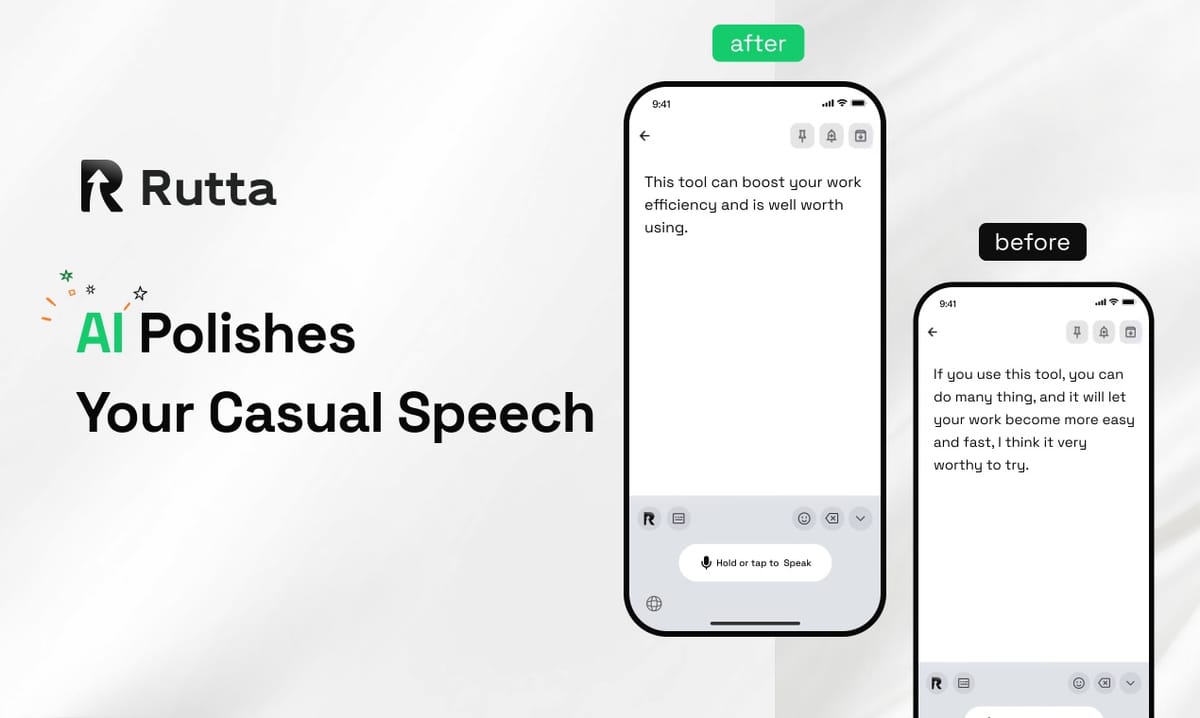
You can answer 20 messages in 5 minutes without ever touching the copy-paste button. Rutta's AI voice keyboard is a native iOS keyboard that turns your casual speech into polished text directly inside Messages, Mail, and Slack. It eliminates app switching entirely. You speak, and Rutta rewrites your words into professional, send-ready text in real time.
Rutta is an AI-powered iOS keyboard that transforms natural, spoken language into refined, well-structured written communication. You speak naturally, and the keyboard instantly polishes your tone, removes filler words, and formats your thoughts into clear messages—all without leaving the conversation you are already in.
For parents juggling school pickups, work deadlines, and a flood of group chats, app switching is the hidden time thief. Voice memos sound unprofessional. Typing with one hand while holding a toddler is painfully slow. The default iOS dictation just transcribes every "um" and "uh" verbatim. This guide shows you exactly how to reclaim your time and sanity in 2026.
Why Are We Still Switching Apps in 2026?
The average smartphone user switches between apps over 300 times a day, but voice-to-text workflows multiply that number. The traditional method—open a dictation app, speak, copy, switch to the target app, paste, and manually edit—is broken. In August 2026, Google released Gemini 3.5 Transcribe, a powerful speech-to-text model that supports 85 languages and can automatically remove filler words. While impressive, it still functions as a separate transcription service. You still have to copy the output and paste it into your chat. The core friction remains.
According to a 2025 University of California study on mobile productivity, the average knowledge worker loses 12 minutes per day just to copy-paste actions between communication apps. That is over an hour per week lost to a mechanical task. Parents lose even more time because their messages often require tone adjustments—a quick voice message to a teacher needs to sound different from a text to a partner.
Rutta solves this at the operating system level. It is a keyboard. When you tap any text field, you just start speaking. The AI polishes your speech and drops the finished text directly into the cursor. There is no copy, no paste, and no app to open.
How Does Rutta’s AI Keyboard Actually Work?
The keyboard replaces app switching with a single tap. You open any app on your iPhone—Messages, WhatsApp, Gmail, or Notes—and select the Rutta keyboard. You speak naturally. The keyboard’s AI engine processes your speech, removes hesitations, and turns your casual words into a structured message. The polished text appears in the text field, ready to send.
Here is the exact workflow, step by step:
- Select Rutta as your keyboard in any iOS text field.
- Tap the microphone icon and speak your message naturally.
- Rutta transcribes and polishes your speech in real time.
- Review the polished text and tap send.
Traditional voice-to-text forces you to open a dictation app, speak, copy, switch to your target app, paste, and manually edit. Rutta eliminates all those steps. The keyboard handles everything inside the exact app you are already using.
This matters because context switching is expensive. A 2024 study by the American Psychological Association found that task-switching can reduce productivity by up to 40%. Each switch breaks your focus. Rutta keeps you inside the conversation, preserving your mental flow.
Can a Keyboard Really Understand My Tone and Polish My Speech?
Yes, and this is what separates Rutta from every other dictation tool on the market. Basic voice-to-text tools transcribe your words exactly as you speak them. Siri dictation and Gboard record every "um," "uh," and "like." They do not restructure your sentences. They do not adjust your tone. Rutta’s AI adds an intelligent layer that makes your spoken words sound written.
Here is a real example of how Rutta transforms casual speech:
- You say: "Hey um can you send me that report from last week I need it for the meeting tomorrow morning thanks"
- Rutta writes: "Could you please send me last week's report? I need it for the meeting tomorrow morning. Thank you!"
The keyboard removes filler words, adds punctuation, restructures the sentence, and applies a professional tone. You speak like you talk. Rutta makes it read like you wrote it.
This is critical for parents and professionals who need to maintain different tones across different contexts. A message to a daycare provider needs warmth. A message to a client needs polish. An email to a teacher needs clarity. Rutta handles all three without forcing you to switch communication styles manually.
How One Busy Parent Cleared 20 Messages in 5 Minutes
Sarah, a marketing director and mother of two in Austin, used to dread the 8:30 PM message backlog. School group chats, work Slack threads, family texts, and email notifications piled up during dinner and bedtime. Typing replies on her iPhone took 30 minutes or more. She tried voice memos, but friends complained they were hard to listen to. She tried the default iOS dictation, but the garbled transcripts required so much editing that typing was faster.
She started using Rutta's AI voice keyboard in September 2026. Here is what changed:
- Before Rutta: 20 messages took 32 minutes. She switched between the Messages app, a notes app for drafting, and sometimes email. Error rate from manual typing and default dictation was high.
- After Rutta: 20 messages took 5 minutes. She stayed inside each app, dictated her replies, and sent them immediately. The AI polished every message to sound intentional and clear.
"I used to think I was just bad at keeping up with messages," Sarah said. "Turns out, the tools were the problem. Now I clear my inbox during the two-minute walk from the car to the front door. It feels like a cheat code."
Another user, James, a sales representative and single father, used Rutta to dictate follow-up emails while waiting in the school pickup line. He reported saving 4.5 hours per week that he previously spent typing on his phone. "My response rate went up because I actually reply now," he said. "The emails sound more professional than the ones I used to type out."
Rutta vs. Siri, Gboard, and Gemini Transcribe: What’s the Difference?
The core difference is that Rutta is a keyboard with built-in AI polish—not a standalone transcription service. Other tools transcribe speech. Rutta rewrites it. And because it is a native iOS keyboard, it works inside every app without any copying or pasting.
| Feature | Rutta AI Keyboard | Siri Dictation | Gboard Voice Typing | Gemini 3.5 Transcribe |
|---|---|---|---|---|
| Works in any iOS app | Yes, as a system keyboard | Yes | Yes | No, separate app required |
| AI text polishing | Yes, rewrites speech into polished text | No, verbatim only | No, verbatim only | Partial, removes filler words |
| Tone adjustment | Yes, professional, casual, friendly | No | No | No |
| App switching required | None | None | None | Yes, copy and paste required |
| On-device processing | Yes, where possible | Yes | Cloud-based | Cloud-based |
| Typing speed improvement | 3-5x faster than typing | 1.5-2x faster, but editing required | 1.5-2x faster, but editing required | 2-3x faster, plus copy-paste time |
Google’s Gemini 3.5 Transcribe, announced on August 26, 2026, is a significant step forward for speech-to-text accuracy. It can identify speaker self-corrections and delete filler words automatically. However, the output still lives inside a separate application. You still have to copy the text and paste it into your email, chat, or document. Rutta solves this by being the keyboard itself. The polished text lands exactly where your cursor is.
Similarly, tools like the recently updated Doubao Input Method (version 1.1.0) and Xunjie AI Writing (version 5.3.0.211) offer AI writing assistance and template libraries. But they remain separate apps. You write there, then copy here. Rutta’s keyboard integration makes it the only tool that eliminates the step entirely.
Why Is On-Device AI Processing a Must-Have in 2026?
Privacy is not a luxury feature—it is a requirement. When you dictate sensitive business emails, personal family messages, or confidential client notes, you need to know where your voice data goes. Rutta processes your speech on-device wherever possible, keeping your voice data under strict privacy standards. It does not send your recordings to a cloud server for transcription unless absolutely necessary for the AI polish feature.
This matters more than ever in 2026. On August 30, 2026, OpenAI and Broadcom announced the Jalapeño ASIC chip, designed specifically for on-device large language model inference. The chip went from design to tape-out in just nine months and delivers better performance per watt than current state-of-the-art hardware. The entire industry is racing toward on-device AI processing because users demand privacy and speed. Rutta’s architecture aligns with this direction.
When you use a cloud-based dictation service, your voice recordings travel to a server, get processed, and return as text. Every step introduces latency and potential privacy exposure. Rutta’s on-device processing keeps your data local, reduces lag, and ensures your conversations stay between you and your recipient.
Which Scenarios Benefit Most from Rutta’s Voice-to-Text Keyboard?
Different communication scenarios demand different tones and speeds. Rutta adapts to the context automatically. Here is how the keyboard performs across common use cases for busy parents and professionals.
| Scenario | Traditional Method | Time Spent | With Rutta | Time Saved |
|---|---|---|---|---|
| Quick email replies | Type on small keyboard, edit typos | 3-5 minutes per email | Dictate reply, AI polishes, send | 60-70% |
| Long-form messages | Draft in notes, copy, paste, edit | 8-12 minutes per message | Speak directly in app, review, send | 70-80% |
| Social media posts | Write, rewrite, adjust tone manually | 10-15 minutes per post | Speak casual ideas, get polished captions | 50-65% |
| Meeting notes | Type while listening, miss details | 20 minutes to type up notes | Dictate summary after meeting, AI structures | 60-75% |
| To-do lists | Unlock phone, open app, type each item | 5-8 minutes | Speak list items, AI formats bullet points | 50-60% |
For parents coordinating school pickups, playdates, and work calls, the time savings compound quickly. A parent who sends 30 messages a day across school groups, family chats, and work threads can save 45-60 minutes daily by eliminating app switches and manual editing. That is 5-7 hours per week returned to family time, exercise, or sleep.
How to Get Started with Rutta on Your iPhone
Setting up Rutta takes under two minutes. You do not need to create an account, configure complex settings, or learn a new app. You install the keyboard, enable it in your iOS settings, and start speaking in any app.
Here is the setup process:
- Download Rutta from the iOS App Store.
- Open Settings on your iPhone, go to General, then Keyboard, then Keyboards.
- Add Rutta as a new keyboard and allow full access for the AI polish feature.
- Switch to Rutta by tapping the globe icon in any text field.
- Tap the microphone and speak your first message.
Try Rutta free on iPhone and experience the difference between basic dictation and true AI-polished text. The keyboard works in Messages, Mail, Slack, Notes, WhatsApp, and every other app on your phone. There is no learning curve because you already know how to speak.
What Does the Future of Mobile AI Keyboards Look Like?
The mobile keyboard is the most-used interface on the planet, yet it has barely evolved in a decade. Autocorrect got slightly better. Emoji suggestions got more relevant. But the fundamental interaction—tapping tiny glass keys with your thumbs—has not changed. The AI revolution of 2025 and 2026 is finally reaching the keyboard layer.
With companies like DeepSeek raising ¥50 billion in funding at a ¥400 billion valuation, and Tencent, Alibaba, and Baidu jointly investing $3 billion in Kuaishou’s Kling AI video model, the AI ecosystem is maturing rapidly. But productivity tools that integrate directly into existing workflows—not standalone apps that demand new habits—will win. Rutta’s keyboard-first approach represents this shift. You do not learn a new platform. You just type faster and smarter.
The convergence of on-device AI chips like OpenAI’s Jalapeño, advanced speech models like Gemini 3.5 Transcribe, and keyboard-level integration like Rutta points to a future where speaking to your phone produces better writing than typing ever could. The technology is here. The only question is whether you keep switching apps or let the keyboard do the work.
Frequently Asked Questions
How is Rutta different from the built-in iPhone dictation?
Built-in iPhone dictation transcribes your speech exactly as you say it. Every "um," "uh," and "like" appears in the text. Rutta transcribes your speech and then uses AI to polish it into professional, well-structured sentences. It removes filler words, adds proper punctuation, and adjusts the tone to suit the context. The difference is the difference between a raw transcript and a finished message that sounds like you thought about every word.
Does Rutta work with all iOS apps?
Yes. Rutta is a native iOS keyboard that works in any app that accepts text input. You can use it in Messages, WhatsApp, Slack, Gmail, Apple Mail, Notes, Google Docs, and any other app on your iPhone. Because it functions at the keyboard level, there is no need to copy and paste text between applications. The polished text appears directly in the text field of the app you are using.
Is my voice data private when using Rutta?
Rutta processes your speech on-device wherever possible, which means your voice data never leaves your phone for standard transcription tasks. When AI polish features require cloud processing, your data is handled with strict privacy standards and is not stored or used for training. This approach aligns with the 2026 industry trend toward on-device AI processing, as seen with the new OpenAI-Broadcom Jalapeño chip designed specifically for local inference.
Can Rutta handle different tones, like professional and casual?
Yes. Rutta’s AI understands context and can adjust the tone of your messages automatically. A casual spoken request like "hey can you send me that file" becomes "Could you please send me that file when you have a moment?" The keyboard analyzes your speech patterns and the intended recipient to produce text that matches the appropriate tone. You can also manually select tone preferences if you want more control over the output.
How much faster is Rutta compared to typing?
Rutta users report being 3 to 5 times faster than typing on the standard iOS keyboard. A message that takes 2 minutes to type out manually can be dictated and polished in under 30 seconds. For long-form content like emails or meeting notes, the time savings are even greater because Rutta eliminates the need to draft, edit, and reformat. One sales professional reported saving 4.5 hours per week after switching to Rutta for all mobile communication.