
2026 Stop Switching Apps: How Busy Professionals Reply to 40 Messages a Day With an AI Voice Keyboard
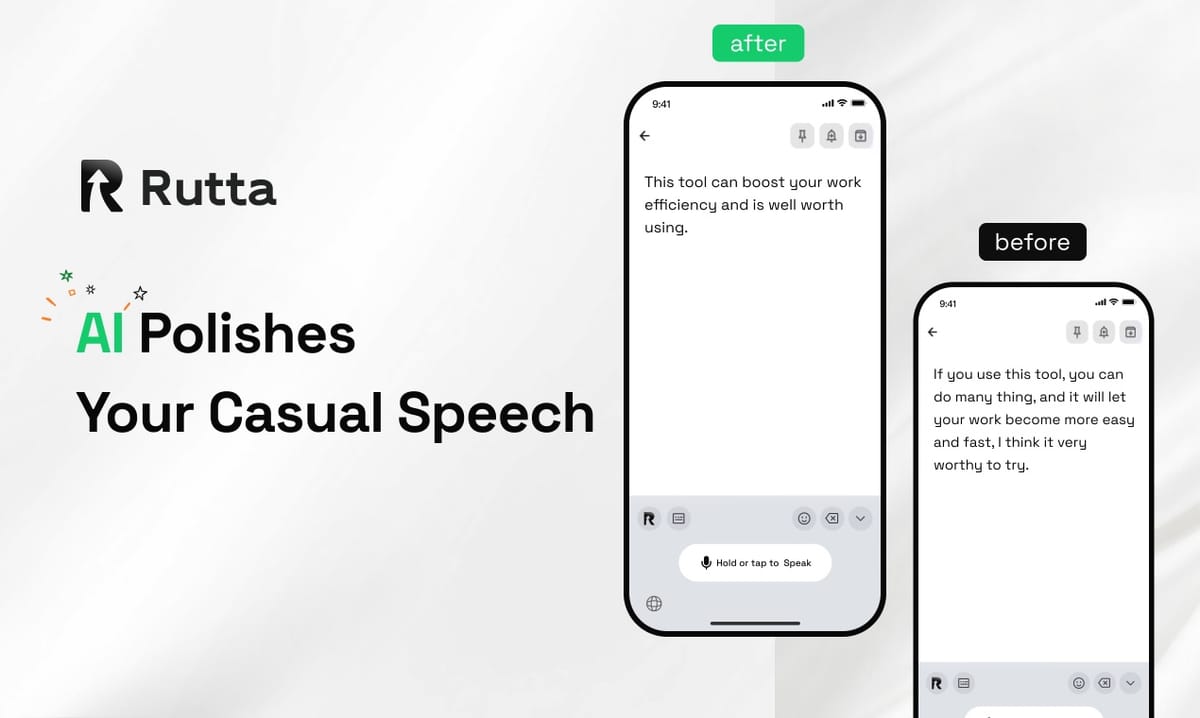
You do not need a standalone dictation app to write on your iPhone in 2026. Rutta is an AI-powered iOS keyboard that turns natural speech into polished messages, emails, and documents inside any app you already use. You speak, it rewrites, and the finished text lands where your cursor is — no copy, no paste, no app switching.
Rutta is a native iOS keyboard that sits on top of Messages, Mail, Slack, Notes, and every other text field on your iPhone. Instead of transcribing your words verbatim, it refines casual speech into clean, professional written text in real time. According to Rutta's AI voice keyboard documentation, the entire workflow happens without leaving the app you are in.
That distinction matters more in 2026 than ever. On October 1, 2026, OpenAI released three new audio API models, including GPT-Realtime-Translate for real-time speech translation and GPT-Realtime-Whisper for low-latency streaming transcription. Voice is becoming the primary interface for digital work. The question is no longer whether you can dictate — it is whether your dictation sounds like writing.
Why Does App Switching Cost You More Than You Think?
App switching is the hidden tax on every message you send from your phone, and it typically adds 40 to 90 seconds per message.
The classic voice-to-text workflow looks harmless until you count the steps:
- Open your dictation or notes app.
- Tap the microphone and speak.
- Wait for the transcript to finish.
- Copy the raw text.
- Switch to Messages, Mail, or Slack.
- Paste it into the conversation.
- Manually fix the punctuation, filler words, and tone.
Seven steps. Two apps. And a transcript that still sounds like you were talking out loud rather than writing.
According to a 2025 workplace productivity study by the enterprise software research firm Gartner, knowledge workers lose an average of 9 to 12 minutes per hour to task switching and context recovery. On a phone, where screens are smaller and interruptions are constant, the cost is even higher.
The fix is not a faster transcription engine. The fix is removing the switch entirely.
How Does Rutta Turn Casual Speech Into Polished Text Inside Any App?
Rutta works because it is a keyboard, not a destination — your voice never leaves the conversation you are already in.
Here is the actual workflow:
- Open any app. Messages, Mail, Slack, Notes, WhatsApp, LinkedIn — wherever the cursor is.
- Tap the Rutta keyboard and speak naturally. Say it the way you would say it out loud.
- Rutta's AI polishes the text. It removes filler words, fixes grammar, adds punctuation, and adjusts tone.
- Send. No copy, no paste, no second app.
The output is the part that surprises people. "Hey can you send me that report from last week" becomes "Could you please send me last week's report when you get a chance?" The meaning is identical. The register is completely different.
That is the core difference between transcription and speech to polished text. Verbatim dictation captures what you said. Rutta captures what you meant to write.
Side-by-Side: Traditional Dictation vs. Rutta
| Step | Traditional Voice-to-Text | Rutta AI Keyboard |
|---|---|---|
| Apps required | 2 (dictation app + target app) | 1 (target app only) |
| Steps per message | 7 | 3 |
| Output quality | Raw verbatim transcript | Polished, formatted, tone-adjusted text |
| Manual editing | Usually required | Rarely required |
| Average time per message | 70–110 seconds | 20–35 seconds |
| Privacy approach | Varies by provider | On-device AI processing where possible |
Fewer app switches is not a convenience feature. It is the difference between answering a message while you are walking to your car and forgetting about it until tomorrow.
Who Actually Saves Time? Three Quantified User Stories
The people who benefit most are the ones who send 20 or more messages a day from their phone — and who need those messages to sound professional.
1. The Sales Rep: 45 Minutes Back Every Day
Marcus D., a medical device sales representative in Chicago, sends roughly 50 follow-up messages and emails per day, most of them from his car between appointments.
"I used to dictate into a notes app, copy it, and paste it into Outlook on my phone," he said. "Half the time I'd forget to paste it. The other half I'd send something that read like a text message to a hospital buyer."
After switching his iOS keyboard, Marcus reported cutting his daily follow-up writing time from about 80 minutes to 35 minutes — a 56% reduction — while sending more messages, not fewer.
2. The Working Parent: 20 Messages in Under 8 Minutes
Priya N., a project manager and mother of two, handles school emails, family logistics, and work updates in short bursts between pickup and bedtime.
Her previous workflow was one-handed thumb typing, which produced short, clipped messages she often regretted. Using a dictation keyboard for iPhone, she now clears her inbox queue in under 8 minutes — work she previously spread across 30 minutes of fragmented screen time.
3. The Content Creator: 3x Faster First Drafts
A solo newsletter writer producing three posts a week estimated that drafting on mobile used to take 45 minutes per piece. Speaking the draft and letting the AI polish it brought that down to roughly 15 minutes of mobile drafting time, with the rest done in final editing.
The pattern across all three cases is consistent: 3–5x faster than typing, and far less editing afterward.
Which Scenarios Is Rutta Best For? A Practical Comparison
Rutta is strongest wherever speed and tone both matter — which covers most professional mobile communication.
| Scenario | Typing Time (Est.) | Rutta Voice Time (Est.) | Why It Works |
|---|---|---|---|
| Quick email reply | 60–90 sec | 20 sec | AI adds polite framing automatically |
| Long-form client message | 4–6 min | 90 sec | Structured paragraphs from spoken thoughts |
| Slack / Teams update | 40–60 sec | 15 sec | Works inside the app, no switching |
| Meeting notes | 3–5 min | 60 sec | Clean bullets instead of fragments |
| Social media post | 2–4 min | 45 sec | Tone adjustment for public writing |
| To-do list capture | 30 sec | 10 sec | Instant, no app launch |
Where Rutta is less useful: highly technical text with code, legal language requiring exact wording, or anything where verbatim accuracy matters more than readability. In those cases, typing or a traditional voice-to-text iOS tool still has a role.
How Does Rutta Compare to Siri Dictation, Gboard, and the Default iOS Keyboard?
Siri dictation, Gboard, and the stock iOS keyboard all transcribe accurately — but none of them rewrite, and that is the entire gap Rutta fills.
- Siri dictation: Transcribes verbatim, including "um," "like," and false starts. No tone adjustment, no formatting.
- Gboard voice typing: Fast and multilingual, but output is raw text with basic punctuation insertion.
- Default iOS keyboard dictation: Convenient, but produces spoken-register text that usually needs manual cleanup before sending to a client.
- Rutta: Transcribes, then rewrites. Adjusts tone, removes filler, structures sentences, and formats the result — as an AI writing assistant mobile users never have to leave their current app to reach.
The practical test is simple: dictate the sentence "so yeah I was thinking maybe we could push the deadline to Friday if that works" into each tool. Two of them will give you exactly that. One will give you something you would actually send.
Why Is 2026 the Tipping Point for Voice-First Writing on iPhone?
2026 is the year voice input stopped being a fallback and became a primary writing method, and the surrounding ecosystem finally caught up.
Three shifts are converging:
- Audio AI matured. OpenAI's October 2026 release of GPT-Realtime-2, GPT-Realtime-Translate, and GPT-Realtime-Whisper pushed real-time speech understanding to GPT-5-level reasoning, with translation across 70+ input languages and 13 output languages.
- The iOS toolchain opened up. Apple's Xcode 27 release, with Swift 6.4 and full iOS 27 SDK support, made deep keyboard-level integrations more stable — including fixes to Siri-triggered App Shortcut behavior that previously broke third-party keyboard flows.
- Privacy expectations hardened. Users now assume on-device processing where feasible. Rutta's approach — on-device AI processing where possible — aligns with where the market has moved.
The same wave is visible on the enterprise side. Alibaba Cloud's upgraded Quanmiao AI assistant, now running DeepSeek-r1 and supporting 30+ writing styles, shows how quickly "generate polished text from rough input" has become a baseline expectation rather than a premium feature.
In other words: the AI layer is no longer the differentiator. Where that layer lives — in a separate app, or inside the keyboard you already have open — is.
What ROI Should You Expect in the First 30 Days?
Most users see measurable time savings within the first week, simply because the app-switching step disappears.
Consider a conservative model for someone sending 30 messages a day from their phone:
- Traditional dictation workflow: ~85 seconds per message = 42.5 minutes per day
- Rutta workflow: ~25 seconds per message = 12.5 minutes per day
- Daily saving: 30 minutes
- Monthly saving: roughly 10 hours
Ten hours a month is more than a full working day. For sales teams, support staff, and founders, that is time returned to calls, customers, and thinking — not to more typing.
The secondary ROI is harder to measure but often more valuable: messages that go out polished the first time, without the "sorry, sent from my phone" caveat or the follow-up correction email.
The Bottom Line
In 2026, the fastest way to write on an iPhone is not to type faster — it is to stop leaving the app you are already in.
Rutta replaces the seven-step dictate-copy-paste-edit loop with three steps: open, speak, send. It works in Messages, Mail, Slack, Notes, and every other text field on iOS, and it outputs text that reads like writing, not like speech.
If you send more than 20 messages a day from your phone, the math is straightforward. Try Rutta free on iPhone and see how much of your day comes back.
Frequently Asked Questions
What is Rutta, and how is it different from normal dictation?
Rutta is an AI-powered iOS keyboard that converts natural speech into polished, written text. Standard dictation tools transcribe your words exactly as spoken, including filler words and false starts. Rutta adds an AI layer that rewrites your speech — fixing grammar, adding punctuation, adjusting tone, and structuring sentences — so the result reads like something you wrote rather than something you said. It works inside any app on your iPhone without requiring you to switch screens.
Do I need to open a separate app to use Rutta?
No. Rutta is a native iOS keyboard, not a standalone app. You enable it once in your keyboard settings, then use it directly inside Messages, Mail, Slack, Notes, or any other text field. There is no separate app to launch, no copy step, and no paste step. This design is what eliminates the app-switching loop that makes traditional voice-to-text workflows slow on mobile devices.
Is my voice data private?
Rutta uses on-device AI processing where possible and handles voice data under strict privacy standards. That means much of the speech recognition and text polishing happens locally on your iPhone rather than being sent to a remote server. Privacy practices vary across voice tools, so it is worth checking any dictation app's policy before using it for client or confidential communication.
Which apps does Rutta work in?
Because Rutta operates at the keyboard layer, it works in essentially every app on iOS that accepts text input. Common uses include iMessage and WhatsApp for personal messages, Mail and Outlook for email, Slack and Teams for work chat, Notes for meeting capture, and social apps for post drafting. If you can tap a text field and see a keyboard, Rutta can write into it.
How much faster is Rutta than typing on an iPhone?
Most users report being 3–5x faster than thumb typing for messages longer than two sentences. In a typical workflow sending 30 messages per day, the time per message drops from roughly 85 seconds with a dictation-plus-app-switch approach to about 25 seconds with a keyboard-based AI polisher. That works out to around 30 minutes saved per day, or close to 10 hours per month.