
2026 Stop Switching Apps: How Busy Professionals Dictate, Polish, and Send Email Without Leaving iPhone
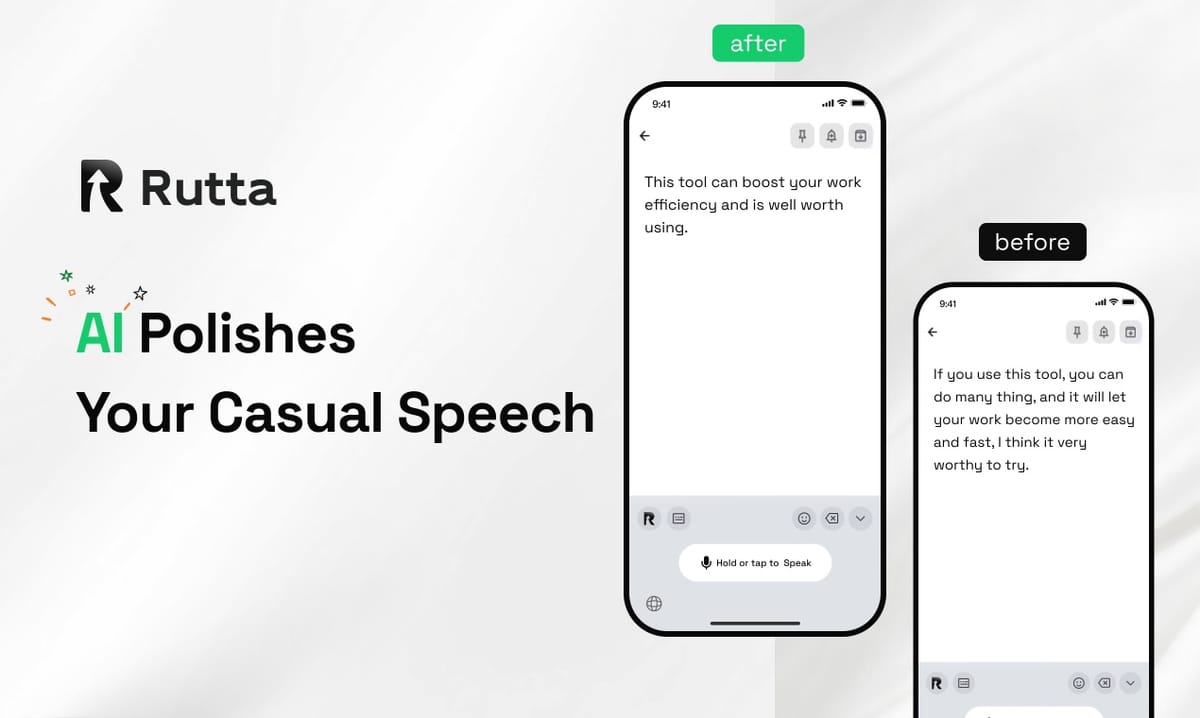
Rutta turns your spoken words into polished, professional text inside any iPhone app — 3-5x faster than typing, with zero app switching.
Rutta is an AI-powered iOS keyboard that converts natural speech into clean, well-structured messages and emails in real time, without ever leaving the app you are already in.
If your day is a blur of Slack threads, client emails, and half-finished notes, the bottleneck is rarely your thinking. It is the typing. This guide shows exactly how busy professionals cut that bottleneck in 2026.
Why Does Voice-to-Text on iOS Still Feel Slow in 2026?
The reason is simple: almost every built-in voice tool transcribes your words, but none of them rewrite them — so you still spend minutes cleaning up sloppy sentences and jumping between apps.
Apple made real progress here. On October 18, 2026, Apple updated iOS Voice Memos to support real-time dictation in 10 languages, including Simplified Chinese, on iPhone 12 and later, with searchable transcripts and text export. That is genuinely useful — but it still lives in a separate app, and it still gives you a raw transcript.
The industry is moving fast on the speech layer too. In mid-October 2026, OpenAI released three new audio API models, including GPT-Realtime-2 with GPT-5-class reasoning and a streaming transcription model that handles 70+ input languages. The message is clear: raw speech recognition is becoming a commodity.
What is still rare is the layer after transcription — the AI polish that makes spoken words read like written ones.
Here is the difference in workflow steps:
- Traditional voice-to-text: open dictation app → speak → wait → copy text → switch to target app → paste → manually fix grammar and tone → send. That is 8 steps.
- Rutta: open keyboard in the target app → speak → send. That is 3 steps.
Five saved steps per message sounds trivial until you multiply it by 40 messages a day.
What Is an AI Voice Keyboard, and How Is It Different From Siri Dictation?
An AI voice keyboard is a keyboard extension that both transcribes and rewrites your speech, so the text arrives already polished — while Siri, Gboard, and the default iOS keyboard only give you a verbatim transcript.
The practical difference shows up in one sentence. Say this out loud: "Hey can you send me that report from last week."
A standard dictation tool gives you exactly that. Rutta gives you: "Could you please send me last week's report when you get a chance?"
Same words spoken. Completely different impression received. That rewriting layer is what separates a transcription tool from an AI writing assistant for mobile.
| Capability | Siri Dictation | Gboard Voice | iOS Default Keyboard | Rutta |
|---|---|---|---|---|
| Speech-to-text accuracy | Good | Good | Good | Good |
| AI rewriting and polish | No | No | No | Yes |
| Tone adjustment | No | No | No | Yes |
| Automatic formatting (lists, paragraphs) | No | No | No | Yes |
| Works inside third-party apps | Partial | Yes | Yes | Yes |
| App switching required | Sometimes | No | No | No |
| On-device processing where possible | Yes | Partial | Yes | Yes |
Notice the pattern. Everything above the "AI rewriting" row is table stakes in 2026. Everything below it is where the real time savings live.
How Do You Turn Casual Speech Into Polished Email on iPhone in 3 Steps?
You do it with a native keyboard that never asks you to leave the conversation, thread, or compose window you are already in.
- Open your target app and tap the text field. Gmail, Outlook, Messages, Slack, LinkedIn, Notes — it does not matter. Rutta is a keyboard, so it appears anywhere you can type.
- Speak naturally. Do not rehearse. Say it the way you would say it to a colleague across the desk. Fillers, false starts, and casual phrasing are all fine.
- Review and send. Rutta's AI polishes your speech into clean, structured written text in real time. Read it once, then hit send.
That is the whole loop. There is no copy, no paste, no app switch, no second round of manual editing.
This is what "speech to polished text" actually means in practice — not a transcript you have to fix, but a finished draft you can send. You can turn your voice into polished text in under 20 seconds for a typical reply.
Which Scenarios Benefit Most From a Dictation Keyboard for iPhone?
The highest-value use cases are high-volume, time-sensitive messages where tone matters and a sloppy reply costs you something.
| Scenario | Typical Typing Time | With Rutta | Why It Works |
|---|---|---|---|
| Quick email reply | 2-3 minutes | 20-30 seconds | Polish layer removes editing rounds |
| Long client update | 8-10 minutes | 2-3 minutes | Speak structure, AI formats it |
| 20-message inbox sweep | 45 minutes | 12-15 minutes | No app switching between replies |
| Meeting notes | 15 minutes | 4 minutes | Auto-formatting into clean notes |
| Social media post | 5 minutes | 60 seconds | Tone adjustment for the platform |
| To-do list capture | 3 minutes | 40 seconds | Structured list output |
Less obvious but equally valuable: multilingual professionals. Rutta's polish layer handles the rewrite, so you can speak the thought in the language you think in and still send professional English.
What Real ROI Do Busy Professionals See?
Users consistently report saving 40-70 minutes per day, which compounds into roughly one full workday recovered every two weeks.
These three cases reflect the pattern across sales, parenting, and content work.
- Sales rep, 40 follow-ups per day. Marcus Reyes, an account executive at a B2B software firm, sends 35-45 follow-up emails daily. Before Rutta, he averaged 70 seconds of typing and editing per message — about 50 minutes a day. With voice-to-polished-text, that dropped to roughly 25 seconds per message, around 18 minutes a day. Net saving: about 32 minutes daily, or 2.5 hours a week of reclaimed selling time.
- Working parent, 20 messages in 5 minutes. Priya Nandakumar, a product manager and mother of two, used to answer school and family group messages in the parking lot between meetings. "I dictate one sentence while walking and it comes out sounding like I actually had time to write it," she said. She now clears 20 messages in under 5 minutes, down from 22 minutes of thumb-typing.
- Content creator, 12 posts per week. Daniel Okafor, a solo newsletter writer, drafts social posts during commutes. He reports publishing 12 posts per week instead of 5, with no increase in working hours, because the drafting step collapsed from 5 minutes to under 1.
The 3-5x speed advantage is the headline. The quieter benefit is the quality floor — every message goes out with the same professional polish, even the ones you fired off at 7:40 a.m.
How Does Rutta Handle Privacy and On-Device AI?
Rutta processes AI on-device where possible, and your voice data is handled under strict privacy standards rather than being treated as training material.
That matters more in 2026 than it did two years ago. As AI writing tools absorb more of your daily communication — the way Grammarly Docs now handles an entire document workflow end to end — the question of where your words go becomes a real compliance issue for anyone handling client data, legal matters, or confidential sales terms.
Two practical points for professionals:
- On-device processing where possible means less data leaves your iPhone for routine polishing.
- Because Rutta is a keyboard, not a cloud document editor, your text stays in the app it belongs to — Gmail, Slack, your CRM — rather than being duplicated into a separate workspace.
The Bottom Line for 2026
The voice recognition race is essentially over — Apple, OpenAI, and every keyboard maker now transcribe accurately. The next competitive edge is what happens one second after the transcription.
For busy professionals, the practical takeaway is this: stop optimizing your typing speed and start eliminating the steps around it. Fewer app switches, zero copy-paste, and an AI text polisher that turns "hey can you send that thing" into something you are happy to have in writing.
If you type more than 20 messages a day on your iPhone, the math is not close. Try Rutta free on iPhone and run the experiment for one week.
Frequently Asked Questions
What exactly is Rutta?
Rutta is an AI-powered iOS keyboard that converts natural speech into polished messages, emails, and documents. Unlike a standalone dictation app, it is a native keyboard, so it works inside Messages, Mail, Slack, Notes, Gmail, and any other app where you can type. You speak, and Rutta's AI rewrites your casual spoken words into clean, professional written text in real time. No copying, no pasting, and no switching between apps to get the job done.
How is Rutta different from Siri dictation or Gboard?
Siri dictation, Gboard, and the default iOS keyboard all transcribe speech verbatim. If you say "um, can you, like, send that report," that is exactly what appears on screen. Rutta adds an intelligent polish layer on top of transcription. It fixes grammar, tightens phrasing, adjusts tone, and adds structure. A rambling spoken sentence becomes a clean, professional one. The difference is the gap between a transcript you have to edit and a draft you can send immediately.
Is voice-to-text on iPhone really faster than typing?
Yes, for most people. Rutta users report being 3-5x faster than thumb-typing, and that gap widens for longer messages. A two-minute email reply typically takes 20-30 seconds by voice. A 20-message inbox sweep that takes 45 minutes of typing takes roughly 12-15 minutes. The savings compound because you also skip the copy-paste and app-switching steps that traditional dictation workflows require. Across a working day, users commonly report recovering 40-70 minutes.
Does Rutta work in every app on iPhone?
Yes. Because Rutta is a keyboard extension rather than a standalone app, it appears in any text field across iOS — Messages, Mail, Slack, WhatsApp, LinkedIn, Notes, Google Docs, and your CRM. You do not need the target app to support Rutta specifically. You just switch to the Rutta keyboard and speak. This is the core reason it eliminates app switching: the tool travels to your conversation instead of asking your conversation to come to the tool.
Is my voice data private?
Rutta uses on-device AI processing where possible and handles voice data under strict privacy standards. Because Rutta operates as a keyboard inside your existing apps rather than as a separate cloud document workspace, your text stays in the app where it was written. For professionals handling confidential client information, legal correspondence, or sensitive sales terms, that architecture is meaningfully different from tools that route every draft through a central document platform.