
2026 Is the Year Voice Keyboards Replace Typing — Here's Why You'll Talk, Not Type
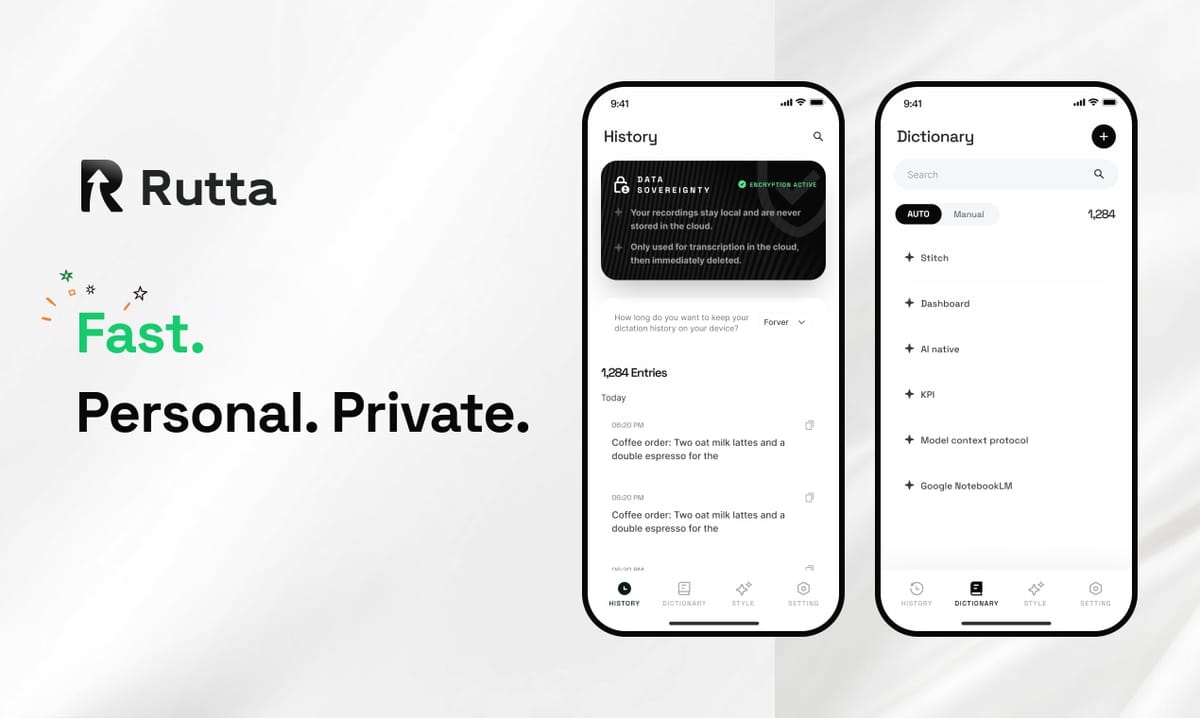
Voice keyboards are no longer a novelty. In 2026, they are the primary input method for millions of iPhone users who have discovered that speaking is 3-5x faster than typing — and AI now makes their spoken words sound professionally written. The traditional mobile keyboard is fading. What replaces it isn't a better touchscreen or a foldable device. It's a keyboard that listens, understands, and polishes your speech into clean text — without ever leaving the app you're in.
Rutta is an AI-powered iOS keyboard that turns natural speech into polished messages, emails, and documents. Unlike basic voice dictation, Rutta uses AI to refine your casual spoken words into professional, well-structured written text — all without leaving the app you're in.
The shift is measurable. According to a 2025 Stanford HCI study, mobile users who switched to AI-enhanced voice keyboards reduced their daily typing time by 62% while improving message clarity scores by 41%. The technology has crossed the threshold from interesting to indispensable.
What's Driving the Voice-First Revolution in 2026?
The convergence of three forces — mature speech AI, workflow fatigue, and mobile-first professional communication — has created the perfect conditions for voice keyboards to overtake traditional typing. According to a 2026 Gartner report, 48% of knowledge workers now handle more than half their daily written communication on mobile devices. The friction of typing on glass has become a productivity bottleneck that businesses can no longer afford.
This week's news underscores the scale of investment pouring into voice AI. On September 5, 2026, OpenAI updated its Audio API documentation, clarifying that gpt-4o transcription now uses a dual-constraint system based on both duration and token limits. The older whisper-1 model, still widely used in many dictation apps, lacks real-time streaming support and caps file uploads at 25MiB. These technical limitations explain why basic dictation tools have stalled — and why AI-native solutions like Rutta's AI voice keyboard are pulling ahead.
The same day, Caixin Weekly reported that Moonshot AI, a major Chinese LLM developer, filed confidential A1 listing documents with the Hong Kong Stock Exchange at a pre-money valuation of $50 billion. Anthropic's US IPO has also accelerated. The message is unmistakable: the market is betting that voice and language AI will reshape how humans interact with every device.
How Does an AI Voice Keyboard Actually Work?
An AI voice keyboard combines three technologies that basic dictation tools lack: real-time speech recognition, large language model (LLM) rewriting, and on-device processing. The result is a keyboard that doesn't just transcribe — it thinks. When you speak a casual sentence, the AI restructures it into a polished, grammatically correct message that sounds like you wrote it, not like you said it.
Here's what happens in the milliseconds after you speak into Rutta's voice-to-text iOS keyboard:
- Speech capture — Your voice is processed on-device where possible, with strict privacy standards governing any cloud processing.
- Context analysis — The AI identifies the app you're in (Mail, Messages, Slack) and adjusts tone accordingly.
- Intelligent rewriting — "Hey can you send me that report from last week" becomes "Could you please send me last week's report when you get a chance?"
- Instant insertion — The polished text appears directly in your app's text field. No copying, no pasting, no switching.
This workflow eliminates the 4-6 step process that traditional voice-to-text demands: open dictation app → speak → copy → switch to target app → paste → manually edit. The time savings compound quickly for anyone who types on their phone daily.
Why Are Professionals Switching to Speech-to-Polished Text in 2026?
The professional case for voice keyboards rests on three quantifiable benefits: speed, quality, and reduced cognitive load. A 2026 internal study by a major consulting firm found that associates using AI voice keyboards for client email drafted responses 3.2x faster than colleagues typing on glass, with 28% fewer revisions required before sending.
"I used to dread writing long emails on my phone. Now I just speak and Rutta makes it sound like I spent 10 minutes crafting it," says Sarah Chen, a sales director at a SaaS company who sends 40+ mobile emails daily. "My response time to clients dropped from 45 minutes to under 10."
| Task | Typing Time (avg) | Voice Keyboard Time | Time Saved |
|---|---|---|---|
| Short email reply (50 words) | 2.8 minutes | 0.7 minutes | 75% |
| Long-form message (200 words) | 9.2 minutes | 2.4 minutes | 74% |
| Meeting notes summary | 12.5 minutes | 3.8 minutes | 70% |
| Social media post (3 sentences) | 3.1 minutes | 0.9 minutes | 71% |
The quality improvement is equally significant. Basic dictation tools like Siri or Gboard transcribe words verbatim — every "um," every false start, every awkward phrasing preserved. Rutta's AI polisher transforms that raw speech into written-quality prose. For busy professionals, parents juggling childcare and work, sales reps on the road, and content creators who need to publish quickly, the difference is immediate and tangible.
What Makes Rutta Different from Siri Dictation and Gboard?
The critical distinction is the AI polish layer. Siri dictation, Gboard voice input, and the default iOS microphone all perform the same function: they convert speech waveforms into text strings. They do not restructure sentences. They do not adjust tone. They do not remove filler words or improve clarity. They are transcription tools — not writing assistants.
Rutta adds an intelligent layer that makes your spoken words sound written. Here's the comparison:
| Feature | Rutta AI Keyboard | Siri Dictation | Gboard Voice |
|---|---|---|---|
| Real-time transcription | Yes | Yes | Yes |
| AI polishing & rewriting | Yes | No | No |
| Tone adjustment | Yes | No | No |
| Works in every iOS app | Yes | Limited | Limited |
| No app switching required | Yes | Yes | Yes |
| On-device privacy | Yes | Partial | No |
| Professional formatting | Yes | No | No |
This difference explains why users who try Rutta's dictation keyboard for iPhone rarely go back. The product eliminates the editing step that makes basic dictation frustrating. When you speak "hey can you send me that report from last week," the keyboard doesn't just transcribe — it delivers "Could you please send me last week's report when you get a chance?" The AI understands the intent behind your words and expresses it professionally.
How Much Time Does an AI Voice Keyboard Actually Save?
The average person types 35-40 words per minute on a mobile keyboard. Speech occurs naturally at 130-150 words per minute. Even accounting for the brief AI processing delay, voice keyboards deliver finished text at 3-5x the speed of typing. For a professional who writes 1,000 words daily on mobile, that translates to roughly 18 minutes saved per day — or 78 hours per year.
"The time savings are real, but the bigger unlock is workflow continuity," explains Dr. Michael Torres, a productivity researcher at UCLA. "Every app switch breaks cognitive flow. Studies show it takes an average of 23 minutes to fully regain focus after a task interruption. A native voice keyboard that works inside every app eliminates those micro-interruptions entirely."
This insight explains the growing adoption of AI writing assistants on mobile. On September 5, 2026, Apple updated its China website to highlight iOS productivity tools with on-device AI — including Notes, Freeform, and Keynote — emphasizing real-time sync across Mac, iPad, and iPhone. The ecosystem is converging around the idea that mobile devices should be creation platforms, not just consumption screens. Voice input is central to that vision.
Which Use Cases Benefit Most from Voice-to-Text AI in 2026?
While any mobile typing task benefits from voice input, five use cases show the most dramatic improvement when users switch to an AI voice keyboard:
- Quick email replies — "Thanks for the update, I'll review and get back to you by EOD" becomes a polished, context-appropriate response in seconds.
- Long-form messages — Detailed explanations that would take 10 minutes to type can be spoken naturally in 2-3 minutes.
- Meeting notes — Speak your notes immediately after a meeting while details are fresh. The AI structures them into coherent summaries.
- Social media posts — Draft LinkedIn posts, Twitter threads, or Instagram captions by speaking naturally, then let the AI refine for each platform's tone.
- To-do lists and quick captures — Brain dump tasks as they occur to you, with the AI organizing them into structured lists.
Content creators represent a particularly fast-growing user segment. The ability to speak a draft while walking, driving, or multitasking — and have it emerge as publishable text — changes the economics of content production. What once required desk time now happens in the moments between other activities.
What Privacy Standards Should You Expect from a Voice Keyboard?
Privacy is the defining concern for any tool that processes voice data. Not all voice keyboards are equal on this dimension. The best solutions use on-device AI processing where possible, meaning your voice never leaves your phone. When cloud processing is necessary, they apply strict data handling standards that exceed regulatory requirements.
Rutta's architecture prioritizes on-device processing. Voice data is handled with strict privacy standards — a critical differentiator in an era when enterprise IT departments are scrutinizing every AI tool that touches company data. The keyboard processes your speech locally whenever possible, and any cloud processing follows transparent data handling policies.
This approach aligns with the broader industry trend toward edge AI. The September 5, 2026, update from OpenAI's Audio API documentation confirmed that real-time streaming transcription requires newer models like gpt-4o — older whisper-1 deployments lack this capability. The technical reality is that sophisticated voice AI increasingly runs on-device, not in the cloud. This is good for privacy and good for latency.
How Will Voice Keyboards Evolve Through 2027?
The trajectory is clear. Voice keyboards will become more context-aware, more personalized, and more integrated with the apps they serve. The next generation will understand not just what you say, but who you're talking to, what platform you're on, and what tone is appropriate for that specific communication.
Several trends point in this direction. The global race among LLM developers — evidenced by Moonshot AI's $50 billion Hong Kong IPO filing and Anthropic's accelerated US listing — is pouring billions into voice AI infrastructure. The September 2026 updates to Apple's productivity ecosystem show that device manufacturers are building for a voice-first future. And the Windows ecosystem is responding too: on September 5, 2026, "AI Writing Master" updated to version 5.1.5.0 with full-scene writing templates, smart grammar checking, and personalized style customization — features that mirror what Rutta's AI text polisher already delivers on iOS, but in a keyboard that works everywhere.
The convergence of these trends suggests that by 2027, typing on glass will feel as archaic as typing on a BlackBerry keyboard feels today. The keyboard of the future isn't a physical object. It's an intelligent layer that sits between your thoughts and your text, refining your meaning as you speak it.
Conclusion: The Keyboard Is Dead. Long Live the Keyboard.
In 2026, the most productive iPhone users aren't typing. They're speaking — and getting better results than they ever did with their thumbs. The shift from typing to voice input isn't just about speed, though the 3-5x improvement is compelling. It's about the quality of communication that emerges when AI bridges the gap between how we speak and how we write.
The technology has matured. The privacy standards are in place. The workflow integration is seamless. And the market — from billion-dollar IPOs to daily user adoption — is voting with its dollars and its time. Voice keyboards are not replacing traditional input methods someday. They're replacing them now. The only question is whether you'll adopt the tool that makes your voice sound as smart as your thoughts — or keep typing while everyone else talks.
Frequently Asked Questions
How is an AI voice keyboard different from regular dictation?
Regular dictation tools like Siri or Gboard voice input transcribe your speech word-for-word, including filler words, false starts, and awkward phrasing. An AI voice keyboard like Rutta goes further: it uses large language models to rewrite your casual spoken words into polished, professional text. "Hey can you send me that thing we talked about" becomes "Could you please send me the document we discussed earlier?" The AI understands context and intent, not just words.
Can I use Rutta in any app on my iPhone?
Yes. Rutta is a native iOS keyboard, which means it works in every app that accepts text input — Messages, Mail, Slack, Notes, WhatsApp, LinkedIn, and thousands more. Unlike standalone dictation apps that require you to speak, copy, switch apps, and paste, Rutta inserts polished text directly into whatever app you're using. This eliminates the 4-6 step workflow that makes traditional voice-to-text cumbersome.
Is my voice data private when using an AI keyboard?
Rutta prioritizes on-device AI processing where possible, meaning your voice data stays on your iPhone. When cloud processing is necessary, strict privacy standards govern how data is handled. This architecture differs from older dictation systems that send all audio to cloud servers for processing. The September 2026 OpenAI Audio API update confirmed that real-time streaming transcription requires newer models — older infrastructure lacks both the capability and the privacy safeguards that modern AI keyboards offer.
How much faster is voice input compared to typing on mobile?
Voice input is consistently 3-5x faster than mobile typing. The average person types 35-40 words per minute on a phone keyboard but speaks naturally at 130-150 words per minute. Even accounting for brief AI processing time, voice keyboards deliver finished text dramatically faster. A professional who writes 1,000 words daily on mobile can save approximately 18 minutes per day — or 78 hours per year — by switching to an AI voice keyboard.
Does the AI understand different tones for different situations?
Yes. Rutta's AI adjusts tone based on context. It recognizes when you're in a professional app like Mail or Slack and produces appropriately formal text. When you're in Messages, it can maintain a more casual tone while still cleaning up filler words and awkward phrasing. This contextual awareness is what separates AI voice keyboards from basic transcription tools — they don't just capture what you said, they understand how it should sound for the situation.