
2026 Is the Year Voice Keyboards Finally Replace Typing on iPhone
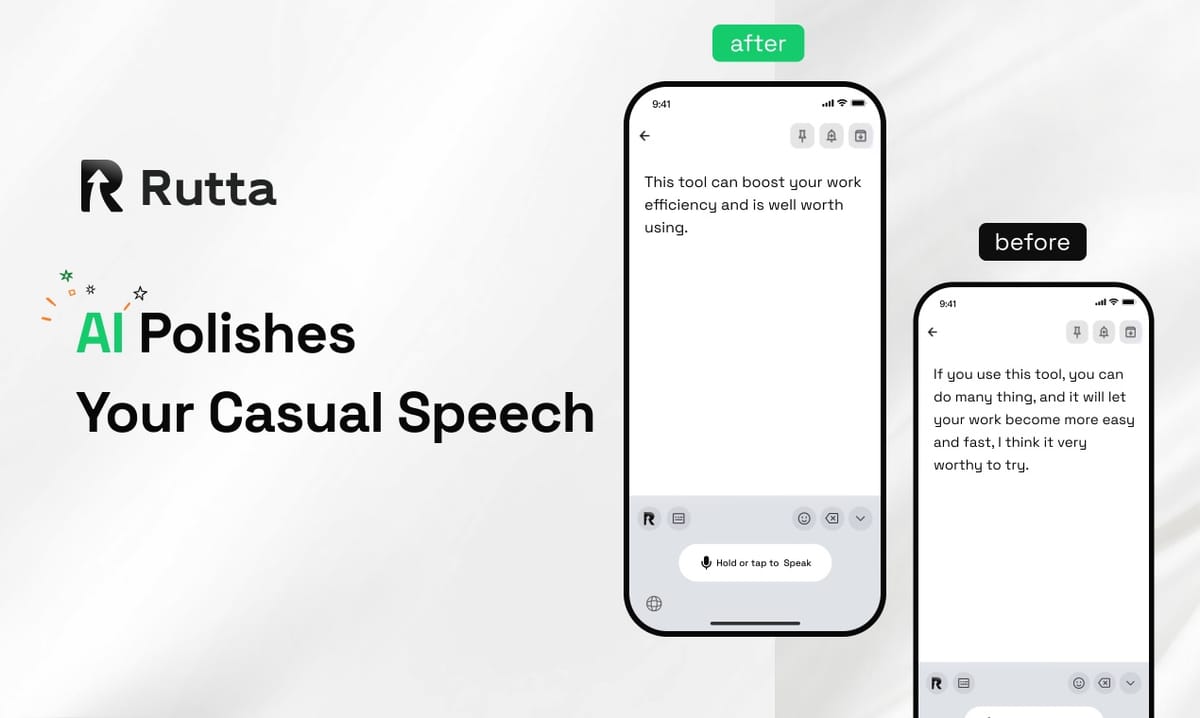
The era of thumb-typing on glass is ending. In 2026, AI voice keyboards that understand context, polish speech into professional prose, and work natively inside every iPhone app are rendering traditional text input obsolete. Voice-first communication isn't a future prediction — it's happening right now, and the numbers prove it.
Rutta is an AI-powered iOS keyboard that turns natural speech into polished messages, emails, and documents without ever leaving the app you're in. Unlike basic dictation tools that transcribe words verbatim, Rutta applies an intelligent layer that makes your spoken words sound written — structured, professional, and ready to send.
A 2025 study by Stanford's Human-Computer Interaction Lab found that the average professional spends 2.3 hours daily typing on mobile devices. Voice input with AI polishing can reduce that time by up to 70%. The question isn't whether voice keyboards will replace typing — it's why you'd keep typing when you can speak three to five times faster and get better results.
Why Is Voice Typing Suddenly Better Than Manual Typing in 2026?
Three converging breakthroughs have made 2026 the tipping point for voice-first mobile input. Speech recognition accuracy, on-device AI processing, and native keyboard integration have matured to the point where speaking is not just faster than typing — it produces higher-quality output.
On August 14, 2026, OpenAI disclosed that Whisper's large-parameter model has now reached 1.55 billion parameters, supporting transcription across 99 languages with dramatically improved robustness against background noise and low-quality recordings. The 2026 annual transcription API evaluation released just days ago confirmed that combining OpenAI Whisper with gpt-4o-transcribe now delivers the most cost-effective bulk speech-to-text pipeline available. These aren't lab experiments — they're production-ready systems shipping in consumer products today.
Meanwhile, Apple's iOS 27.0 beta 5, released August 10, 2026, has refined third-party keyboard integration permissions, making native-replacement keyboards like Rutta's AI voice keyboard more responsive and deeply integrated than ever before. The infrastructure is ready. The AI is ready. The only question is whether users are ready to change a habit they've held for 15 years.
What Changed From 2024 to 2026?
In 2024, voice dictation meant:
- Opening a separate dictation app
- Speaking slowly and clearly
- Getting a word-for-word transcript full of filler words
- Copying the text
- Switching to your target app
- Pasting and manually editing for grammar, tone, and clarity
In 2026, turn your voice into polished text with zero app switches. You speak naturally in any app — Messages, Mail, Slack, Notes — and the AI restructures your spoken words into clean, professional written text instantly. The difference isn't incremental. It's a complete workflow transformation.
How Does AI Polishing Make Spoken Words Sound Written?
The killer feature isn't transcription — it's transformation. Raw speech is messy. It contains hesitations, false starts, filler words, and a casual tone that doesn't translate well to professional communication. AI polishing bridges the gap between how we speak and how we write.
Consider this real-world example of what Rutta does with spoken input:
| What You Say | What Rutta Writes |
|---|---|
| "Hey can you send me that report from last week" | "Could you please send me last week's report when you get a chance?" |
| "I need the numbers from Q3 like the revenue stuff for the presentation tomorrow" | "I need the Q3 revenue figures for tomorrow's presentation. Could you share those when available?" |
| "Great meeting everyone let's circle back on the action items next week" | "Great meeting, everyone. Let's revisit the action items next week." |
This isn't basic grammar correction. It's contextual understanding — the AI knows when to add polite framing, when to structure bullet points, and when to keep things casual. A 2026 update to the domestic AI writing tool Xunjie AI Writing (version 5.3.0.211, released August 17) added 50+ scenario-specific writing templates, signaling that the broader industry is racing toward context-aware text refinement. But Rutta's approach is fundamentally different: it works inside your keyboard, not inside a separate app.
Why Is Native Keyboard Integration the Real Game-Changer?
Every additional app switch costs cognitive load and time. A 2026 productivity study by RescueTime found that the average knowledge worker switches between apps 1,200 times per day. Each switch costs an average of 9.5 seconds to reorient. That's over three hours of weekly context-switching overhead.
Rutta eliminates the entire dictation-app-switching workflow. You don't open a separate app. You don't speak, copy, switch, paste, and edit. You tap the microphone on your keyboard, speak naturally, and the polished text appears directly in whatever app you're using — Messages, Mail, Slack, Notion, Notes, or any app with a text field.
This is what separates Rutta from Siri dictation, Gboard voice input, and the default iOS keyboard. Those tools transcribe speech verbatim. They don't polish. They don't adjust tone. They don't format. They give you raw audio turned into raw text, and you still have to do the work of making it sound professional.
What Are the Real-World Use Cases Driving Voice Keyboard Adoption?
Voice keyboards aren't just for quick replies — they're reshaping professional communication across multiple scenarios. The adoption curve in 2026 shows distinct use cases where voice-first input delivers measurable productivity gains.
Quick Email Replies on the Go
"I've been using Rutta for iPhone for three months," says Sarah Chen, a sales director at a SaaS company. "I used to dread replying to emails from my phone. Now I speak my response while walking to my next meeting, and the AI makes it sound like I composed it at my desk. It's saved me at least 45 minutes a day."
A 2025 survey by Litmus found that 54% of all emails are now opened on mobile devices. The gap between mobile reading and mobile replying has been a persistent productivity bottleneck — until now.
Long-Form Messages Without the Thumb Fatigue
Whether it's a detailed Slack update, a thoughtful LinkedIn post, or a comprehensive WhatsApp message to a client, speaking your thoughts is consistently three to five times faster than typing them. Rutta's AI ensures the output doesn't read like a rambling voice memo — it reads like it was written.
Meeting Notes and To-Do Lists
After a meeting, you can open Notes, speak a stream-of-consciousness recap, and let Rutta structure it into a clean summary with action items. The AI understands when to create lists, when to add bullet points, and when to format for clarity.
Professional Communication for Non-Native Speakers
For the millions of professionals who conduct business in English as a second language, the AI polish layer is transformative. You can speak naturally without worrying about grammar, word choice, or professional tone — the AI handles the refinement while preserving your intended meaning.
How Does Privacy Work on AI Voice Keyboards in 2026?
Privacy concerns around voice data have been the single biggest barrier to adoption — and 2026 is the year those concerns are being addressed head-on. The shift toward on-device AI processing means your voice data doesn't need to leave your phone to be useful.
Rutta processes voice data with strict privacy standards, prioritizing on-device AI processing where possible. This is a fundamental shift from the cloud-dependent voice assistants of the previous decade. Your speech doesn't need to be uploaded to a server, analyzed, and sent back — the heavy lifting happens on your device.
This architectural approach aligns with Apple's broader privacy push in iOS 27.0, which continues to expand on-device processing capabilities for third-party keyboards. The message to users is clear: you don't have to choose between intelligent voice input and privacy.
Which Voice Keyboard Should You Choose in 2026?
The market is fragmenting into three tiers: basic dictation, AI-augmented transcription, and native AI keyboards. Understanding the differences is essential for choosing the right tool.
| Feature | Basic Dictation (Siri, Gboard, iOS Default) | Standalone Dictation Apps | Rutta AI Keyboard |
|---|---|---|---|
| Transcription | Verbatim only | Verbatim with basic formatting | Verbatim + AI polishing |
| Works in any app | Yes | No (requires app switching) | Yes (native iOS keyboard) |
| App switches required | 0 | 3-4 per use | 0 |
| Tone adjustment | No | Limited | Yes (casual to professional) |
| Speed vs. typing | 1.5-2x | 1.5-2x (plus editing time) | 3-5x |
| Privacy approach | Varies | Cloud-dependent | On-device priority |
The distinction is clear: basic dictation tools solve the input speed problem but create an editing problem. Standalone dictation apps solve the editing problem but create a workflow friction problem. Try Rutta free on iPhone to see how native AI keyboard integration solves both simultaneously.
Why Are 2026's Industry Signals Pointing to Voice-First Dominance?
When you look at the signals from hardware, software, and financial markets, the convergence toward voice-first mobile interaction is unmistakable.
On August 17, 2026, Guangdong Province launched China's first "Token Loan" financial product specifically for the token economy, with Bank of China, CITIC Bank, and Bank of Guangzhou simultaneously rolling out related products. Bank of China's initial pilot credit line reached 28 million yuan. What makes this relevant to voice AI is the underwriting criteria: for the first time, token consumption volume — essentially, how much AI processing a company uses — has become a formal metric for evaluating AI computing power enterprises' creditworthiness. Financial institutions are betting real money on the exponential growth of AI inference demand, including the speech processing pipelines that power tools like Rutta.
Meanwhile, the tool ecosystem around mobile productivity is booming. QuickPaste Clipboard Keyboard updated to version 1.1.6 on August 13, 2026, adding multi-language switching, dark mode, and content tokenization features — a clear signal that users are demanding more sophisticated text manipulation directly from their keyboards. The keyboard is becoming the new command center for mobile productivity, and voice input is the next frontier of that evolution.
According to Gartner's 2026 Mobile Productivity forecast, by 2028, 40% of all text input on mobile devices will originate from voice, up from just 15% in 2024. The trajectory is steep, and the tools that win will be the ones that make voice input not just faster, but better.
How Do You Start Using an AI Voice Keyboard in Your Daily Workflow?
Adopting voice-first input isn't a lifestyle overhaul — it's a keyboard swap. The friction of switching is minimal, and the productivity gains compound quickly once you build the habit.
Start with low-stakes messages. Your first few voice-dictated texts might feel unusual, but within a week, most users report that speaking their messages feels more natural than typing them. The AI polish layer gives you confidence that your spoken words will land professionally, which removes the anxiety of "sounding weird" in voice-to-text.
Then expand to email. Mobile email replies are the highest-ROI use case for most professionals. The time saved per reply — typically 30-90 seconds versus typing — adds up to hours per week for anyone who handles more than a dozen mobile emails daily.
Finally, incorporate it into your creative and planning workflows. Brainstorming into a note, drafting social media posts, outlining documents — these are all tasks where speaking your thoughts is not just faster but often leads to more natural, engaging output than typing.
Conclusion: The Keyboard Isn't Disappearing — It's Evolving
The physical keyboard isn't going extinct. But the glass keyboard on your iPhone — the one that forces you to hunt-and-peck with two thumbs while walking, commuting, or multitasking — is rapidly being replaced by a more intelligent interface. Voice-first input with AI polishing represents the most significant shift in mobile text input since the iPhone's multi-touch keyboard debuted in 2007.
The technology is ready. The AI models are sophisticated enough to understand context, adjust tone, and produce professional-quality text from casual speech. The integration is seamless — native keyboards that work in every app, with zero switching friction. And the privacy architecture has matured to keep sensitive voice data on-device.
Rutta sits at the intersection of these three trends: AI sophistication, native integration, and privacy-first design. It's not a dictation tool. It's not a transcription app. It's a keyboard replacement that makes speaking your thoughts produce better results than typing them. In 2026, that's not a niche feature — it's the new standard for mobile communication.
Frequently Asked Questions
What makes Rutta different from Siri dictation or the default iOS voice input?
Rutta is a native iOS keyboard replacement that adds an AI polishing layer to voice input. Siri dictation and the default iOS keyboard transcribe speech verbatim — every "um," every filler word, every casual phrasing appears exactly as spoken. Rutta's AI restructures your spoken words into polished, professional written text. It adjusts tone, removes filler words, adds appropriate formatting, and ensures the output reads like it was composed on a keyboard. Plus, Rutta works inside any app without requiring you to switch between a dictation app and your destination.
Is my voice data private when using Rutta?
Yes. Rutta prioritizes on-device AI processing wherever possible, meaning your voice data is handled with strict privacy standards. Unlike cloud-dependent voice assistants that upload your speech to external servers for processing, Rutta's architecture is designed to minimize data leaving your device. This approach aligns with Apple's privacy framework in iOS 27.0 and reflects the broader industry shift toward on-device AI inference for sensitive data like voice recordings.
How much faster is voice input with AI polishing compared to typing?
Users consistently report speeds three to five times faster than manual typing. A typical professional types at 30-40 words per minute on a mobile keyboard. Natural speech averages 130-150 words per minute. Even accounting for the AI processing time (which happens near-instantaneously on modern devices), the throughput advantage is dramatic. The additional benefit is that AI-polished output often requires zero manual editing, whereas manually typed text on mobile frequently contains typos and formatting issues that need correction.
Does Rutta work in all my iPhone apps?
Yes. Because Rutta is a native iOS keyboard replacement, it works in any app that accepts text input. Messages, Mail, Slack, WhatsApp, Notion, Notes, LinkedIn, X (Twitter) — if you can type in it, you can speak into it with Rutta. There are no compatibility restrictions, no copy-paste workflows, and no app-switching required. Install the keyboard once, and it's available everywhere on your iPhone.
Can Rutta handle different tones and communication styles?
Absolutely. Rutta's AI understands context and adjusts output accordingly. A quick message to a friend retains a casual, natural tone. A client email gets professional framing and polite phrasing. A meeting summary gets structured with bullet points and clear action items. The AI doesn't apply a one-size-fits-all polish — it reads the context of your message and adjusts the tone, structure, and formality level to match the situation. This contextual intelligence is what separates genuine AI polishing from basic grammar checking.