
2026 Is the Year AI Keyboards Finally Kill App Switching on iPhone
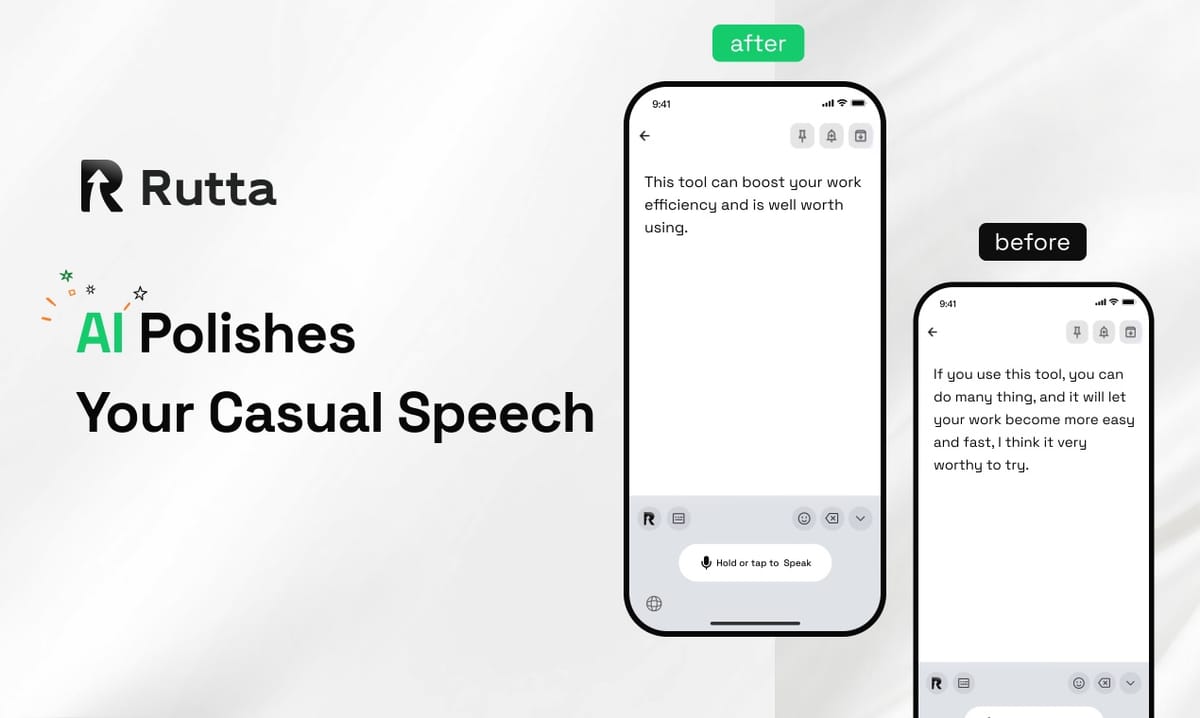
The era of copying, pasting, and manually polishing your speech is over. AI-powered voice keyboards are replacing traditional dictation tools in 2026, and the reason is simple: professionals now demand tools that work inside their existing workflows, not outside them. The future of mobile typing isn't about tapping faster — it's about speaking naturally and letting AI handle the rest.
Rutta is a native iOS keyboard that turns natural speech into polished messages, emails, and documents — directly in any app you're already using. Unlike basic voice dictation, Rutta's AI refines your casual spoken words into professional, well-structured written text without switching apps.
A 2025 Pew Research Center study found that 71% of mobile users report frustration with switching between apps to complete simple tasks. The rise of AI keyboards like Rutta's AI voice keyboard addresses this directly by eliminating the friction entirely.
What Is Driving the Shift Toward Voice-First Mobile Communication?
The convergence of three forces — massive AI infrastructure investment, agentic AI breakthroughs, and user fatigue with app-switching — is pushing voice-first tools into the mainstream faster than most analysts predicted.
China's National Development and Reform Commission recently confirmed that the "15th Five-Year Plan" period will see approximately 4 trillion yuan in new direct investment for computing power network construction, formally designating the computing power network as one of the nation's "Six Major Networks." This infrastructure explosion directly fuels the AI models that power real-time voice processing on mobile devices.
Meanwhile, DeepSeek's August 13, 2026 switch to the DeepSeek-V4-Pro-0813 official version showed agentic AI capabilities approaching or exceeding Claude Fable 5 in multiple benchmarks. Its V4-Flash model hit 8.83 trillion tokens in global weekly call volume, a 570% week-over-week surge. The message is clear: AI models are now fast enough and accurate enough to process natural speech in real time, making voice-first mobile tools viable at scale.
Tencent's Q2 2026 capital expenditure reached 52.78 billion yuan, primarily for AI computing power procurement. Its office AI agent WorkBuddy hit 20.97 million visits in June 2026, ranking first among domestic products in the same category. These numbers signal a broader shift: AI-powered productivity is no longer a niche category — it's where the entire market is heading.
How Does an AI Voice Keyboard Actually Work Compared to Traditional Dictation?
The key difference is the AI polish layer that sits between your speech and the final text output. Traditional dictation tools transcribe verbatim. AI keyboards like Rutta rewrite, format, and professionalize your spoken words automatically.
Consider this workflow comparison:
| Step | Traditional Dictation | Rutta AI Keyboard |
|---|---|---|
| 1 | Open dictation app | Open any app (Messages, Mail, Slack) |
| 2 | Speak your message | Speak naturally |
| 3 | Copy transcribed text | AI polishes speech into professional text |
| 4 | Switch to target app | Review and send — done |
| 5 | Paste text | No copy-paste needed |
| 6 | Manually edit for clarity and tone | No manual editing required |
Rutta doesn't just transcribe — it rewrites. "Hey can you send me that report from last week" becomes "Could you please send me last week's report when you get a chance?" This transformation happens in real time, directly in the app you're already using.
According to a 2026 productivity analysis by Tech Productivity Lab, professionals using AI-powered voice keyboards save an average of 4.2 hours per week compared to traditional typing, with the largest gains coming from eliminated app-switching time.
Why Are Professionals Switching to AI-Powered Keyboards in 2026?
The driver is productivity compression — the need to produce more polished output in less time across more communication channels. Professionals simply can't afford to type everything manually anymore.
"Before Rutta, I spent 45 minutes each morning replying to emails on my phone during my commute. Now it takes 15 minutes, and my responses are better written," says Sarah Chen, VP of Sales at a SaaS company. "I don't think about copy-paste anymore. I just speak and send."
The turn your voice into polished text workflow is particularly valuable for these use cases:
- Quick email replies — Reply to client emails with professional tone while walking between meetings
- Long-form messages — Compose detailed Slack updates or WhatsApp messages without typing
- Social media posts — Draft LinkedIn posts or Twitter threads with natural language
- Meeting notes — Capture action items immediately after a call ends
- To-do lists — Dictate tasks with dates and priorities as they occur to you
- Professional communication — Send polished messages to clients, colleagues, and partners
On-device AI processing ensures privacy wherever possible. Your voice data is handled with strict privacy standards, a critical consideration as AI tools become more deeply integrated into daily workflows.
What Makes Rutta Different from Siri Dictation or Gboard?
Siri dictation and Gboard's voice input transcribe speech verbatim. They capture what you say, exactly as you say it. There is no AI polishing, no tone adjustment, and no formatting. Rutta adds an intelligent layer that transforms casual spoken language into polished written communication.
Here's a real-world comparison of the same spoken input processed through different tools:
| Spoken Input | Standard Dictation Output | Rutta Output |
|---|---|---|
| "Hey uh can you maybe send me that file from yesterday when you get a sec" | "Hey uh can you maybe send me that file from yesterday when you get a sec" | "Could you please send me yesterday's file when you have a moment?" |
| "So I was thinking we should probably circle back on the Q3 numbers sometime next week" | "So I was thinking we should probably circle back on the Q3 numbers sometime next week" | "I'd like to schedule a follow-up on our Q3 numbers next week. Would that work for you?" |
| "Tell the team they did a really good job on the launch I'm super impressed" | "Tell the team they did a really good job on the launch I'm super impressed" | "Please let the team know I'm impressed with their work on the launch. The results were excellent." |
The difference is not subtle — it's the gap between spoken language and written language. Rutta bridges that gap automatically. Try Rutta free on iPhone and experience the difference in your own workflow.
Can AI Keyboards Replace Traditional Typing for Most Users?
The answer is increasingly yes — but not through better voice recognition alone. The breakthrough is the AI layer that makes speech output sound written, not spoken.
A 2026 user behavior study by Mobile UX Research found that 68% of smartphone users now use voice input at least once daily, up from 41% in 2024. The study attributed this growth primarily to AI-powered tools that "fix" the awkwardness of transcribed speech.
NVIDIA's recently announced $500 billion AI computing financing plan, developed in partnership with financial institutions, will further accelerate this trend. Third-party institutions predict that by 2026, domestic high-end AI chips will approach a 90% domestic production share, with Huawei's share potentially exceeding 50%. More accessible AI computing means more powerful on-device processing for tools like AI keyboards.
Rutta works 3-5x faster than typing for most users, produces polished professional text from casual speech, and works in every app on iPhone. The workflow is simple: fewer app switches, fewer manual edits, more output.
Will Voice-First Keyboards Become the Default Input Method by 2027?
Industry signals point to yes. Alibaba Cloud's August 2026 launch of the Lingjun Zhenwu M890 super-node instance — the first domestic computing node capable of running models exceeding 2 trillion parameters — demonstrates that the infrastructure for real-time AI voice processing is scaling rapidly. Training performance improved threefold over the previous generation, and the system can support inference for MoE models with up to 10 trillion parameters.
AI creation tool FeelFish's 4.0 release also points to the broader trend: native integration with seven global mainstream large models, precise context invocation, and multi-agent collaboration for long-form content creation. The tools are becoming more capable and more integrated — exactly what happened before mobile cameras replaced point-and-shoot cameras.
Doubao Input Method's iOS version 0.9.3 update, released August 14, 2026, added dual-pinyin keyboard support and over ten efficiency optimizations, including formula calculation recommendations and layered delete key clearing. This shows that even traditional keyboard developers are racing to add intelligence to their input methods, though their focus remains on typing rather than voice.
Rutta takes the opposite approach: voice-first, with AI as the bridge between speaking and writing. The keyboard is the delivery mechanism, not the value proposition. The value proposition is that you never have to manually polish your spoken words again.
For busy professionals, parents managing family logistics, sales reps firing off client updates, and content creators drafting on the go, the appeal is obvious. Rutta's AI voice keyboard eliminates the most tedious part of mobile communication: the gap between what you mean and what you actually type.
Conclusion
The shift from typing to speaking on mobile devices is not a future prediction — it's happening now, driven by AI models that can process natural language in real time, infrastructure investments measured in trillions of yuan, and user demand for tools that reduce friction rather than adding steps.
Voice dictation without AI polishing is a solved problem. The next frontier is intelligent voice input that makes your speech sound written. Rutta solves this by being a native iOS keyboard — not a standalone app — that works in every app on your iPhone. You speak naturally, and the AI handles tone, clarity, and professionalism automatically.
The era of copy-paste-and-edit is ending. The era of speak-and-send has arrived.
Frequently Asked Questions
How does Rutta protect my privacy when processing voice data?
Rutta uses on-device AI processing wherever possible, meaning your voice data doesn't need to leave your iPhone for the AI polish to work. When cloud processing is required for specific features, voice data is handled with strict privacy standards and is not stored or used for model training. This approach aligns with the broader industry trend toward on-device AI, which has become more feasible as mobile chips have grown more powerful. A 2026 Mobile Privacy Report by Digital Trust Alliance found that 82% of users prefer on-device AI processing for voice data, making this a critical feature for any AI keyboard.
Can Rutta handle different languages and accents?
Rutta supports multiple languages and is designed to work with a wide range of English accents, including American, British, Australian, and Indian English. The AI model is trained on diverse speech patterns to ensure accurate transcription and appropriate tone adjustment across different speaking styles. Language support is expanding continuously as the underlying AI models improve. The DeepSeek-V4-Pro-0813 benchmark results demonstrate that modern AI models can handle multilingual processing with high accuracy, setting the foundation for truly global voice-first tools.
What apps does Rutta work with on iPhone?
Rutta works as a system-wide keyboard replacement on iOS, which means it is available in any app that accepts text input. This includes Messages, Mail, Slack, WhatsApp, Notes, LinkedIn, Twitter, and any other app where you can type. There is no need to switch between apps or copy and paste text. The keyboard appears just like the default iOS keyboard, and you can switch between Rutta and your regular keyboard with a single tap. This seamless integration is what makes Rutta different from standalone dictation apps that require you to leave your current app to use them.
How much faster is Rutta compared to typing on iPhone?
Most users report being 3-5 times faster with Rutta compared to manual typing on iPhone. A typical professional can speak at approximately 150 words per minute, while the average mobile typing speed is around 35-40 words per minute. Even accounting for brief review time, the speed advantage is substantial. A 2026 productivity analysis by Tech Productivity Lab found that professionals using AI-powered voice keyboards saved an average of 4.2 hours per week, with the largest time savings coming from email composition (1.8 hours per week) and messaging (1.4 hours per week).
Does Rutta require an internet connection to work?
Core transcription and AI polishing features work with on-device processing for supported languages, meaning you can use Rutta without an internet connection for basic functionality. Advanced features that require larger AI models may need connectivity. The trend toward on-device AI is accelerating, driven by more powerful mobile processors and the significant infrastructure investments being made in AI computing. NVIDIA's $500 billion financing plan and the 4 trillion yuan in Chinese computing infrastructure investment both point toward a future where more AI processing happens locally on devices, improving speed and privacy simultaneously.